Pets
Steps and activity: what a collar says about your dog's day
Some GPS collars count steps. How the Wellness tab of a pet profile shows steps, active time, distance, rest and time at home against goals, how to compare weekdays and weekends, and why it is a guide, not a veterinary assessment.
Ashish Srivastava5 min read
A dog activity tracker that counts steps shows, day by day, how much your dog moved: its steps, the time it spent active, the distance it covered and, with a home zone, how long it was at home and away. On a pet's profile, the Wellness tab puts those figures against daily goals you set, with a daily score, so you can see at a glance whether your dog had a lazy Tuesday or a big Saturday. Only some GPS collars count steps; others report only their position, and then wellness shows distance and active time worked out from the positions instead. Either way, it is a guide to your dog's routine, not a veterinary assessment.
Key takeaways
- Steps need a collar that counts them. Without a step counter, wellness shows the distance and active time from the collar's positions.
- Set goals for steps, active time and distance; the daily score is the average of the goals reached, each capped at 100%.
- Time at home and away needs a home zone on the profile.
- Compare weeks rather than single days: weekdays against weekends, this month against last.
- A sudden change in activity is a reason to look closer and perhaps to call the vet; the figures are not a diagnosis.
Only some collars count steps
Every GPS collar reports where it is; that is what puts the dog on the map. Counting steps takes a motion sensor in the collar and a collar that sends the count with its positions. Many collars do; many do not.
- With a step counter, wellness shows the day's steps, against a steps goal if you set one.
- Without one, the wellness tab says that the tracker counts no steps and shows the distance instead. Active time and distance still come from the positions: how long the collar was moving, and how far.
If activity matters to you, check before you buy that the collar reports steps. The pet collars page lists what collars report on the platform. Heart rate is rarely reported by pet collars; it is mainly a feature of watches worn by people.
The daily view and goals
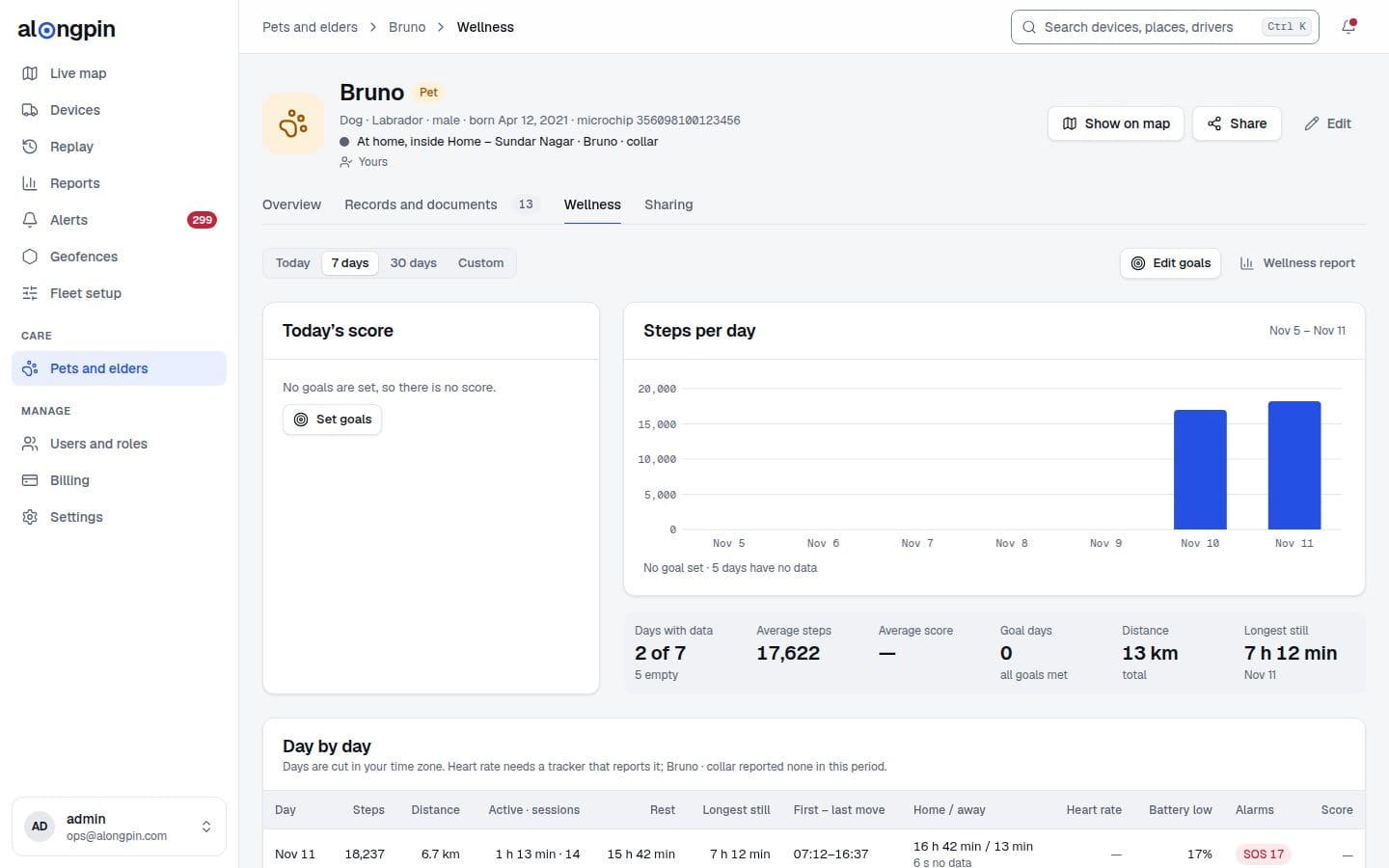
Open Pets and elders, your dog's profile, and the Wellness tab. For each day of the period you choose (Today, 7 days, 30 days or a custom period of up to 366 days) it shows:
- Steps, if the collar counts them, with a chart of steps per day.
- Active time: the time spent moving.
- Distance: how far the collar travelled, with a chart of distance per day.
- Rest: the time the collar was still while it kept reporting.
- At home and away, with a home zone.
- The wellness score, when goals are set.
Setting goals
Under Edit goals, set any of three daily goals: Steps, Active time and Distance. Leave a goal empty for no goal. Each day's progress is the day's figure divided by the goal, and the score is the average of the goals you set, each capped at 100%, so a day of twice the walking does not make up for a missed goal elsewhere.
What goal to set depends on the dog's breed, age, size and health. A young working-breed dog and an elderly toy dog have little in common. Ask your vet what amount of exercise suits your dog, and set the goal from that, rather than from a number you read about another dog. If you are not sure, leave the goals empty for two weeks, look at what your dog does on a normal week, and set the goals from there.
Time at home and rest
With a home zone on the profile, wellness splits each day into time at home, time away and time without known whereabouts, such as a stretch when the collar sent nothing. For a dog, that answers questions like:
- How long is the dog alone at home on the days everyone works?
- How long are the walks the dog walker gives it, really?
- Did the dog spend the afternoon in the garden or out of it?
Rest is the time the collar was still while it was reporting. A dog that sleeps through the afternoon shows a long rest; a dog that paces shows short rests and frequent active stretches.
If the home zone is missing, the profile says so, and at home and away stay empty. Setting a home zone for your dog or cat explains how to draw one.
Comparing weekdays and weekends
Single days vary for ordinary reasons: rain, a visit, a long car journey. Patterns tell you more. Choose 30 days and look at the charts:
- Weekdays against weekends. Many dogs have quiet weekdays and big weekends. If the gap is very large, a longer weekday walk may suit the dog better than a long hike on Sunday.
- Walker days. If a walker takes the dog on certain days, those days should stand out. If they do not, ask.
- Seasons. Hot summer days and dark winter evenings both shorten walks. Comparing months shows by how much.
- Days without data. A day with no positions has no progress and no score; usually the collar was off or flat, not the dog idle.
For a longer view, or several pets side by side, the wellness report under Reports shows the same figures for the collars and period you choose.
What the figures can and cannot tell you
Activity figures are a picture of your dog's routine. They can show you when that routine changes: a dog that suddenly moves much less, rests much longer, or paces at night. That is worth noticing, and worth mentioning to your vet with the dates.
They cannot tell you why. A drop in steps may be a stiff joint, a hot week, a new walker, or a collar that sat on the hall table for three days. Steps from a collar are an estimate, and two collars on the same dog may count differently. Use the figures to ask better questions, not to answer them.
Keep the vet's own measurements, such as weight, in the profile too, as measurements over time. The health readings page shows how readings and measurements are kept, and the pets solution how activity fits with the collar, the home zone and the reminders.
Who sees your dog's activity
Wellness is shown to you and to the people the profile is shared with, for Everything or Location only, as long as they can also see the collar itself; a share of the profile alone does not show the collar's activity, so share the tracker with it. Sharing a care profile with family or a carer explains how.
How Alongpin helps
Alongpin (alongpin.com) is a GPS tracking platform you open in a browser or on your phone. A GPS collar becomes your pet's profile: its position on the live map, a home zone that tells you when it leaves, its walks in trip history, and vaccinations and vet visits with reminders. See how it works for pets, the pet collars it works with, and check yours in the device check.
Frequently asked questions
Why does my dog's wellness show no steps?
The collar does not count steps, or does not send the count. Wellness then shows the distance instead. If you expected steps, check the collar's specification; why health readings are not showing covers the usual causes.
Why is the score empty?
Either no goals are set, or the collar sent no positions that day.
Does activity drain the collar's battery?
Counting steps uses little power; reporting positions often uses more. How long a GPS pet collar battery lasts explains what drains it.