Management
Give each person only what they need.
Scoped roles, managers who delegate only what they hold, and read-only shares. A change to someone's access applies at once.
Choose a package in the portal; you see the first invoice before you confirm.
Roles
A role is a set of rights, given for a scope
Create roles from a catalogue of fine-grained rights, such as reading the positions of one vehicle or editing geofences, and assign them to a user for a group, a device or everything. Access follows ownership, sharing and roles.
Dispatcher
Read devices and positions, send commands. Given to Ines for the group Depot North.
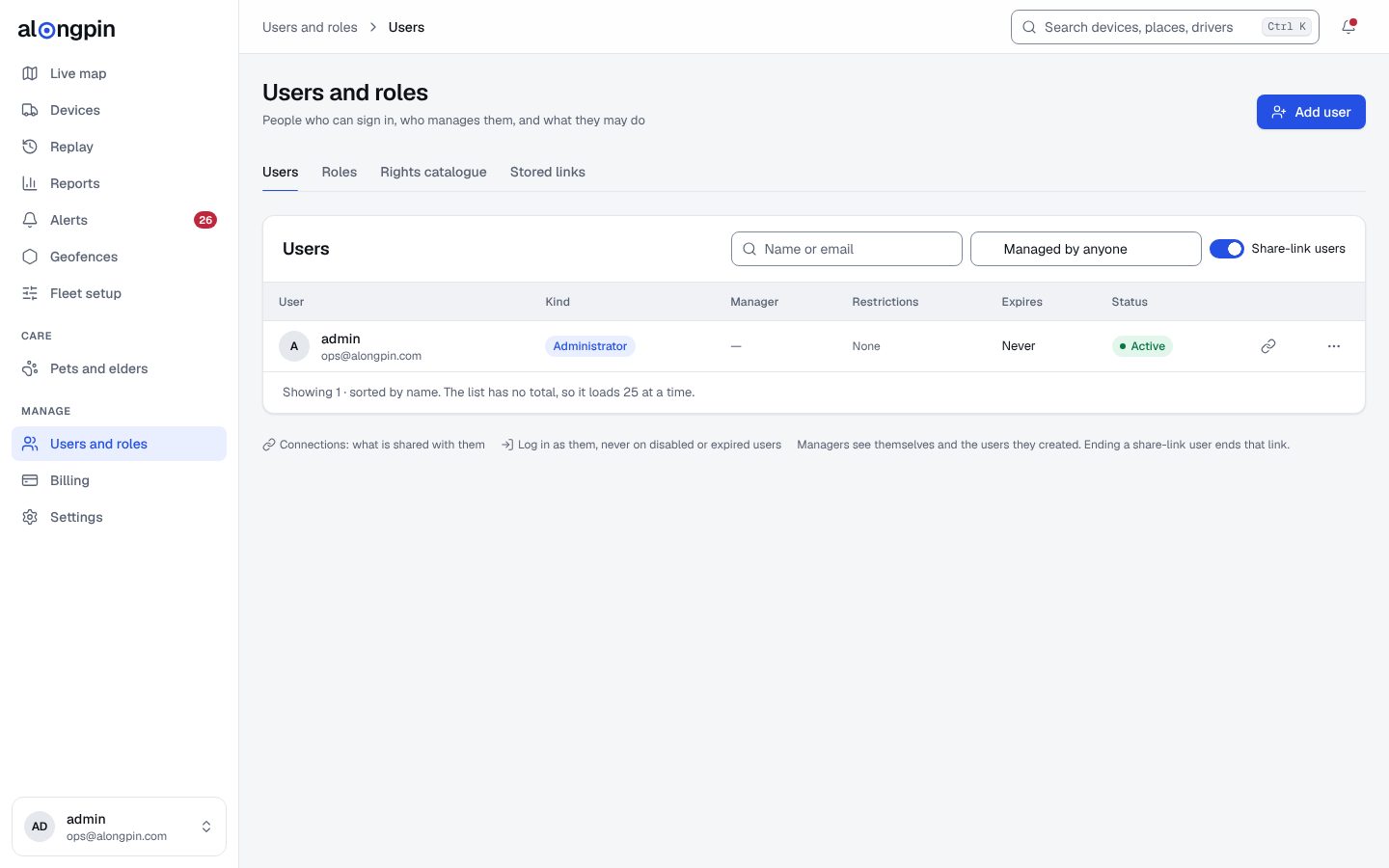
- Users for dispatch, the workshop and the owner, each with a role.
- See a user's roles and the rights they add up to.
- Shared access is read-only, and changes to access apply at once.
Scopes
The same role, for all vehicles or for one depot
A scope says which objects a role's rights apply to.
- Everything
- Every device and object of the account.
- For example: The owner, the fleet manager
- Their own
- The objects the user owns.
- For example: A branch that runs its own vehicles
- Their own and shared
- What the user owns, plus what others shared with them.
- For example: A team lead
- Chosen groups
- One or more groups, such as a depot or a team.
- For example: A depot dispatcher
- Chosen devices
- A list of single vehicles or trackers.
- For example: A driver, a customer contact
Sub-accounts
Managers delegate only what they hold
Let a depot, a branch or a reseller run its own users, without handing over the account.
- 01
The manager creates their own users
The users belong to the manager who created them. An administrator can also make one user the manager of another.
- 02
Builds roles from the rights they hold
A manager picks rights from the same catalogue, but only the ones they have themselves.
- 03
Gives them out within their own reach
A role goes to a user for a scope inside what the manager sees: never more than the manager holds.
- 04
Stays within the limits you set
Limit how many devices a user may own and how many users a manager may create.
When a unit changes hands, an administrator can hand its tracker to another user: a branch account, or a customer who runs their own. The new owner sees it in their list and the previous owner no longer does.
Restrictions
Six switches on a user, next to the role
Read-only
Sees everything the role covers and cannot edit.
No device changes
May work with the account but not change its devices.
Saved commands only
May send the commands you prepared, and no others.
No reports
The reports are switched off for this user.
An expiry date
The account ends by itself on the date you set.
Disabled
Switch an account off without deleting it.
Outside your account
A read-only link for one unit
For a customer who asks where their delivery or hire is, or a family member who wants to watch one device.
- Read-only access to one unit or one group
- A label and an expiry date for each link (7 days at most by default), and a short link to send
- An optional 4 to 6 digit PIN, when your administrator turns PINs on
- Listed under your account and revoked one by one
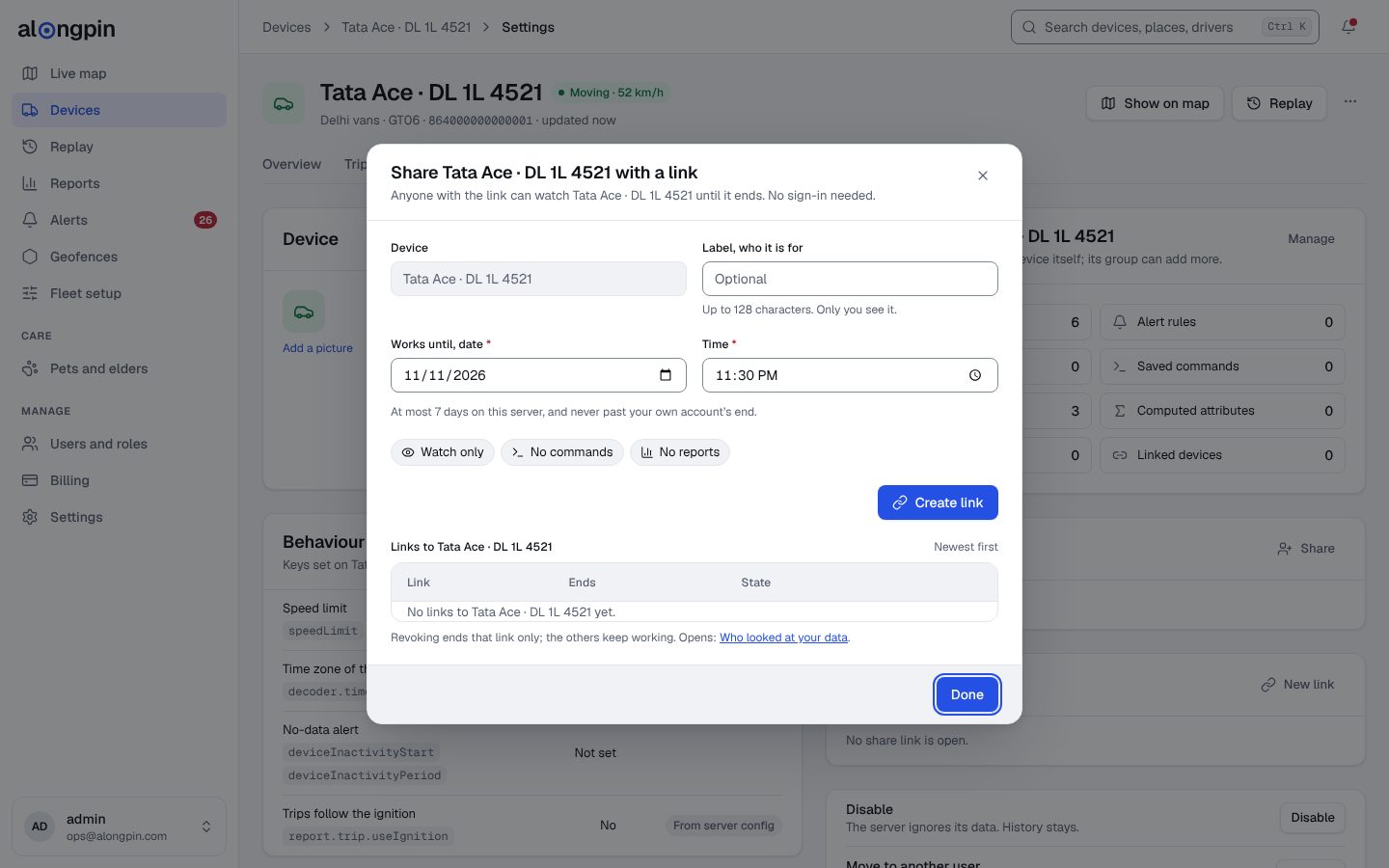
Anyone with the link can watch and cannot change anything. By default, people using a share link cannot send commands or run reports; your administrator can change this. Opens of a link are recorded in the audit log.
Rental and leasingAccountability
A record of who may see what, and who changed it
Every change is in the audit log
Changes with the old and new value, sign-ins and failed sign-ins, tokens and share links created or opened. Filter by user, action, object and period.
"Log in as" leaves a trace
A manager can sign in as a user they manage. These sessions need a reason, are written to the log and notify the user.
People see their own access
Each user sees, by name, who manages them and who gave them their roles, and who owns or shared what they see.
FAQ
Questions about users and roles
Can my dispatcher see vehicles but not change them?
How fast does a change to access apply?
Can a customer see a unit without an account?
Can a customer change settings or send commands?
How do I move a tracker to another account?
Try roles in an account of your own
Create an account and add your first users, or let us show you the platform with your own fleet. Choose a package in the portal; you see the first invoice before you confirm.