Tracking
Draw a zone. Know who enters and who leaves.
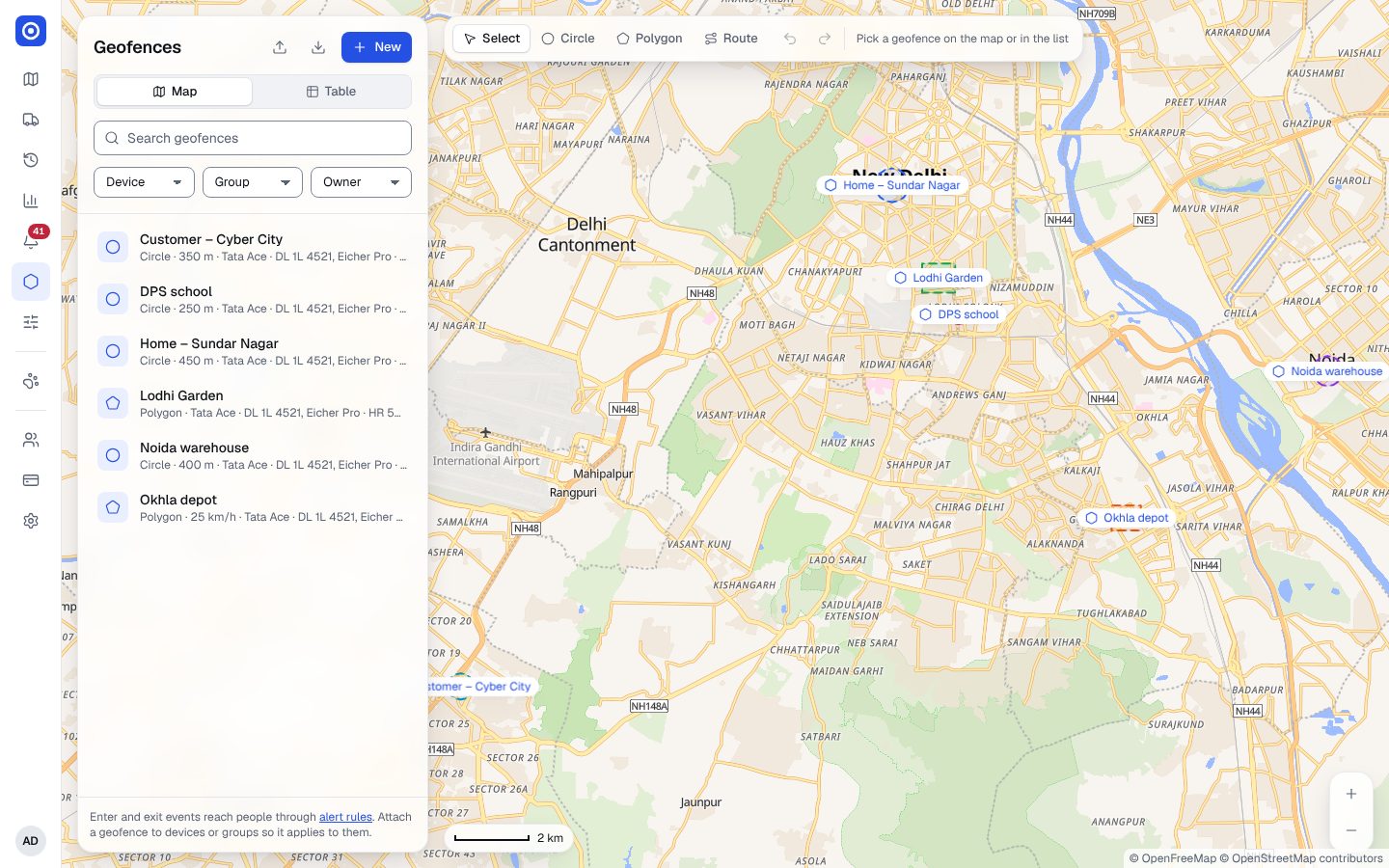
A circle, a polygon or a corridor along a route, drawn on the map. Attach it to a vehicle, a group or a person and get an alert on arrival and on departure.
Choose a package in the portal; you see the first invoice before you confirm.
Three shapes
A zone can be a circle, a polygon or a corridor
Circle
A centre and a radius. The quick way to mark a depot, a customer site, a home or a school.
Polygon
Point by point along the real boundary: a yard, a campus, a district or the area a rental may be used in.
Route corridor
A line with a width, along the road a vehicle should keep to. You hear about it when it leaves the corridor.
On each zone
Name it, attach it, and give it its hours
Draw the zone once and decide what it is checked against. Each zone shows the alert rules that use it.
- A name and a colour, so zones can be told apart on the map
- Attached to one device, a group or everything you have
- A speed limit that applies inside, if you want one
- A calendar, so enter and exit events happen only in the hours that matter
The geofence report
One row per stay: entered, left, time inside
The answer to when a visit started, when it ended and how long it took. Download it as CSV or Excel, or have it sent each evening.
| Device | Geofence | Entered | Left | Time inside |
|---|---|---|---|---|
| Van 12 | Depot North | 07:02 | 07:41 | 39 min |
| Van 12 | Site 14 | 08:16 | 10:48 | 2 h 32 min |
| Truck 3 | Site 14 | 09:30 | 11:02 | 1 h 32 min |
| Van 12 | Depot North | 16:55 | — | Still inside |
A sample with example names. The report also has the distance and speeds of each stay. Scheduled reports send it to you by themselves.
Calendars
Zones that follow your working day
Create a calendar such as "weekdays 08:00 to 18:00", or import an iCalendar file, and put it on a zone or on an alert rule.
- On a zone
- Enter and exit events happen only while the calendar is in progress. Arrivals and departures outside it raise no event; the route of the device still shows it was there.
- On a rule
- An alert rule with a calendar sends its message only inside the hours, or only outside them: a night rule for the depot, a school-day rule for a watch.
- Speed limits
- A speed limit set on a zone applies at all times, with or without a calendar.
Who uses it
The same zone tool, from depots to gardens
- Customer sitesA zone around each site gives the office an arrival and a departure for every visit, and a time on site to check against.Field service and deliveries
- The agreed areaDraw the area a unit may be used in, or the depot, and get a message when a unit leaves or returns.Rental and assets
- Depots and speed zonesKnow when a vehicle leaves the depot, and set a lower speed limit for a yard or a town.Fleet and logistics
- Home and schoolA safe zone around home, school or a grandparent's house, with a rule that runs only on school days.Personal and child safety
- Leaving homeDraw a home zone for a parent. You get a message when the tracker leaves it.Elder care and safety
- The gardenA zone around the garden or the yard, and a message when the collar is outside it.Pet tracking
FAQ
Questions about geofences
How accurate is an arrival alert?
Does a geofence prove a delivery was made?
Can a zone be active only in working hours?
Can I bring zones from another system?
Is a route corridor the same as a route with stops?
How do I get told when a device enters or leaves?
What happens if a tracker is switched off inside a zone?
Draw your first zone today
Create an account, or let us show you geofences on your own map. Choose a package in the portal; you see the first invoice before you confirm.