Care profiles and health
Health readings not showing
Why steps, heart rate and other readings from a watch or collar may not show on a care profile: what the device reports, the link to the profile, recent reports, consent, the kind of share, and entering readings by hand.
Ashish Srivastava3 min read
When smartwatch health data is not showing on a care profile, the cause is usually one of five things: the watch does not report that reading, it is not linked to the profile, it has not reported recently, the elder's health data is locked until a consent is recorded, or your share does not include health data. Work through the checks below in that order; if the device cannot send a reading, you can still enter it by hand as a measurement.
Key takeaways
- Steps, heart rate, blood pressure and oxygen show only for devices that send them; many watches send only some, and most collars send no heart rate.
- The watch must be the profile's tracker, and must have reported recently.
- An elder's health data stays locked while the health consent is missing, also for the owner.
- A Location only share hides heart rate and health data; Health data only has no wellness.
1. Does the device report this reading?
A care profile shows what its tracker sends. Some 4G health watches report heart rate, blood pressure or blood oxygen; many report steps only, and some neither. Most pet collars report position, battery and perhaps steps, not heart rate. If a reading has never appeared since the watch was set up, the device probably does not send it. Compare your model on the watches page; the compatibility check tells you whether a model works with Alongpin at all.
2. Is the watch linked to the profile?
Open Pets and elders and the profile. If it says "No tracker is linked: the map, wellness and alerts need one.", select Edit and choose the watch under Tracker and home → Tracker, then save. A watch can belong to one profile only; one already used by another profile is refused.
3. Has the watch reported recently?
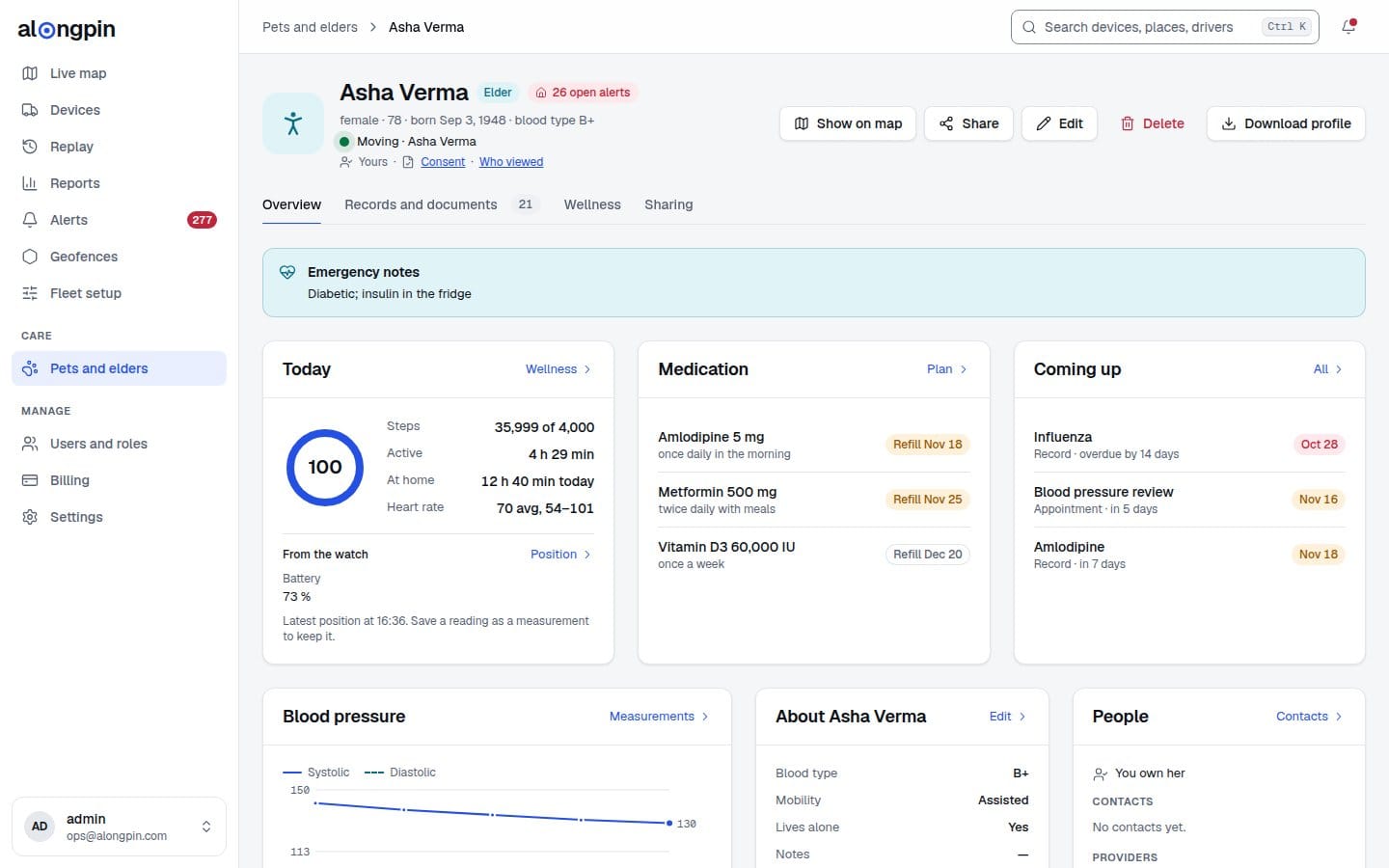
On the profile's Overview, the card From the watch shows the latest readings with their time, and the map says "No new position since …" when the watch has gone quiet. A watch that is switched off, out of battery or without mobile data sends nothing, so nothing new appears. Wellness says "No activity recorded today yet." on a day without data. Charge the watch, check that it is worn and switched on, and look again once it reports.
4. Is health data locked for lack of consent?
If your server requires consents, an elder's health data stays locked until a health consent of the person, or their legal representative, is recorded. The profile then shows Health locked or "Health data is locked", and heart rate in wellness is hidden too, for everyone, the owner and administrators included. Nothing is deleted: the owner selects Record consent on the profile, and the data shows again. If the consent was withdrawn, the same applies until a new one is recorded. Pets need no consents.
5. Does your share include health data?
What you see depends on how the profile is shared with you:
| Your share | Health readings |
|---|---|
| Everything | Shown |
| Location only | Heart rate and other health readings hidden; blood type, mobility and notes hidden |
| Health data only | Records and measurements shown, but no wellness |
Wellness also needs the watch itself to be shared with you ("The tracker is not shared with you, so its activity can't be shown.") and reports to be switched on for your account ("Reports are switched off for your account."). Ask the profile's owner to change your share or to share the watch with you. While an administrator is logged in as you, health data is hidden as well. Care profiles explains each kind of share.
6. Enter readings by hand
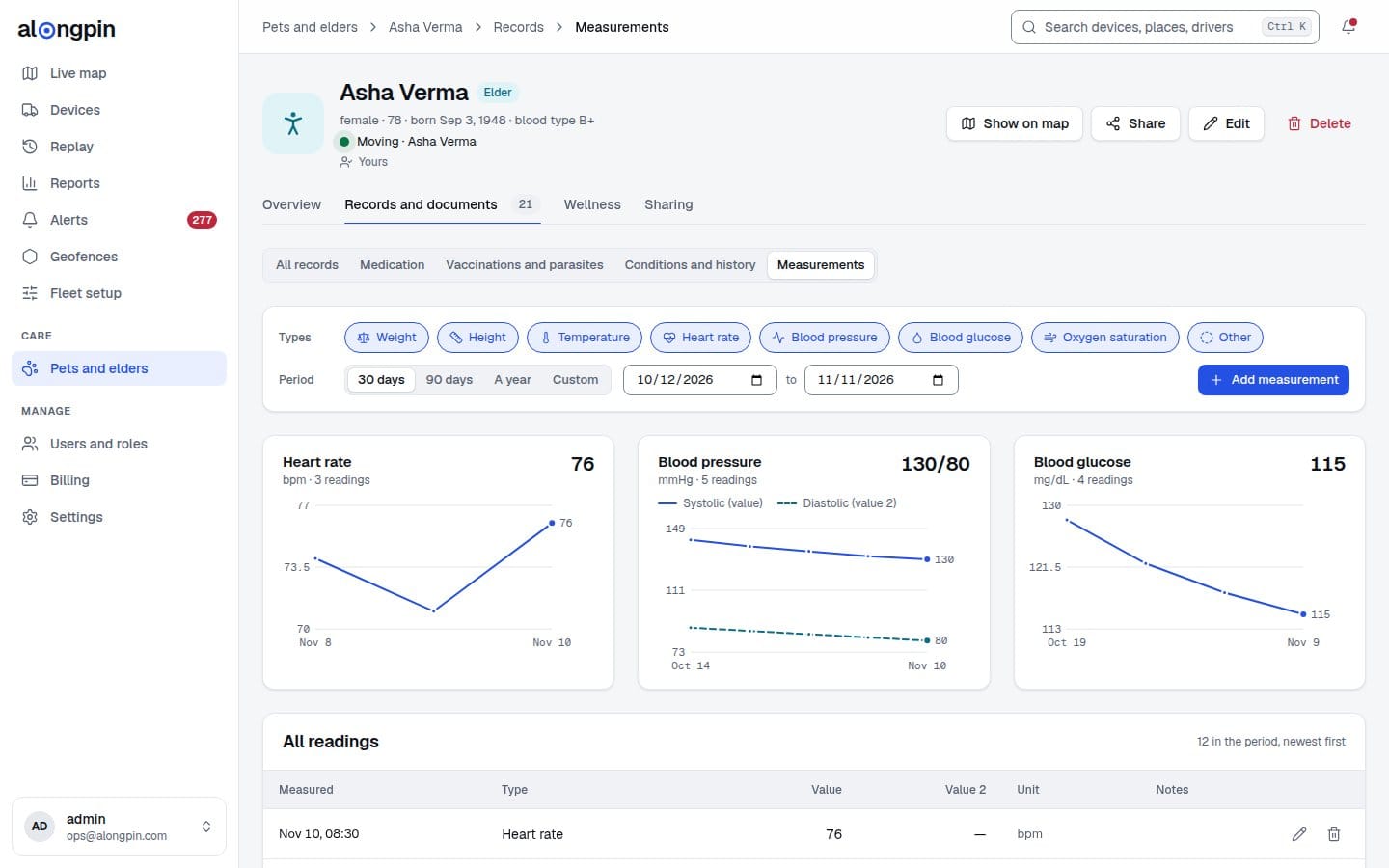
When the device does not report a reading, or you take it with a separate monitor, record it yourself: open the profile, Records and documents → Measurements, select Add measurement, choose the Type (Weight, Height, Temperature, Heart rate, Blood pressure, Blood glucose, Oxygen saturation or Other), enter the Value and the time it was Measured on, and save. Measurements build a history with a chart per type. Readings from the watch are not kept as measurements by themselves: to keep one, save it as a measurement. The health readings page shows how readings, records and wellness fit together.
Frequently asked questions
Steps show, but heart rate does not. Why?
The watch counts steps but does not send heart rate, or your share is Location only, which hides heart rate.
The readings stopped yesterday. What changed?
Usually the watch: battery, mobile data or it was taken off. If the watch is fine, ask the owner whether the health consent or your share changed.