Care profiles and health
Sharing a care profile with family or a carer
How to share a pet's or an elder's care profile with a family member or carer: for everything, for location only or for health data only, until a date if you wish, and how to stop sharing.
Ashish Srivastava3 min read
To share a care profile with family or a carer, open the profile, select Share, enter the email of their account under Their email (or pick a user you manage), choose what they see: Everything, Location only or Health data only, set an end date if you like, and select Share. The person needs an account of their own; someone without one can still be told about alerts and reminders as a contact.
Key takeaways
- Everything gives the profile, health data, contacts, alerts and wellness, with reminders and alerts.
- Location only gives contacts, alerts and wellness, but no health data and no reminders.
- Tick Also share the watch (or tracker) so they see it on the map and in wellness.
- Stop sharing ends a share at once; nothing is deleted, and a profile shared with you can be left with Leave.
Share a profile
- Open Pets and elders and the profile.
- Select Share, at the top of the profile. The Sharing tab shows the same list of who it is shared with.
- Under Their email, type the email of the person's account. If you manage users, you can also pick one under Share with a user you manage.
- Choose What they see (see the table below) and, if you like, a Relationship: Family, Carer, Doctor or Other. The relationship is only a label; it gives no access.
- Tick Also share the watch (or tracker) if they should see it on the map and in wellness. It leaves their account again when the share ends; a device they had before stays.
- Optionally set Ends: the last day of the share. After it they see nothing and the share leaves the list.
- Select Share.
The person sees the profile the next time they open Pets and elders. The profile's owner can share with anyone who has an account; administrators and managers can share with the users they manage. How accounts and the people under them work is on the users and roles page.
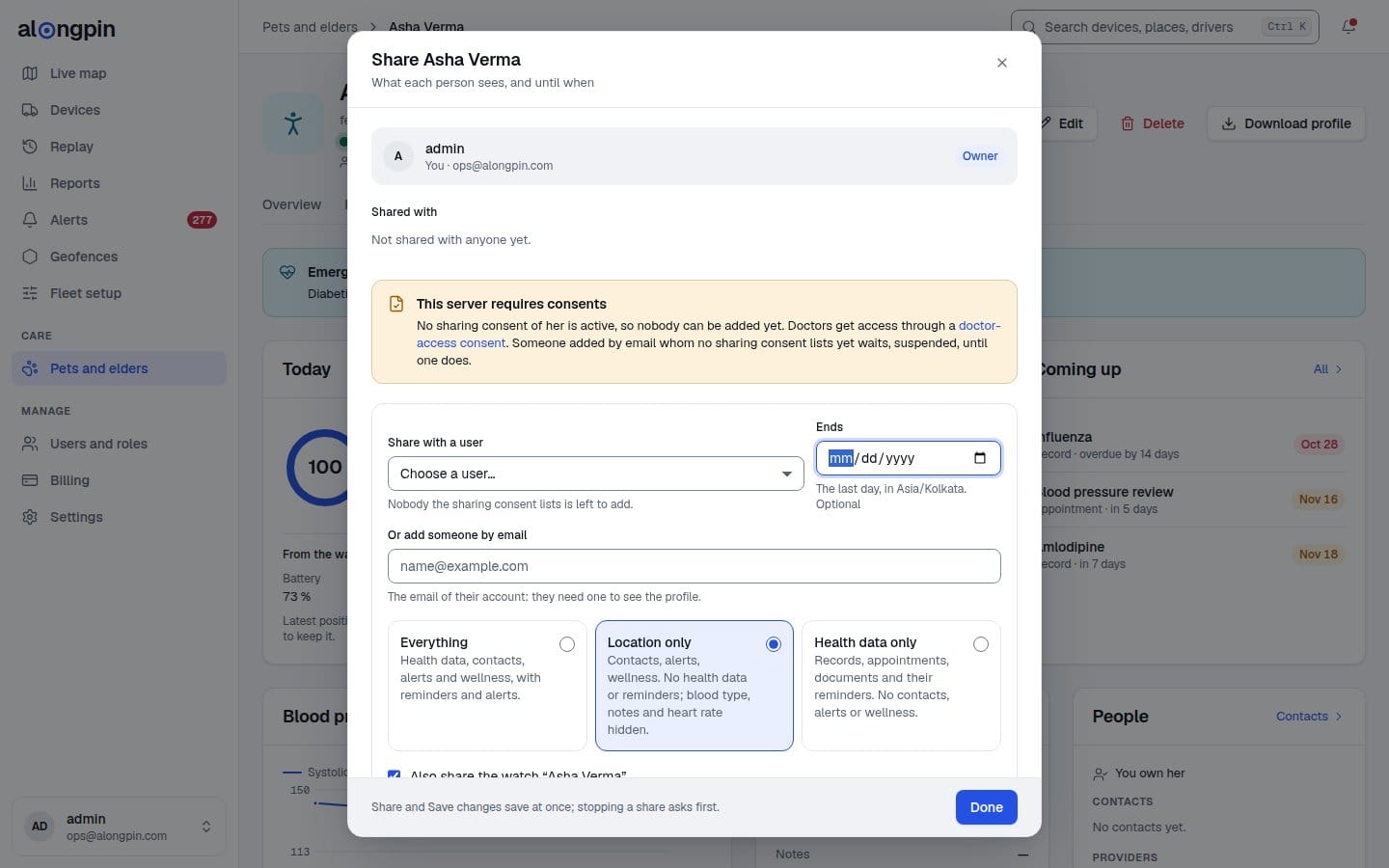
What each choice shows
| Choice | They see | They get |
|---|---|---|
| Everything | The profile with its health details, records, appointments, documents, contacts, alerts and wellness | Alerts and reminders |
| Location only | The profile, contacts, alerts and wellness; no health data. For an elder, blood type, mobility, notes and heart rate are hidden | Alerts only |
| Health data only | The profile, records, appointments and documents | Reminders only; no contacts, alerts or wellness |
Location only suits a neighbour or a sibling who should hear about an SOS or leaving home but has no need for medical details. Health data only suits a carer who looks after medication and appointments. A doctor who should read an elder's records gets access through a doctor-access consent instead, which ends with the consent. The care profiles page shows the whole picture.
When the server requires consents
For elders, your server may require consents before health data is kept or the profile is shared. Then only the people that the elder's sharing consent lists can be added, and someone added by email whom no consent lists waits, suspended, until one does. A suspended share gives nothing: no profile, reminders or alerts. Record a sharing consent that lists them, from the profile, and the share comes into force without sharing again. Pets need no consents. What is kept and who sees it is described under privacy.
Change or stop a share
In the Shared with list, select Change what … sees to switch between Everything, Location only and Health data only, or to change the end date, then Save changes.
To end a share, select Stop sharing with … and confirm Stop sharing. They no longer see the profile, its location, alerts or health data. Nothing is deleted, and their past views of health data stay in the access log. A watch shared together with the profile leaves their devices too.
The owner can see who read the elder's health data, and when, under Who viewed on the profile.
Remove a profile shared with you
If a profile is shared with you and you no longer need it, open it and select Leave, then confirm. You no longer see it or get its reminders and alerts, and only its owner can share it with you again.
Frequently asked questions
My brother has no account. Can he still get the alerts?
Yes, as a contact: add him under Pets and elders → Contacts with his mobile and email, and tick Receives alerts. He gets emails and text messages but cannot open the profile.
Does sharing the profile also share the watch?
Only if you tick Also share the watch. Without it, they see the profile but not the watch on the map, and no wellness.
Can I share until the end of a holiday?
Yes. Set Ends to the last day; the share ends by itself.