Delivery routes

Tell each recipient when their delivery is close.

Set up a round with its stops in order. Recipients get an approaching message with a private live page, dispatch hears about a missed stop, a late run or a vehicle off the route, and your own system gets every event.

Choose a package in the portal; you see the first invoice before you confirm.

123456Stop 2 missed09:52 · dispatch alertedWHAT THE RECIPIENT SEESYour stopabout 11:202.2 km away1 stop before yours

Dispatch

Four questions of a delivery round

And where the answer comes from.

  • Recipients ask when the delivery will come.

    An "approaching" message with a link.

    It goes out when the vehicle is within the distance you set, measured along the route line, with the expected time.

  • One customer must not see where the others are.

    The private view.

    A recipient sees the vehicle and their own stop. The line and the other stops are not sent to their page.

  • Dispatch learns of a problem from a complaint.

    Missed stop, off the route, late.

    Each is an event on the board and in the run, and reaches dispatch through an alert rule.

  • Your own system has to know too.

    A signed webhook per account.

    Every event of a run is posted to your address as JSON, and tried again when your endpoint is down.

One round

The recipient, dispatch and the report.

01Tell the recipient

"Approaching", with a page that shows only their own stop

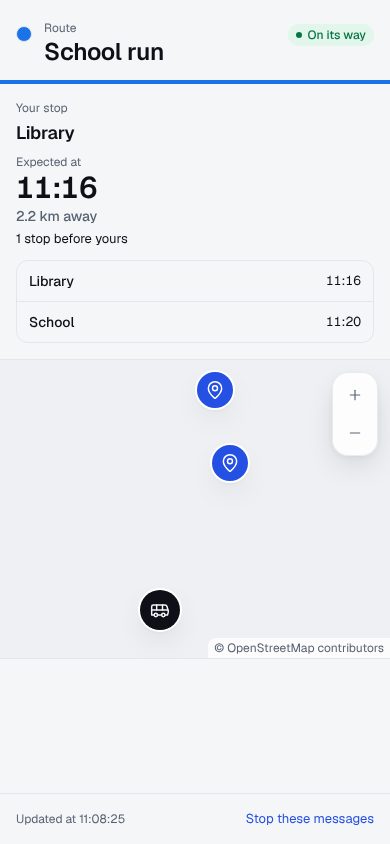
Assign each consignment to its stop with the contact to tell. The contact gets a text message or an e-mail when the vehicle is approaching, and the link opens a live page: the vehicle, their stop, the expected time and how many stops come before theirs.

  • The private view: no route line, no other stops, no other recipients
  • The vehicle shows until their stop has been served
  • A link in every e-mail and on the page stops the messages

Text messages need SMS to be set up for your account and count against a monthly limit. At the limit SMS stop and e-mail goes on.
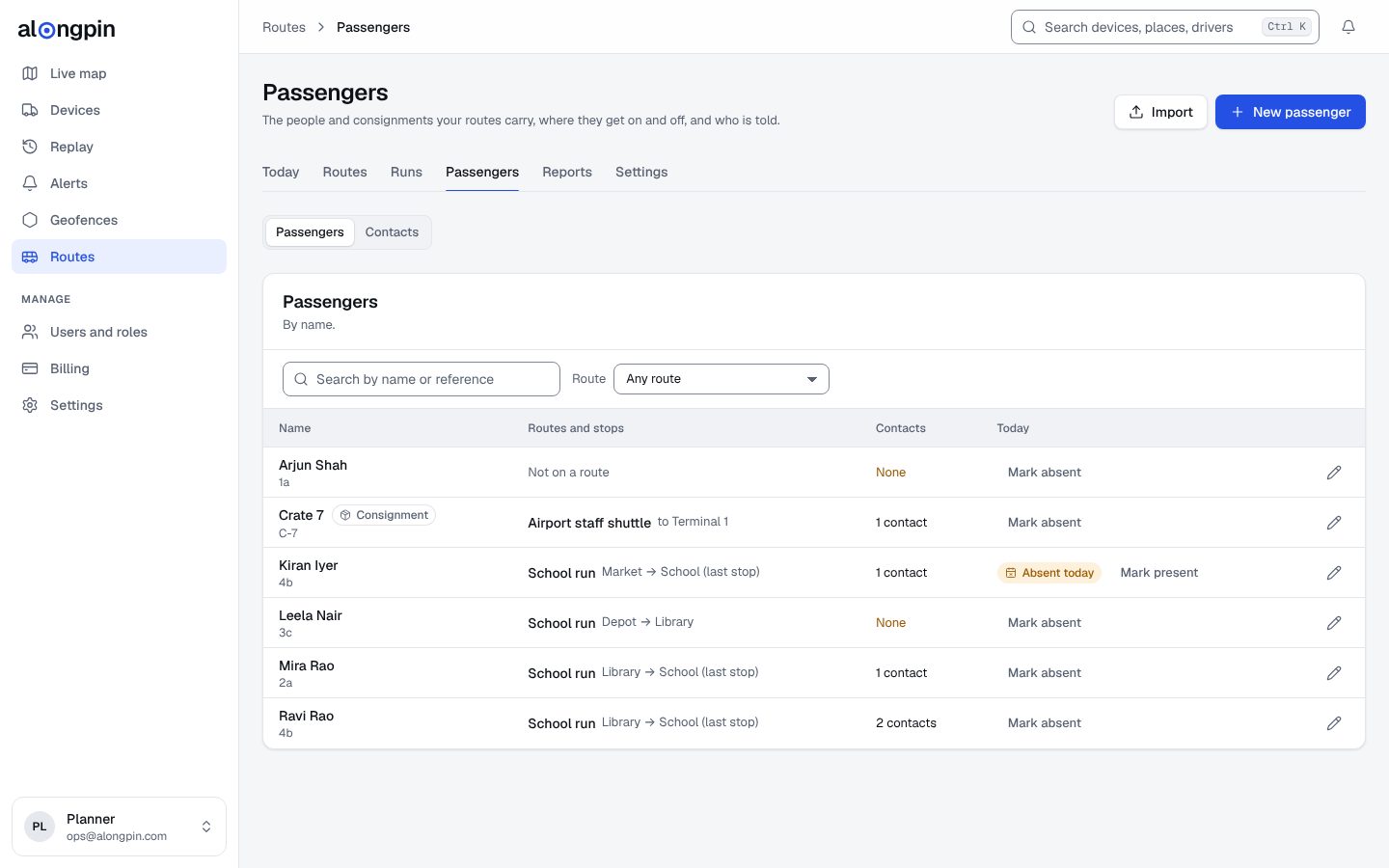
Passengers and consignments in the portal: each with its reference, the route and stop it belongs to and its contacts
The live page of a delivery with the private view: the vehicle, the recipient’s own stop and the expected time, without the route line or other stops

02Keep dispatch informed

Hear about the round that is not going to plan

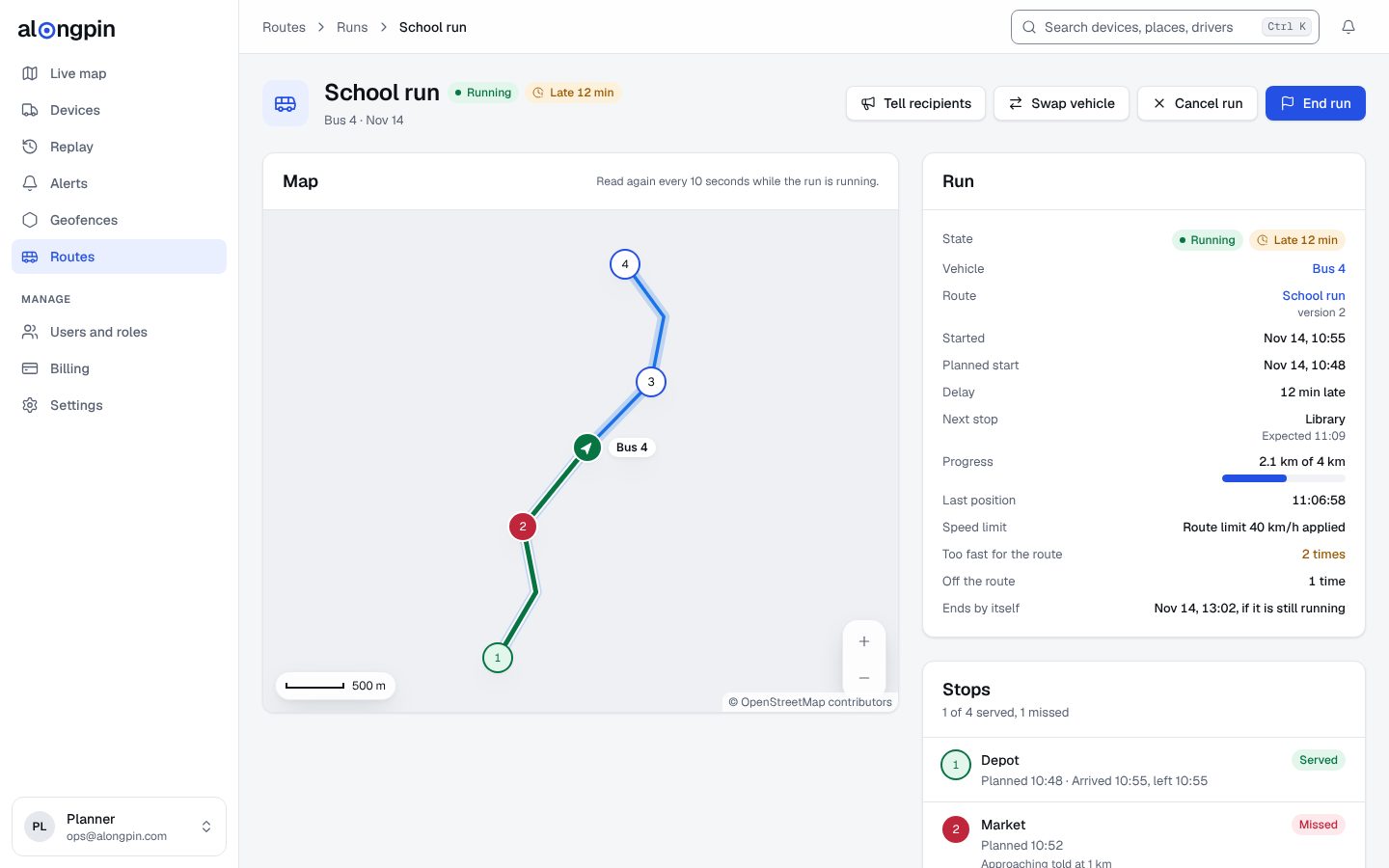
The stops have a fixed order. A stop the vehicle passes without stopping is marked missed, a vehicle outside the corridor for longer than the limit is off the route, and a run behind its planned times is late. Each can alert dispatch on the channels of your alert rules.

  • Missed stop, left the route, back on the route, running late
  • Not started in time, for rounds with a timetable
  • Faster than the route's speed limit, counted only during the run
A run in the portal: the vehicle on the route line, one stop served and one missed, the delay, the next stop and the route’s speed limit

03Look back

On time, per route and period

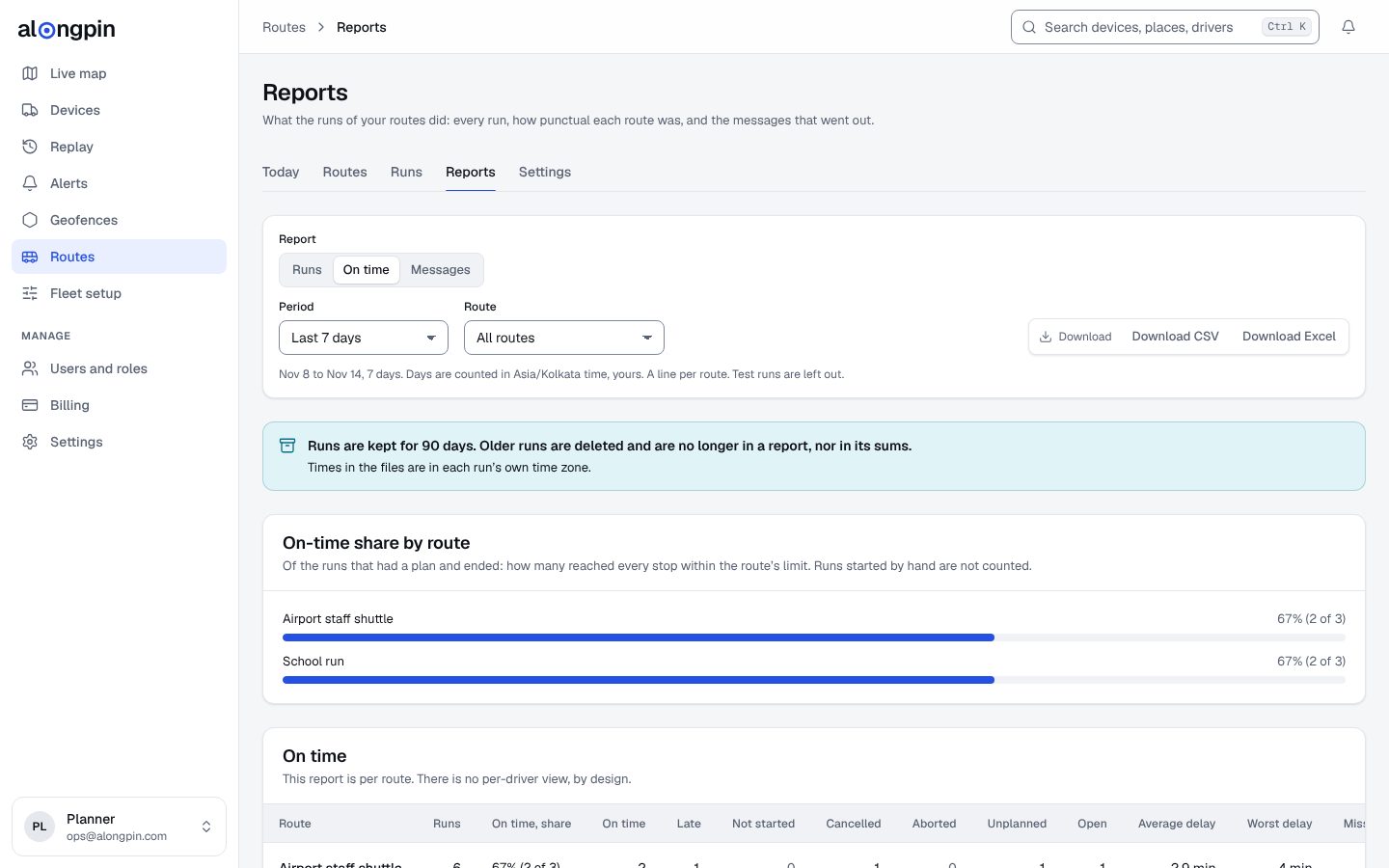
The on-time report counts the planned runs that reached every stop within the limit you set, with the average and the worst delay and the missed stops. The runs report has one line per run, and each run shows planned against real time for every stop.

  • Download as CSV or Excel
  • Runs started by hand are counted apart, as unplanned
  • A messages report: sent, failed and not sent, by channel

The platform records where the vehicle was and when it reached a stop. It does not collect signatures or photos, so it is not proof of delivery.

The on-time report of Routes in the portal: the share of runs on time per route, with late, cancelled and not started runs

Webhook

Every event of a run, in your own system

Run started, approaching a stop, arrived, left, missed, late, off the route, ended: each is one signed request to your address.

  • One https address per account, with the event types you tick
  • Each request is signed with your secret, so your system can check where it came from
  • A failed delivery is tried again for an hour; the deliveries of the last 30 days are listed
  • Consignment references are sent only if you switch them on. Names and contact details are never sent
Webhooks
POST /routes HTTP/1.1
X-Alongpin-Event: stopArrived
X-Alongpin-Signature: sha256=5f1c…

{
  "id": "transit:4711:93:stopArrived:0",
  "type": "stopArrived",
  "time": "2026-03-01T10:04:00Z",
  "run": { "id": 4711, "state": "running" },
  "route": { "id": 12, "name": "North" },
  "stop": { "id": 93, "name": "Market", "position": 2 },
  "vehicle": { "id": 11, "name": "Van 5" }
}
An example request, shortened. The ids and names are examples.

Good to know

What it does not do

Routes follows a vehicle along a line you set. Three things people sometimes expect are not part of it.

  • It does not plan the round

    You draw or import the line and set the order of the stops. The platform does not calculate routes, re-order stops or react to traffic.

  • It does not guide the driver

    There is no navigation for the driver. The vehicle needs a tracker that reports its position; nothing else changes in the cab.

  • It is not proof of delivery

    A stop counts as reached when the vehicle stood inside its radius. Signatures, photos and scans are not part of it.

Devices

Works with the tracker already in the van

A round is followed from the positions the vehicle's tracker reports. Recipients need nothing but a phone that opens a link.

How close to the set distance a message goes out depends on how often the tracker reports.

We do not sell hardware.

How teams use it

Stories from customers, in their words, published by our team.

No stories published yet

Customer stories appear here once our team publishes them. In the meantime, book a demo and we will walk you through a setup like yours.

All customer stories

Pay per device

Packages set the price, the features and the number of devices. Routes is an add-on that is switched on per package. Start with a free trial where the package has one.

No packages are offered yet

The platform's administrators have not published any package.

FAQ

Questions people ask first

Can a recipient see the other deliveries of the round?

Not with the private view. Their page gets the vehicle, their own stop, the expected time and the number of stops before theirs. The route line and the other stops are not sent to it, and once their stop has been served the vehicle is no longer shown.

See routes and stops

Does the recipient need an app or an account?

No. The message carries a link to a live web page that needs no sign-in and works for that run only. You can also invite a contact by e-mail to a viewer account in the web portal.

Does it optimise the route or the order of stops?

No. The stops are served in the order you set, and a stop that is passed is marked as missed. Route planning, free stop order and traffic are not part of it.

How is the distance to a stop measured?

Along the route line you drew, not as the crow flies. The expected time is an estimate from that distance, the planned times and how the vehicle has been driving. While the vehicle is off the route, the time is shown as uncertain.

Check if your device works

Can our order system receive the events?

Yes. Set one webhook address for your account and each event of a run is posted to it, signed. You can let stop events carry your own consignment references.

Webhooks

Is Routes part of every package?

No. Routes is an add-on that is switched on per package. Ask us, or see the packages on the pricing page.

See pricing

Put your first round on the map

Create an account, or let us set up a delivery route with you in a demo. Choose a package in the portal; you see the first invoice before you confirm.

Chat with us