Personal safety
Who should receive your SOS alert
How to choose the people told when you press SOS: awake, nearby and certain to answer. Which channels reach them, how to see who was notified and who acknowledged, and why to agree the response and test once a year.
Ashish Srivastava6 min read
The people to set as SOS emergency contacts are those who are awake when you are likely to need them, near enough to come or to send someone, and certain to answer: usually two or three, not your whole family. When you press SOS on a watch or personal alarm, the platform raises an alarm with your position and sends it to everyone your alert rule reaches, on the channels you chose. It records who was told, on which channel and whether it went out, and who acknowledged it. It does not decide who goes, and it does not call the emergency services. That part is an agreement between you and your contacts, made before you need it.
Key takeaways
- Choose people by when they are awake, how near they are and whether they answer, not by how close you feel to them.
- Two or three people are enough. Everyone is told at the same moment, so a long list adds confusion, not safety.
- Alerts go out by email, text message, push or Telegram where your server has them switched on. Each person checks their own details.
- Every alarm shows who was notified, on which channel, and who acknowledged it.
- Agree who does what in advance, and test with a real press at least once a year.
People who are awake, nearby and will answer
Start with your days. When are you most likely to press the button: walking home late, at work alone, on a run at dawn, at home during the day? Then ask, for each person you are thinking of:
- Are they awake then? A friend on night shifts is ideal for late journeys and useless for a morning run.
- How near are they? Someone ten minutes away can come. Someone in another city can phone, coordinate and call for help, but cannot open your door.
- Will they answer? Some people leave their phone on silent, ignore unknown numbers or check messages twice a day. Be honest about it.
- Will they stay calm? The best contact is the one who acts, not the one who panics or waits for someone else.
A good list usually mixes one person nearby, one person who is available at the times you are most exposed, and one person who knows you well enough to give your details to the emergency services if needed. Ask each one before you add them, and tell them what the role means.
Push, email, text message or Telegram, where switched on
An SOS reaches people through an alert rule: Alarm under When this happens, with only SOS ticked under Alarm kinds, so that no other alarm sends a message. Under Tell people by, you choose the channels. Which ones you can tick depends on what your server's administrator has switched on:
- Email goes to each person's account email.
- Text message goes to the phone number on their account, where a text message gateway is set up.
- Push notification goes to the apps signed in to their account.
- Telegram goes to the Telegram chat linked to their account, where the administrator has set up a Telegram bot; the Telegram alerts guide covers linking a chat.
- In the app shows a pop-up only while the portal is open, and keeps nothing.
Tick at least two channels that reach people when the portal is closed. A text message wakes more people at night than an email.
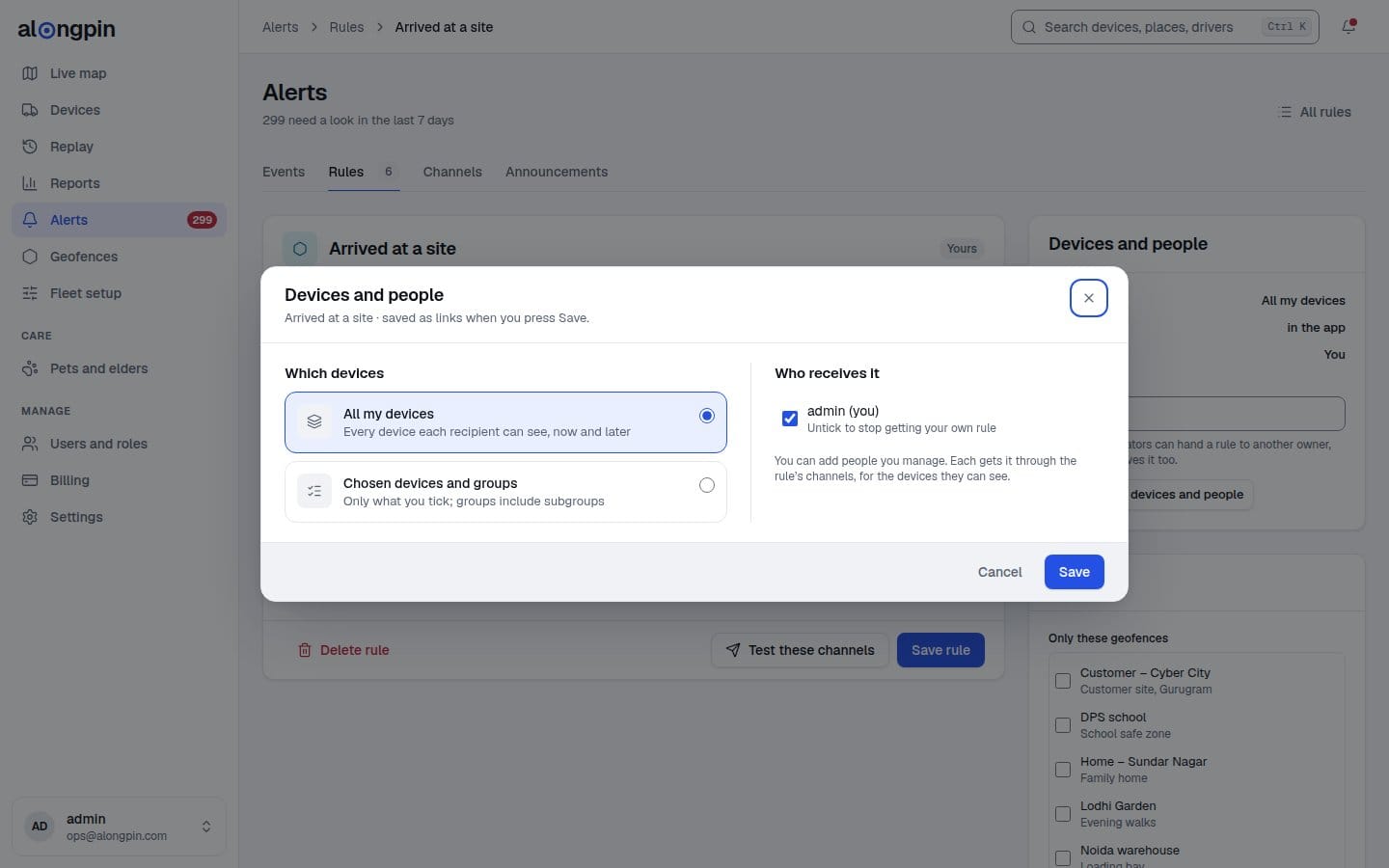
The people the rule reaches need their own account, with your device shared with them. An account that manages other users can add them under Devices and people, in Who receives it; otherwise each person creates the same SOS rule in their own account for your device. Your first alert rule shows the rule editor step by step.
Each person should check their own side under Settings → Your account → Alerts and channels: that their phone number and email are right, and that SOS is among the alerts that still go out during their Quiet hours. SOS is let through by default; someone who changed their quiet hours may have removed it. The test in the rule editor, Test these channels, sends to you alone, so ask each person to send themselves a test message too.
If the person who presses SOS is an older relative with a care profile, the profile's contacts receive SOS alerts by email and text message without an account. Emergency contacts for an elderly parent covers that case.
Seeing who was notified and who acknowledged
When an SOS arrives, it stands at the top of Alerts for everyone on the rule, with the time, the place and a button to show it on the map. Opening the alarm shows who it was sent to: one line per person and channel, marked sent, skipped or not delivered, with the reason, such as no phone number on the account, the channel switched off, or held back by quiet hours. A delivery that failed is visible there, and nowhere else: nobody is told by message that a message failed.
The first person who chooses Acknowledge takes the alarm. Everyone else sees "Acknowledged by" with the name and the time on their open screens within seconds. Acknowledging records who took it; it sends no message, so the person who takes it should still tell the others. Acknowledging an alarm explains what everyone sees.
The alerts page covers rules and channels for every kind of device, and the SOS page follows an alarm from the button to the person who handles it.
Agreeing the response in advance
The platform tells everyone at the same moment. It does not call one person after another or wait for the first to answer. The order is yours to agree, and it should be written down and shared with everyone on the list:
- The first person who sees the alert phones you straight away.
- If you answer and all is well, they acknowledge the alarm and send one line to the others.
- If you do not answer, they open the alarm, note the place and the time, and phone the person nearest to it.
- If there is reason to fear the worst, they call the emergency number and give your position, your name and anything the responders should know.
- Anyone who sees an alarm still open after ten minutes phones the first person on the list.
Give your contacts what they would need in that call: your address, a description of the places you go, any health condition, medication or allergy, and who has a key. Keep it short and up to date.
A test press once a year
A list of contacts goes stale quietly: a number changes, someone moves, a channel is switched off, a phone is replaced and the app is not signed in again. Test with a real press at an announced time, at least once a year and after any change:
- Tell everyone the day and the hour.
- Press SOS on the device as you would in an emergency.
- Check the alarm's list of who was notified: every person, every channel, sent.
- Ask each person whether the message arrived and how long it took.
- Have one person acknowledge it, and check that the others see it.
If something failed, fix it and test again. A test is also a rehearsal: it reminds everyone of the plan.
Being plain about the platform's role
Alongpin passes on what the device reports. It notifies the people you chose and records who was told and who acknowledged. It does not call the police, an ambulance or a monitoring centre, and nobody at Alongpin watches the alerts. A device without charge or coverage cannot send an alarm at all. Your contacts are the response; the platform makes sure they hear about it and can see that someone has acted.
The personal safety page shows how SOS, safe zones and sharing fit together for adults and families.
How Alongpin helps
Alongpin (alongpin.com) is a GPS tracking platform you open in a browser or on your phone. A personal tracker, GPS watch or phone shares your position with the people you choose, the SOS button alerts your contacts with where you are, and a share link lets someone follow one journey and then expires. See how it works for personal safety, and check your device in the device check.
Frequently asked questions
Can I set an order, so one person is told first?
No. Everyone on the rule is told at the same moment. The order is the plan you agree between you.
Can someone without an account receive my SOS?
Not through an ordinary alert rule: its recipients have accounts. Contacts without an account receive alerts on a care profile for an older relative or a pet.
How do I know a message really went out?
Open the alarm. It lists each person and channel, and whether the message was sent, skipped or not delivered, with the reason.