Cars and bikes
A classic car or motorbike in winter storage
A GPS tracker for a classic car or motorbike in winter storage: keep it powered without flattening the battery, draw a zone around the garage with a leaving alert, read an offline tracker correctly, and run a spring check.
Ashish Srivastava6 min read

A GPS tracker for a classic car or a motorbike earns its keep in winter storage, when the vehicle sits in a garage for months and nobody looks at it. The setup that works is simple: keep the tracker powered without flattening the vehicle's battery, draw a zone around the garage with an alert for leaving it, and know what an offline tracker usually means before it worries you. In spring, check that everything still reports before the first ride.
Key takeaways
- A stored vehicle is the least watched one: a leaving alert does the watching for you.
- A tracker wired to the vehicle draws a small current all winter. Plan for it with a battery maintainer or a tracker that can run on its own backup battery.
- Draw a zone around the garage and add an alert for leaving it; add ignition, vibration or power-cut alerts where your tracker reports them.
- An offline tracker in storage is usually a flat battery or no mobile signal, not a theft. Know which before the first cold night.
- A spring check takes ten minutes: battery, reporting, zone and alert.
Why storage is when a vehicle is least watched
During the season you see your car or bike every week. In storage it may be weeks between visits, and a rented garage or a shared barn may have other people coming and going. If the vehicle leaves, you could find out at the next visit, long after the trail went cold.
A vehicle tracker keeps reporting where the vehicle is. Paired with a zone and an alert, it turns months of silence into a single message the moment something changes.

Tracker power while the vehicle is laid up
This is the part owners most often get wrong. A wired tracker takes its power from the vehicle's battery. Its draw is small, but small over four months adds up, and a motorbike battery has far less capacity than a car's.
What you can do depends on the tracker and the garage:
- A battery maintainer. If the garage has a socket, a smart charger or maintainer on the vehicle battery keeps both the battery and the tracker going all winter. Many classic owners use one anyway.
- A tracker with a backup battery. Some trackers carry their own small battery and keep reporting for a while after the vehicle battery is disconnected. How long depends on the model and how often it is set to report; the manual gives the figure.
- Power-saving settings on the tracker. Many trackers report less often while the ignition is off, and some have a sleep mode. These are settings of the device itself, set through its own configuration or a command it supports. Reporting less often saves battery but means a leaving alert can arrive later.
- Disconnecting the battery. If you take the battery out, a tracker without a backup battery stops reporting. That is a choice, but then the tracker does not guard the vehicle.
If your tracker reports the battery level or the external voltage, keep an eye on it in the first weeks of storage: a falling line tells you early that the plan is not working.
A zone around the garage and a leaving alert
The zone is what turns a position into a warning.
- Under Geofences, draw a circle around the garage. Make it somewhat larger than the building, so the ordinary wander of GPS positions indoors does not look like the vehicle leaving.
- Under Alerts, create a rule for leaving a geofence, linked to the vehicle, and choose the channels in Tell people by. Push, email, text messages and Telegram are offered when the operator of your installation has switched them on.
- Use Test these channels on the rule to check that the message reaches your phone. A test sends notifications only; it does not move the vehicle or raise a real alarm.
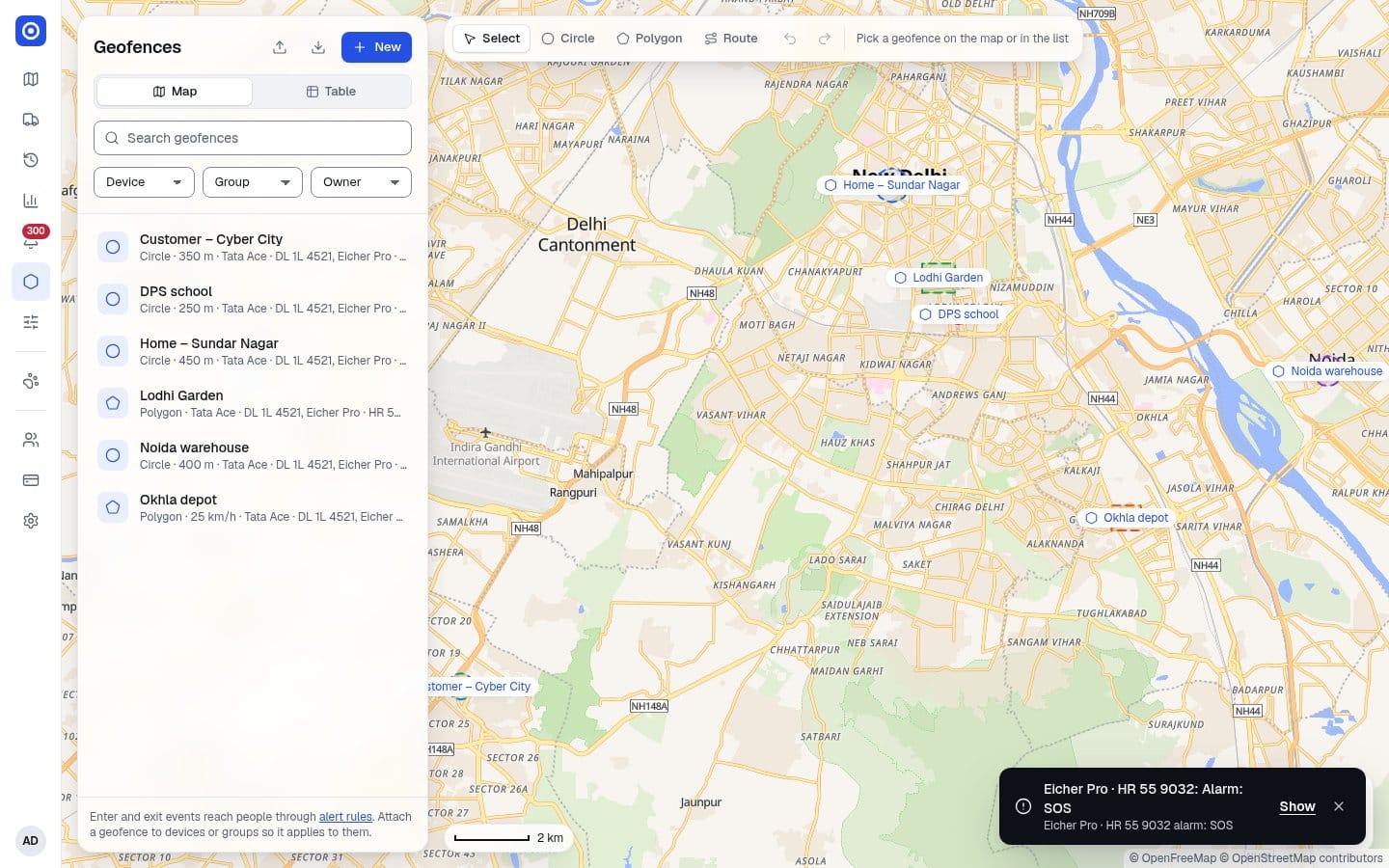
Geofences explains zones in more detail, and drawing your first geofence walks through the circle step by step.
Depending on what the tracker reports, a few more rules make sense for a stored vehicle:
- Ignition on, where the tracker is wired to the ignition: nobody should start the engine in February.
- Vibration, tamper or power-cut alarms, where the tracker raises them: a sign that someone is handling the vehicle or the wiring.
- Low battery, where the tracker reports it.
All of these are ordinary alert rules; Alerts shows the event types and channels.
An offline tracker: battery or coverage
Sooner or later the tracker will show as offline or with an unknown status. On the live map, a tracker that has not reported for a while (ten minutes in a standard setup) shows as Unknown, and one that has lost its connection as Offline. In storage there are two usual causes:
- Power. The vehicle battery has run down, or the tracker's backup battery has. A falling voltage or battery reading before it went quiet points this way.
- Coverage. Underground garages, metal roll-shutters and thick stone barns can block the mobile signal. A tracker that has never reported reliably from that spot points this way. Many trackers store positions and send them when coverage returns.
An alert for a tracker going offline tells you the moment it happens, so you can visit before the battery is beyond saving. Why a device shows offline goes through the other causes.
The spring check
Before the first ride of the season:
- Battery. Check the vehicle battery and, if the tracker has one, its own.
- Reporting. Open the vehicle on the live map and look at the time of its last position. Start the engine and watch it change to moving or idle when you drive off.
- Zone and alert. Make sure the leaving rule is still linked to the vehicle. Keep it if you store the vehicle in the same place each night, or switch it to a calendar so it only applies while the vehicle is laid up.
- Odometer. If the platform's distance has drifted from the vehicle's own odometer, correct it in the device's settings so service reminders stay in step.
How Alongpin helps
Alongpin (alongpin.com) is a GPS tracking platform you open in a browser or on your phone. A tracker in your car, motorbike, scooter or bicycle shows on the live map, with trip history, geofences around home and work, and alerts when it moves or leaves. Check your tracker in the device check, see the vehicle trackers it works with, and start on the pricing page.
Frequently asked questions
Will the tracker drain my motorbike battery?
Over months, it can. A battery maintainer, a tracker with its own backup battery or a power-saving setting on the tracker are the usual answers. Check the tracker's manual for its draw and its options.
Can I hide the tracker in a classic car without changing the wiring?
That depends on the vehicle and the tracker. Battery-powered trackers need no wiring but have to be charged; wired ones are best fitted by someone who knows the car's electrics.
I take the car out on a sunny winter day. Will the alert go off?
Yes, and that is the point: it tells you the vehicle left the zone, whoever drove it. If you expect a drive, the message simply confirms it. If you work on the car in the garage and start the engine, an ignition rule will fire too; put that rule on a calendar under Only during if you want it to apply only at night.
What if the alert comes while I am away?
Share the vehicle with someone nearby, or forward the alert to them as well. An alert is only as useful as the person who can act on it.