Devices and connection
Why a device shows offline
A checklist for a tracker that shows offline or unknown: what each state means, then power and coverage, the SIM's data and APN, the server address and port, the identifier, and disabled or expired devices.
Ashish Srivastava4 min read

When a GPS tracker shows offline, the platform has stopped hearing from it: the tracker closed its connection, never reached the server, or its data is being refused. Work through five checks in this order: power and coverage, the SIM's data and APN, the server address and port, the identifier, and whether the device is disabled or its subscription ended. Start with these three; they need no access to the platform.
Key takeaways
- Offline means the tracker closed its connection; Unknown means nothing arrived for a while; Never connected means it has not reached the server yet.
- Power, mobile coverage and a SIM with data and the right APN cause most outages.
- The tracker must send to the server address and the port of its own protocol, as Set up the tracker shows.
- A tracker with an identifier no device has lands in Unverified, not on the map.
- A disabled or expired device keeps its history, but its new data is refused.
What online, offline and unknown mean
The Devices list shows each device's state and when it last reported:
| State | What it means |
|---|---|
| Online | The tracker is connected or sending data now. |
| Offline | A tracker that keeps a connection open closed it, for example when it lost power or coverage. |
| Unknown | Nothing has arrived for a while (ten minutes in a standard setup). Phone apps, which send each report on its own instead of keeping a connection, turn unknown rather than offline. |
| Never connected | The device was added, but no message with its identifier has reached the server. |
| Disabled or Expired | The device is switched off on the platform or its time ran out: its data is refused. |
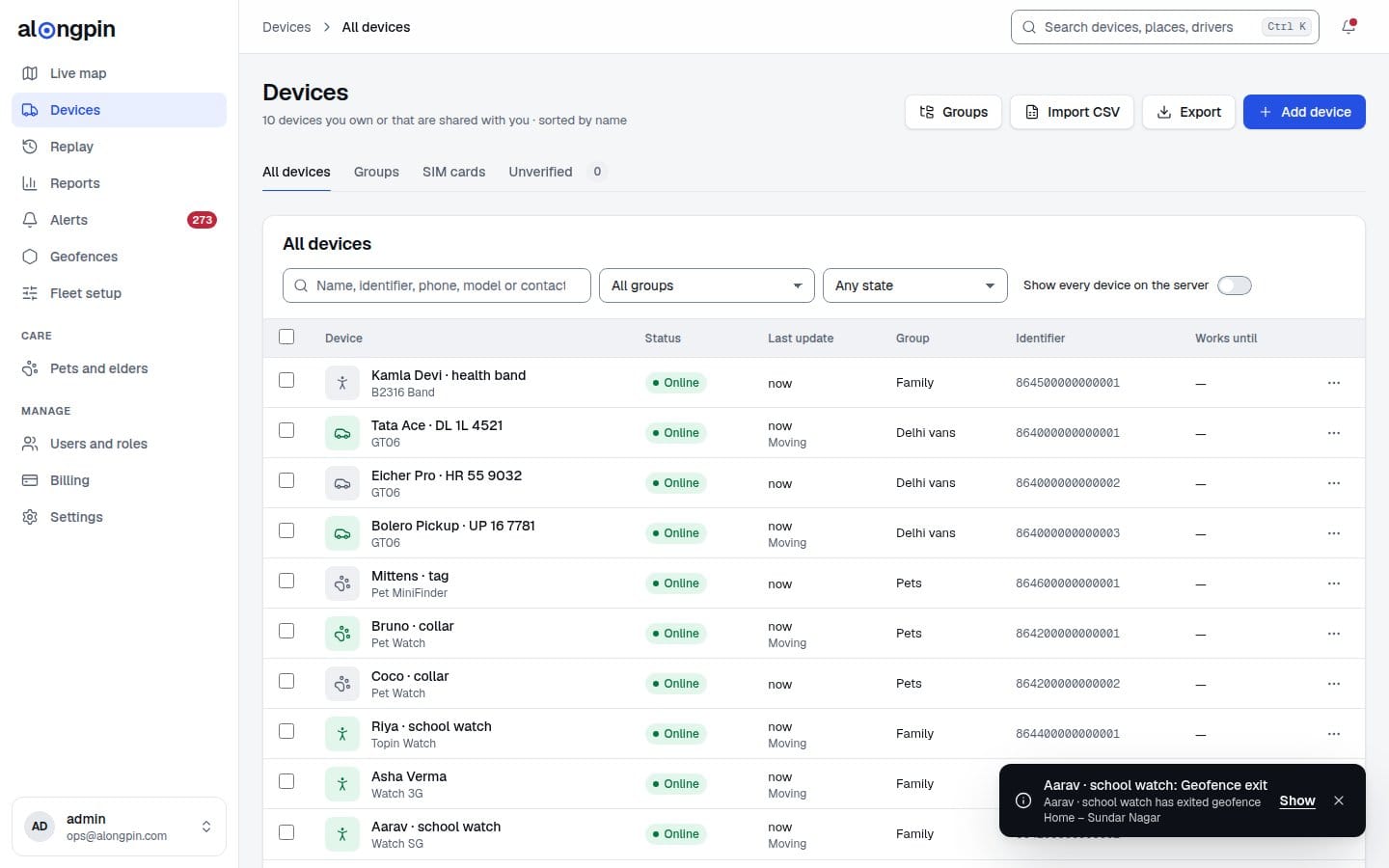
An offline tracker in a parked vehicle is not always a fault: many trackers sleep when the ignition is off and connect again when it starts. If the vehicle is moving and the tracker stays offline, go through the checks below. The live map shows the last known position meanwhile.
1. Power, battery and coverage
- Is the tracker powered? Check the fuse and the wiring to permanent power and ground; a tracker on the ignition line only reports while the ignition is on.
- A battery tracker may simply be flat, or in a deep sleep set on the tracker.
- Most trackers have status lights for power, mobile network and satellites. Your tracker's manual says what each pattern means.
- Underground garages, basements and remote valleys can have no mobile coverage. A tracker that comes back when the vehicle moves on had no network, not a fault.
2. The SIM has data and the right APN
The tracker needs a SIM with an active data plan, and the APN (access point name) of that SIM's network set in the tracker. A prepaid SIM that ran out of credit, a SIM that was suspended, or a wrong APN all look the same on the platform: the tracker is powered but never connects. If your account records SIM cards, the APN of the installed SIM shows in Set up the tracker.
3. The server address and the port
Every tracker protocol has its own port. On the wrong port, a tracker reaches nothing, or reaches another protocol's port, which cannot read it. Open the device, select Edit, and choose Set up the tracker from the menu of more actions: it shows the Server address, the Port for the tracker's protocol (pick the protocol in the list if the device has never connected) and the APN. Compare these with what is set in the tracker, by its configuration tool, its app or a text message.
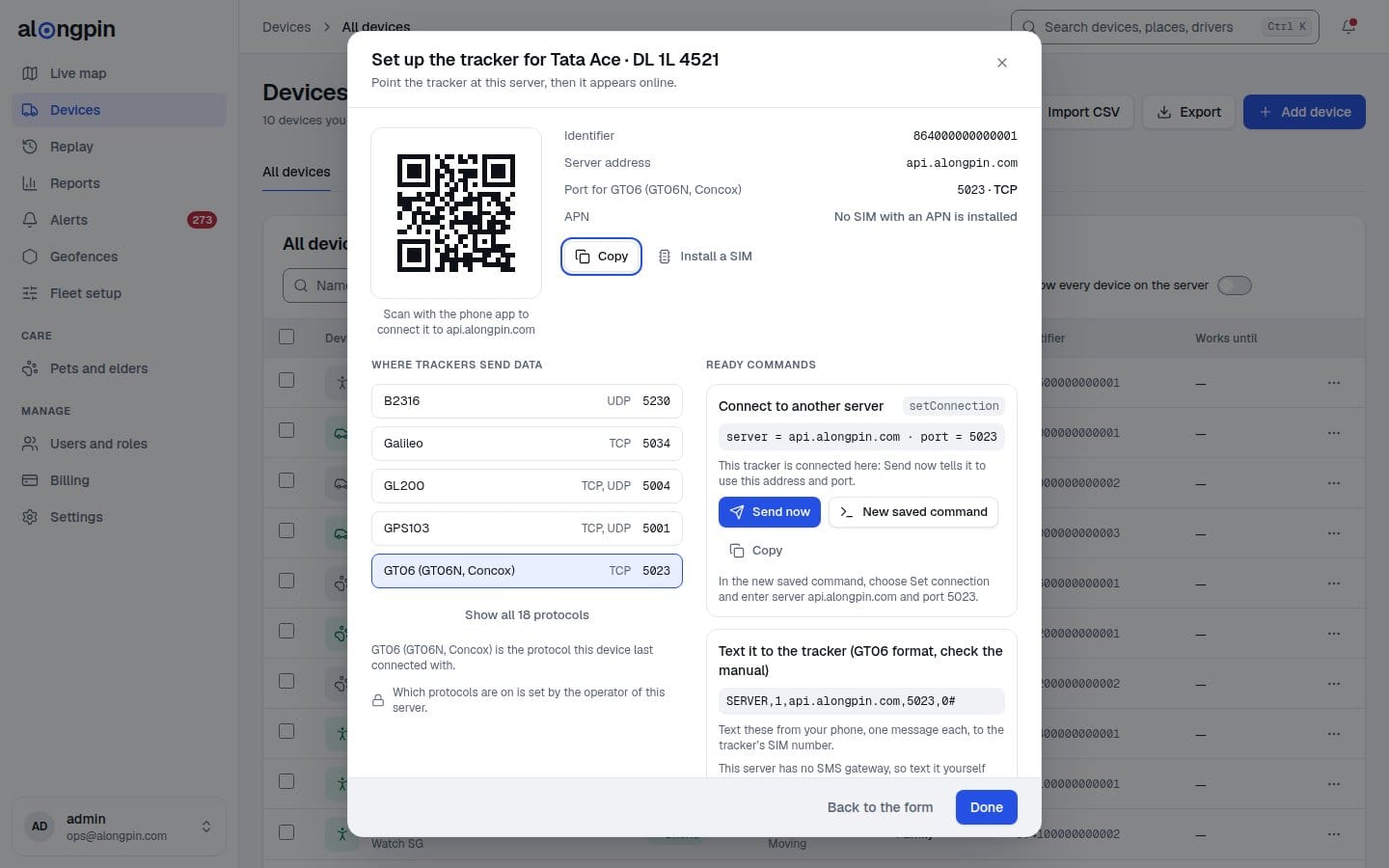
The device connection guide lists the ports of common protocols in a standard setup; always use the one Set up the tracker shows, because your installation may differ. If you do not know your tracker's protocol, look the model up in the compatibility check.
4. The identifier and the list of unverified devices
The tracker reports an identifier, usually its IMEI, and the platform matches it with a device. If the identifier on the device differs by one digit, the tracker's messages belong to no device. Those trackers are kept under Devices → Unverified, with their identifier, address and last contact; from there an administrator registers one as a device in a single step. If your tracker is listed there, the identifier on the device is wrong or the device was never added.
5. Disabled, expired or out of subscription
A device that was Disabled, whose expiry date has passed, or whose subscription ended has its data refused: it gets no new positions or events and is not listed as unverified either. Its history stays, and it works again with its next message once it is enabled, its date moves forward or the subscription is renewed. The device list says Its data is refused or Subscription ended in that case; ask your administrator or look under Billing.
Still offline?
If all five checks pass, open Raw messages and choose the device: it shows what the tracker sends as it arrives. Nothing appearing there means nothing reaches the platform with that identifier; messages appearing while the device stays offline is a case for support. For the first connection of a new tracker, the setup guides go through each kind of device step by step.
Frequently asked questions
Why does a phone show unknown instead of offline?
Phone apps send each report separately rather than holding a connection, so the platform cannot see them disconnect. After a while without a report they turn Unknown.
Can I be alerted when a tracker goes offline?
Yes. Alert rules can react to a device going offline or turning unknown; set one up under Alerts.