Fleet management
Spreadsheets vs fleet tracking software: when to switch
A spreadsheet holds what someone typed in; tracking records trips, sites and alerts as they happen. What each does well, the signs a fleet has outgrown the spreadsheet, and a low-risk way to try.
Ashish Srivastava6 min read

Fleet tracking software vs a spreadsheet comes down to one difference: a spreadsheet holds what someone remembered to type in, while a tracking platform records positions, trips and alerts as they happen. For a handful of vehicles driven by people you see every day, a spreadsheet and the phone can be enough. When you start arguing about who was where, missing services or guessing at mileage, the fleet has outgrown it. The switch does not mean throwing the spreadsheet away: most businesses keep it for costs and records, fed by exports from the platform.
Key takeaways
- A spreadsheet is cheap, flexible and good at costs, contracts and records that change rarely.
- It cannot know where a vehicle is, how far it went or when it left a site, unless someone types it in afterwards.
- Disputes over times and places, missed services and guessed mileage are the signs it has stopped working.
- Tracking records trips, stops, zone visits and alarms as they happen, and alerts you without anyone checking.
- CSV and Excel exports from the platform feed the spreadsheet you keep.
- Try it on two or three vehicles first; the running cost is a subscription plus hardware and a data SIM per vehicle.
Quick comparison
| Spreadsheet and phone calls | Fleet tracking software | |
|---|---|---|
| Where vehicles are now | Ask the driver | Live map, updated as the tracker reports |
| Trips and mileage | Typed in by drivers or office staff, often later | Recorded from every trip, with start, end, distance and duration |
| Arrival and departure at sites | Driver's word or the customer's | Zone entry and exit events with times |
| Service reminders | Someone checks the dates and readings | Plans by distance, engine hours or date, with alerts |
| Out-of-hours movement | Found out the next morning, if at all | An alert rule on a calendar sends a message when it happens |
| Costs, contracts, insurance | Good at it | Not what it is for; keep these in the spreadsheet |
| Effort to keep current | Grows with every vehicle and driver | Mostly set up once, then runs |
| Running cost | Staff time | A subscription, trackers and a data SIM per vehicle |
What a spreadsheet does well for a small fleet
A spreadsheet is the right tool for information that changes rarely and needs no measurement: registration numbers, insurance and tax dates, lease terms, fuel card numbers, purchase prices and the service history from the workshop's invoices. It costs nothing extra, everyone knows how to use it, and you can shape it exactly to your business.
For three vans that start and end every day at your yard, driven by people you talk to every morning, a spreadsheet plus a quick call is often all you need. You know where they go because you sent them there.
Signs it has stopped working
The spreadsheet breaks down when the information it needs comes from the road rather than from the office. Watch for these:
- Disputes you cannot settle. A customer says the engineer arrived at 11:40, not 10:15. A driver says the van was at the depot all weekend. Without a record made at the time, it is one word against another.
- Missed services. The oil change was due at 60,000 km, but nobody updated the mileage column for three months.
- Guesswork in the mileage log. Drivers fill in their kilometres at the end of the week from memory, or the column is copied from last month.
- Phone rounds. Every urgent job starts with ringing drivers to ask where they are.
- More vehicles than one person can hold in their head. Somewhere past ten or fifteen vehicles across more than one site, the person who knew everything is on holiday and nobody else does.
If two or more of these sound familiar, the time spent keeping the spreadsheet current, and the cost of the mistakes it lets through, is the figure to compare with a tracking subscription.

What tracking adds: records made as things happen
A tracker in each vehicle reports its position, speed and, on most wired trackers, the ignition. The platform turns that into records nobody has to type:
- Trips and stops: every journey with its start, end, distance, duration and top speed, and every stop with where and how long. Replay any trip on the map.
- Zones: draw your depot and customer sites, and every arrival and departure is recorded with its time.
- Alerts: a rule tells someone when a vehicle leaves the depot at night, speeds, loses tracker power or nears its next service, by e-mail, push or the other channels your account offers.
- Reports: trips, stops, summaries, events and zone visits for any period and any group of vehicles.
The difference that matters in a dispute is that the record was made when it happened, by the tracker, not afterwards by someone with a reason to remember it a certain way. The fleet solution page shows how these parts fit a business with vans, trucks or service vehicles.
What stays in the spreadsheet, fed by CSV and Excel exports
Most fleets keep a spreadsheet after they switch; it simply stops being the place where positions and mileage are typed in. Every report in the platform downloads as CSV, Excel or Excel, a sheet per device, with the unit in each column header and real numbers and dates in the cells, so the figures drop straight into your own workbook:
- The summary report per month gives each vehicle's distance, engine hours and odometer for your cost-per-kilometre sheet.
- The trips report gives the journey list for mileage claims or customer billing.
- The geofence stays report gives time on site per customer.
- The device list itself exports to a file, and new devices can be imported from one, so the spreadsheet you already have can seed the platform.
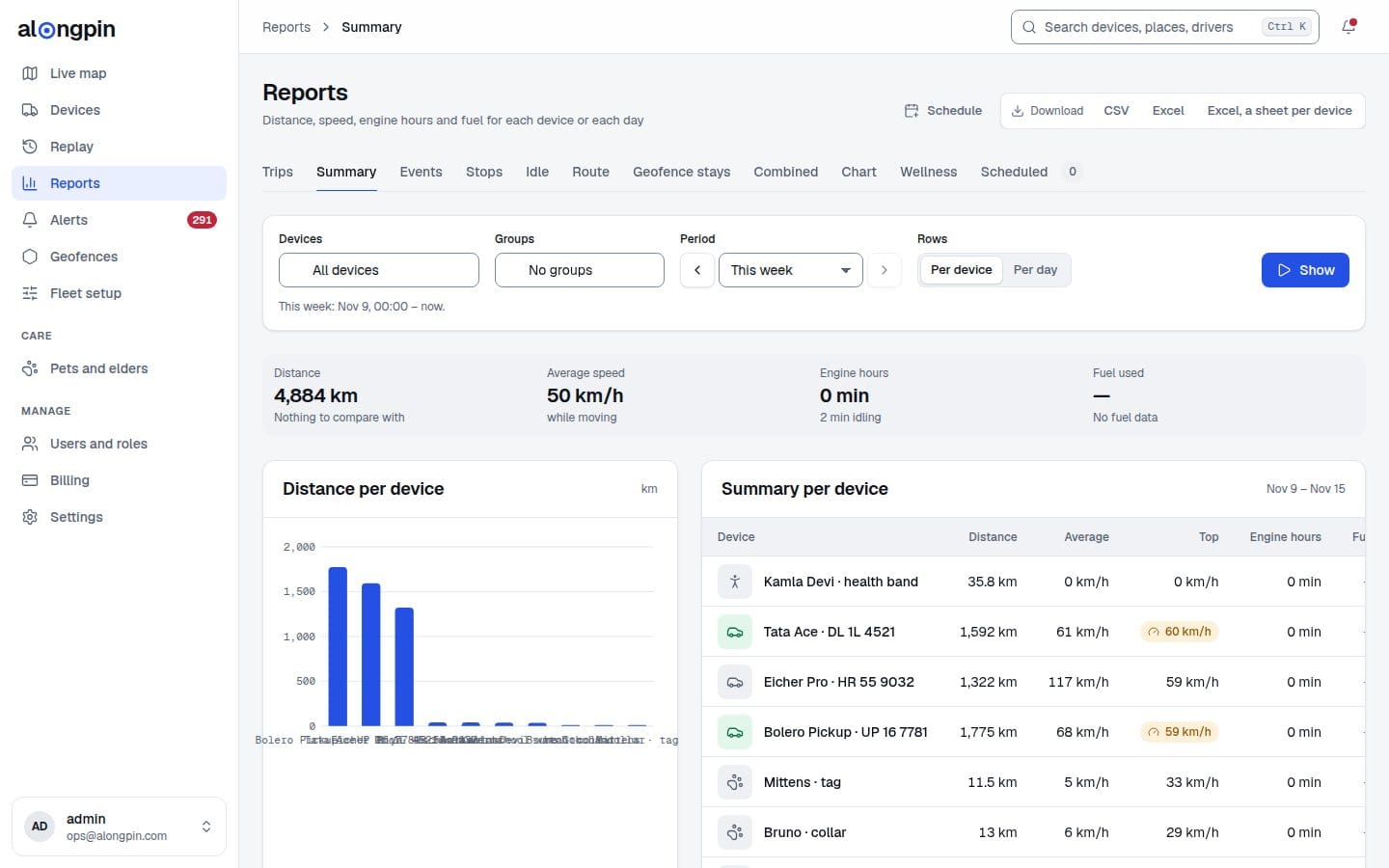
Costs, contracts, fuel card statements and the workshop history stay where they are. Running a report and downloading it as CSV or Excel covers the formats, and the reports page lists every report.
Effort and running cost to expect
Switching takes a few kinds of effort and money; what each costs depends on your choices, so here is what to budget for rather than figures:
- The platform subscription. Packages are per device or for a whole account; what each includes is on the pricing page.
- Trackers. Bought separately, from a supplier you choose. A plug-in tracker in the diagnostic port takes minutes; a hard-wired one is usually fitted by an installer and reports the ignition more reliably.
- A data SIM per tracker. Each message is small, so the data used is small, but the SIM must work where your vehicles go.
- Setup time. Adding vehicles, drawing your depot and main customer sites, a few alert rules and a scheduled report: an afternoon for a small fleet.
- Telling drivers. Drivers should know what is recorded, when and why, before trackers go in. Where private use of vehicles is allowed, private trips can be kept out of view.
Against this, count the hours spent on phone rounds, mileage logs and chasing service dates each month, and the cost of one missed service or one lost dispute.
A low-risk way to try it
Start small rather than fitting the whole fleet:
- Pick two or three vehicles: one that drives a lot, one that causes disputes, one at a second site if you have one.
- Check the trackers you plan to buy against the device check before ordering, so you know the platform reads them.
- Start an account. Where a package offers a free trial, it shows on the pricing page and when you sign up.
- Run it next to the spreadsheet for a month. Compare the platform's trip and mileage records with what was typed in.
- Decide with your own numbers. If the records matched and saved nothing, the spreadsheet was enough. If they disagreed, you know which one to trust.
Who should choose what
Stay with the spreadsheet if you run a few vehicles from one yard, see your drivers daily and have never had to prove where a vehicle was. Switch to tracking when vehicles spread across sites, disputes or missed services start to cost money, or when knowing where vehicles are takes phone calls every day. Keep the spreadsheet either way, for the things it is good at.
How Alongpin helps
Alongpin (alongpin.com) is a GPS tracking platform you open in a browser or on your phone. Your trackers, in the vans, trucks and cars you already run, show on one live map with trips, stops, idle time and alerts; reports and scheduled reports answer the questions this article raises, and users and roles let each depot see its own vehicles. Check your trackers in the device check, read how it works for fleets, and start on the pricing page.
Frequently asked questions
Do I need fleet tracking software for five vans?
Not always. If the signs above do not apply, a spreadsheet may serve you well. If one of them costs you money each month, five vans is a good size to start.
Can I import my current vehicle list?
Yes. Devices can be imported from a file, so you do not have to type every vehicle in again.
Will I still need Excel?
Probably, for costs and records. The platform's exports are made to drop into it.