Elder care
Steps, activity and time at home: reading a parent's day gently
An activity tracker for elderly parents, read gently: what the wellness view in a care profile shows, where steps, active time and time at home come from, how to set goals that fit, and why trends over weeks matter more than one day.
Ashish Srivastava5 min read

An activity tracker for elderly parents is most useful when you read it slowly. The daily wellness view in an Alongpin care profile shows, for each day, your parent's steps, active time, distance and time at home, measured against goals you set with her. One quiet day means little. A month in which her walks get shorter and her time at home grows may be worth a gentle conversation. This article explains what the view shows, where the numbers come from, how to set goals that fit the person, and why it is an aid to conversation rather than a diagnosis.
Key takeaways
- Wellness shows each day's steps, active time, distance, time at home and away, rest and, where the watch reports it, heart rate.
- Everything comes from the watch's positions and counters: no watch data, no figures.
- Goals for steps, active minutes and distance give each day a score from 0 to 100.
- Look at weeks and months, not single days. A trend is information; a bad Tuesday is not.
- It is a picture of routine, not a medical measure. Talk to her first, and to her doctor if something worries you.
What does the wellness view show?
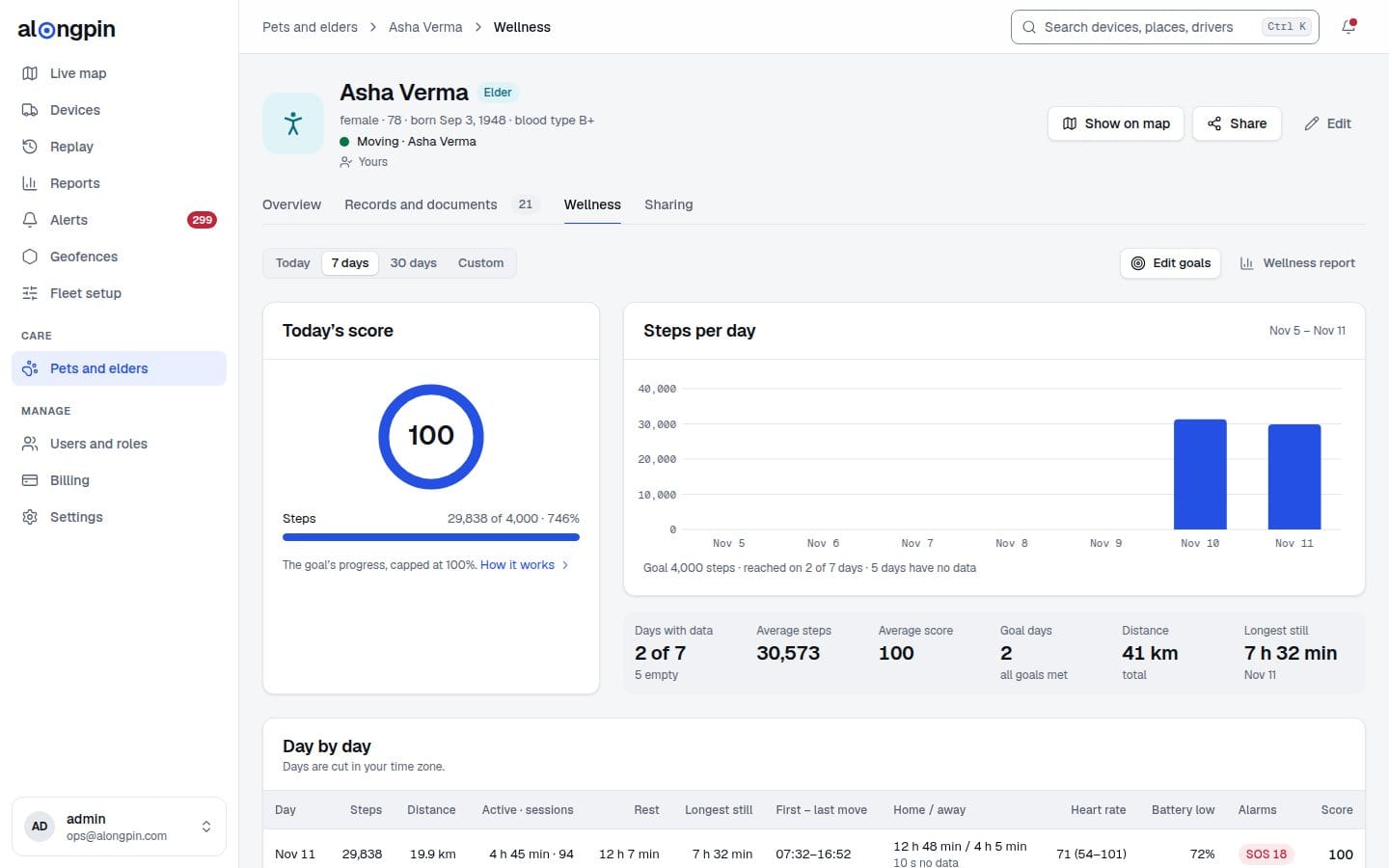
Open Pets and elders, your parent's profile and its Wellness tab. For the period you choose (Today, 7 days, 30 days or a custom range of up to a year), you see:
- a score for each day, if goals are set, and today's score at the top;
- charts of steps per day (or distance, if the watch counts no steps), against the goal line;
- a period summary: days with data, average steps, average score, goal days and the longest still stretch;
- day by day: steps, distance, active time and how many times she started moving, rest, the longest still stretch, the first and last movement, time at home and away, heart rate, the lowest battery and any alarms.
The profile's Overview also shows a small Today card with steps, active time, distance, rest, time at home and heart rate.
Where do the numbers come from?
Every figure is worked out from what the watch reports:
- Steps come from the watch's step counter. Watches without one report none, and the view then shows distance instead.
- Active time is time the watch was moving or counting steps; rest is time it reported while still.
- Distance is measured from the watch's positions.
- Time at home and away compares those positions with her home zone, the geofence chosen as home in her profile. Without a home zone there are no home and away figures.
- Heart rate (lowest, average and highest of the day) appears only if the watch reports it.
Stretches when the watch was silent, switched off or out of coverage are shown as no data rather than guessed. A day without any positions has no progress and no score. Days are cut at midnight in your own time zone.
Which goals fit the person?
Goals turn the figures into a daily score. Open Edit goals (or Set goals the first time) and fill in what makes sense:
- Steps per day, which needs a watch that counts steps;
- Active minutes per day, time moving or stepping;
- Distance per day.
Leave a goal empty for no goal. Each day's score is the average progress towards the goals you set, each capped at 100%, so one very long walk does not make up for no activity on the others.
Set goals with your parent, not for her, and start from what she does now. If she walks to the shop and back most mornings, a goal near that walk is meaningful: on most days she reaches it, and when she stops reaching it, you notice. An ambitious target she misses every day turns the score into a reproach and tells you nothing.
Scores are worked out when you look, from the goals set at that moment. Changing a goal changes the scores of past days as well, which keeps the comparison fair.
Why look at weeks rather than days?
Single days are noisy. She stayed in because it rained, a friend visited, she left the watch on the charger until noon. Look at:
- the 30-day view for her usual range: how many steps on a normal day, how long at home;
- the summary: how many goal days in the month, the average score;
- slow changes: walks that get shorter over several weeks, time at home that creeps up, a first movement that comes later each morning.
A change in routine can have many causes: the weather, a new television series, a sore knee, low mood, a friend who moved away. The view tells you that something changed, not why.
The Wellness report under Reports gives the same daily figures for any period, to download as a spreadsheet if you want to compare months.
What depends on the watch?
- Steps need a watch with a step counter. Many have one; some simple personal alarms do not.
- Heart rate needs a watch that measures and reports it. Many do not.
- Time at home needs a home zone in the profile.
- Continuous figures need the watch to be worn and charged. A watch left on the bedside table shows a very still day.
Check the model on the watches page before you buy, and see the health readings page for heart rate and other readings.
Who in the family sees wellness?
The profile's owner sees it, and so do family members the profile is shared with, provided the watch itself is shared with them too, because wellness is worked out from the watch's positions. A Location only share shows steps, activity and time at home but leaves heart rate out. A Health data only share, meant for a doctor, shows no wellness. Where your installation requires consents, wellness stays locked until a health consent of your parent, or her legal representative, is recorded. The care profiles page explains the shares.
An aid to conversation, not a diagnosis
The wellness view does not assess health, detect illness or check figures against medical limits. It shows routine. Use it the way you would use a weekly phone call: as a reason to ask "how have you been?".
A few habits keep it gentle:
- Tell her what you can see. "The watch shows your walks; I look at them on Sundays." Nothing hidden.
- Ask, do not report back. "You've been in a lot this week, everything all right?" works better than "Your score dropped to 40".
- Let her own the goals. If she wants to walk more, the score is hers to enjoy.
- Bring it to the doctor only with her. A month of shorter walks can be useful context at an appointment she attends.
If you are worried about a sudden change, such as no movement at all for hours, the profile's No movement alert is the right tool, not the score. See setting up the inactivity alert for an elder.
How Alongpin helps
Alongpin (alongpin.com) is a GPS tracking platform you open in a browser or on your phone. A parent's GPS watch or alarm becomes a care profile: SOS, fall, leaving-home and inactivity alerts reach the family and emergency contacts, and health readings, medication refills and appointments sit in one place you can share. See how it works for elder care, and check a watch in the device check.
Frequently asked questions
Why is today's score empty?
Either no goals are set, or the watch has sent no positions today yet.
Why does the view show distance instead of steps?
The watch counts no steps. Distance from its positions is shown instead.
Can I see a whole month at once?
Yes. Choose 30 days, or a custom period of up to a year.