Alerts and SOS
Telegram alerts not arriving
Telegram alerts need the Telegram channel switched on for your account and a chat to send to. What to check, how to test, and why Telegram messages are always short and carry no location.
Ashish Srivastava3 min read
Telegram GPS tracking alerts arrive only when two things are in place: the Telegram channel is switched on for your account, and there is a chat for the messages to go to. If either is missing, nothing reaches Telegram. This article goes through both, the test message, quiet hours and the delivery log, and explains why Telegram messages are always short and never carry the location.
Key takeaways
- If Telegram is not offered among a rule's channels, it is not switched on for your account.
- Telegram alerts go to your own chat id, or to your company's shared chat when you have none and one is set up.
- Send test on the Telegram row checks the path to your chat.
- Telegram messages carry only the device and what happened, never the location: open the alert in the app for the details.
1. Is Telegram offered as a channel?
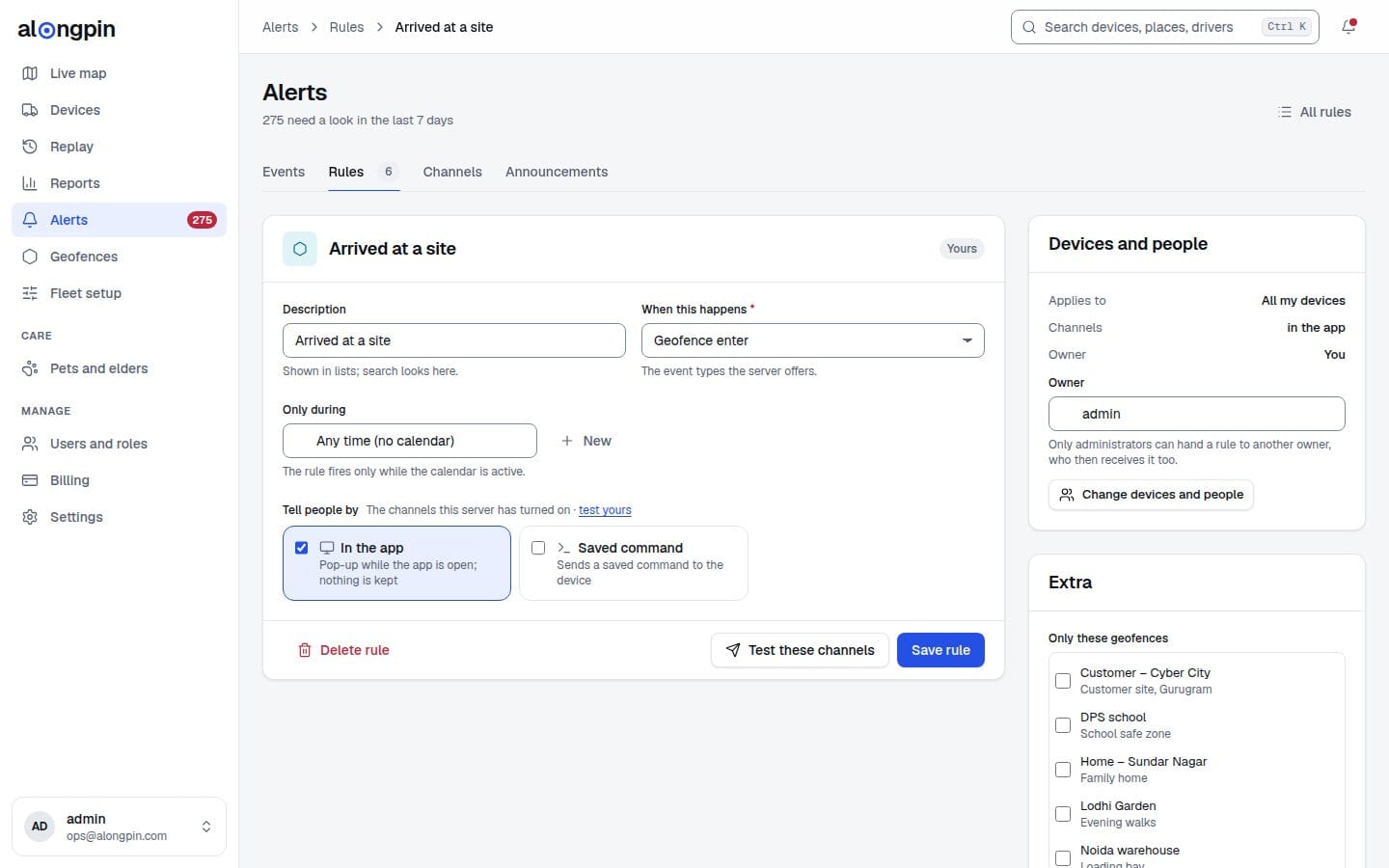
Open Alerts, then the rule. Under Tell people by, Telegram must be in the list and ticked. If it is not offered, Telegram is not switched on for your account; a rule that still names it shows it as "off on this server", and nothing goes out on it. Telegram is connected by your service's operator, who can also switch it off for privacy reasons; ask your administrator.
2. The chat the messages go to
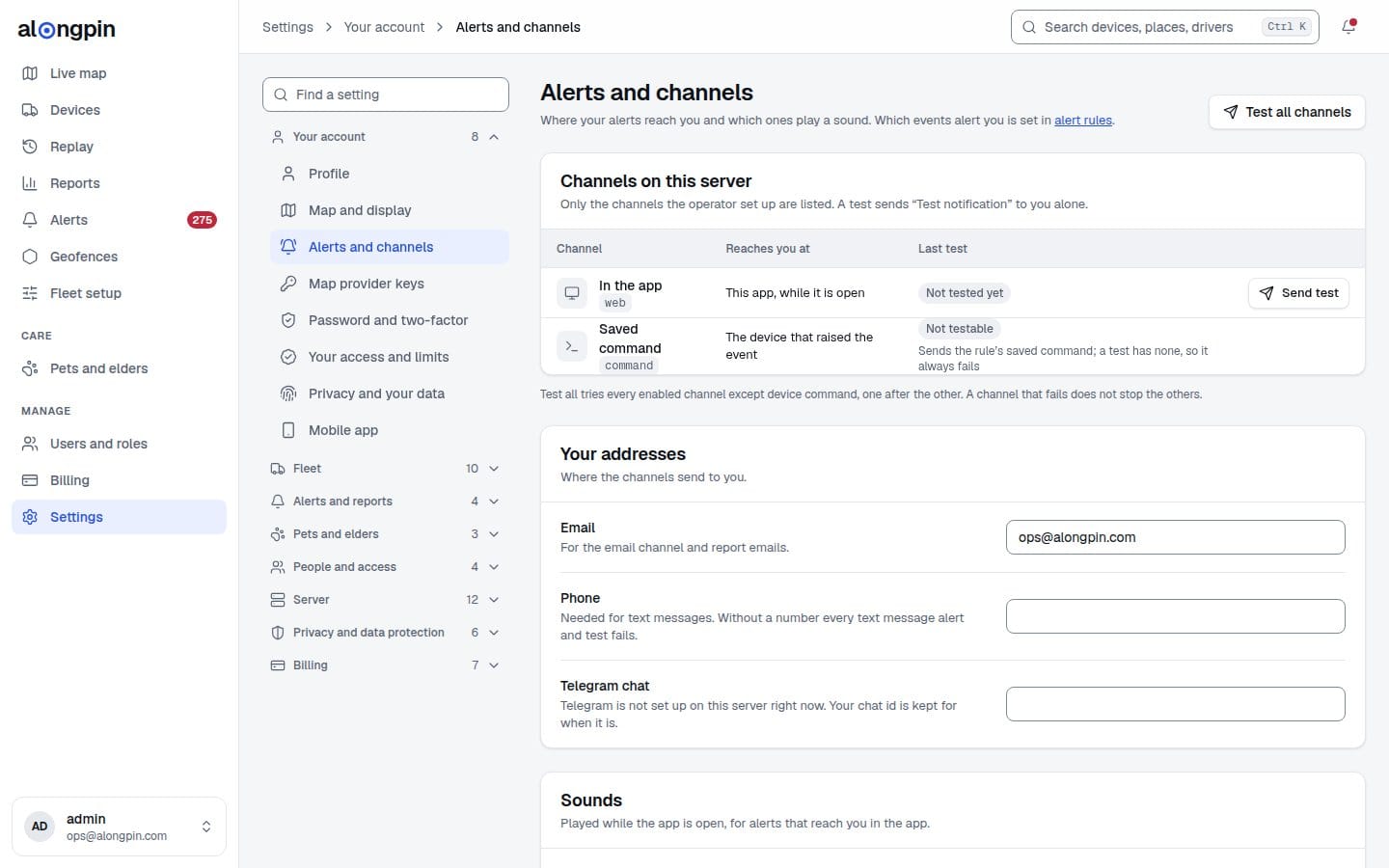
Open Settings → Your account → Alerts and channels. Under Your addresses, Telegram chat holds your own chat id: the identifier of the Telegram chat in which your company's alert bot writes to you. How you get that id depends on how your company set up its bot, so ask your administrator for the step that applies to you, then enter it here.
- With a chat id, alerts go to your own chat.
- Without one, they go to your company's shared chat, if one is set up. The page then says "Without a chat id it goes to the server chat".
- Without either, every Telegram alert to you fails: the page says there is no Telegram chat id on your account and no server chat.
3. Send a test message through Telegram
On the same page, press Send test on the Telegram row. It sends "Test notification" to you alone.
- Delivered: the bot sent it. Look in the chat the id points to, or in the shared chat.
- Could not deliver, "there is no Telegram chat id on your account": step 2.
- Could not deliver, "the provider refused the message": the chat id may be wrong, or the bot may not be allowed to write in that chat. Check the id, then ask your administrator.
4. Why the message is short and has no location
Telegram messages always carry the short text: the device and what happened, for example "Car: alarm (SOS)", and a link to open the alert, or "Open the app for details." where the server has no link set up. They never carry the address or coordinates, whatever the message detail for e-mail and text messages is. Telegram is a service outside the platform, and chats are easily shared and forwarded, so the location stays in the app, where only people who may see the vehicle can open it.
If you need the full details in another tool, a webhook can deliver them to your own system; the integrations overview explains the options.
5. Quiet hours and the delivery log
Your quiet hours hold back Telegram messages, except the alerts you let through (SOS and power cut by default), and a held-back message is not sent later.
Open the alert from Alerts. Under Sent to, the Telegram entry says sent, no Telegram chat, gateway refused, held back (quiet hours) or channel off. A failed message is not sent again.
Read more about alert channels, and about how SOS alerts can reach several people at once.
Frequently asked questions
Can several people share one Telegram chat?
Yes: people without their own chat id receive their Telegram alerts in your company's shared chat, where one is set up.
Why did the alert come by e-mail but not Telegram?
Each channel is separate. The rule may not include Telegram, your chat id may be missing, or Telegram may be switched off for your account.