Alerts and SOS
Why alert e-mails and texts do not show the location
By default, alert messages that leave the platform say only that there is a new alert; the place and details are in the app. Why this is, what each channel carries and who can change the message detail.
Ashish Srivastava3 min read
Alert email, no location? That is the default, not a fault: messages that leave the platform, by e-mail, text message, push, Telegram or webhook, say only which device raised which alert, with a link to open it in the app. The place, the address, the speed and the other details stay in the app, where only people who may see the device can read them. An administrator can switch e-mail and text messages to full detail; Telegram always stays short.
Key takeaways
- A short message carries the device and what happened, for example "Van 12: geofence exit", and a link to the alert or "Open the app for details."
- Location stays out of messages by default because e-mail, SMS and chat leave your control once sent.
- The link opens the alert after sign-in, so only people allowed to see the device see where it was.
- Administrators change Message detail under Settings → Privacy by default; care alerts follow the same setting.
What a short message contains
With the default, minimal message detail, an alert message names the device and what happened, and nothing else:
- E-mail: the subject is the alert, such as "Van 12 has exited geofence Depot"; the text says what happened and carries a link to open the alert, with the time.
- Text message and Telegram: one line, for example "Van 12: geofence exit. Open:" followed by a short link.
- Push: the device name and the short text.
- Webhook: the device and what happened, without position or attributes.
Where the server has no web address set up, the messages say "Open the app for details." instead of a link. Inside the app and the portal, the same alert always shows in full: place on the map, address, speed and time.
Why locations are kept out by default
A message that leaves the platform is out of anyone's control: e-mails are forwarded and stored in mailboxes for years, texts show on lock screens, chats are shared and webhooks land in other systems. A location is personal data, often the most sensitive kind: where a driver is, where an elder lives, where a child is after school. Keeping it in the app means:
- only people who may see the device can see where it was, after signing in;
- access to it follows the account's roles and is removed when someone leaves;
- what a message reveals is the same, whoever ends up reading it.
This is privacy by default: a fresh installation starts with the strictest value, and an organisation chooses to send more. Read more about how the platform handles privacy.
Open the alert in the app from the link
The link in a short message opens the alert itself after you sign in. A link stays valid for 30 days and is shared by everyone the alert went to; on its own it shows nothing to someone who is not allowed to see the device. If it no longer opens, the alert is still in the Alerts list.
An administrator can change the message detail
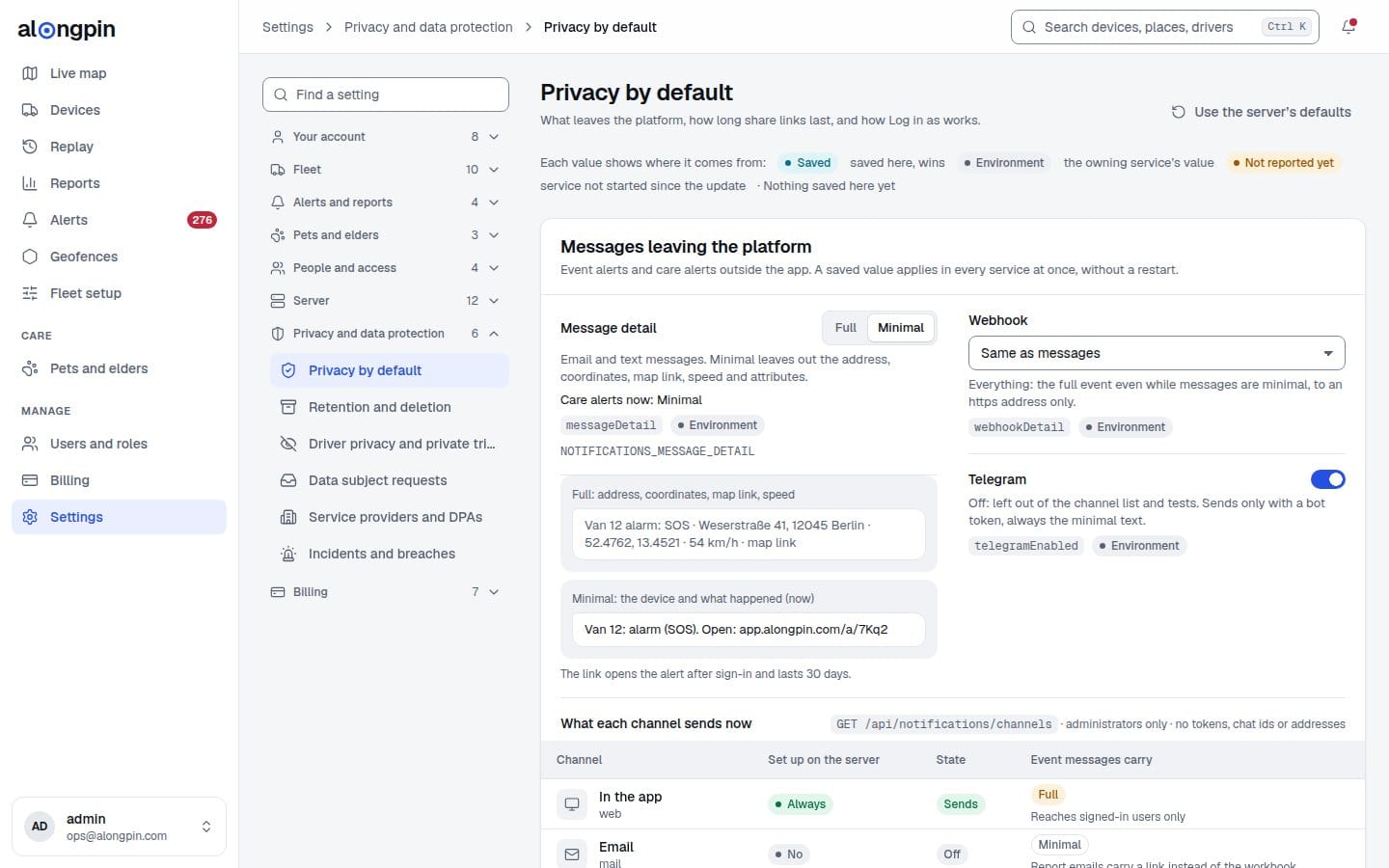
Administrators, and people whose role allows them to change the privacy settings, set Message detail under Settings → Privacy by default, in Messages leaving the platform:
- Minimal (the default): device and what happened, with the link.
- Full: e-mails add the address or coordinates of where it happened; text messages add the address, and may then take more than one text message.
The page shows What each channel sends now. Telegram always gets the short text, whatever is chosen. Webhooks send the full payload only to an https address, either with full message detail or when the webhook payload is set to send everything; see webhooks.
Before switching to full, record the decision and the reason, for example in your records of processing, and tell the people whose locations will travel in messages. Learn more about alert channels.
Care alerts follow the same rule
Care alerts for a pet or an elder, such as an SOS, a fall or leaving home, follow the same choice once a message detail is saved. With minimal detail, a care alert e-mail or text only says that there is a new alert and to open the app. The page shows what care alerts use now next to the setting.
Frequently asked questions
Does SOS carry the location by text message?
Only with full message detail. With the default, the text names the device and the SOS, and the link opens the place in the app.
Do short messages affect what the app shows?
No. The app and the portal always show the full alert to those who may see the device.