Care profiles and health
Setting reminders for medication, vaccinations and appointments
How to give a medication, vaccination, appointment or document a due date on a care profile, choose up to five reminder days, pick the channels, and see what is due, overdue and upcoming.
Ashish Srivastava3 min read
To set a medication reminder for an elderly parent, add the medication as a health record on their care profile with a Next refill date, then choose under Reminders how many days ahead you are reminded (up to five days, such as 7 and 1) and the channels: Portal, Email or SMS. The same works for a pet's vaccinations, for appointments and for documents that expire. Everything dated is collected in Pets and elders → Notification center.
Key takeaways
- Reminders count down to the item's date: a record's next due date, an appointment's day or a document's expiry date.
- Up to five reminder days per item, from 0 (on the day) to 365 days before.
- The owner, people the profile is shared with for everything or health data, and contacts marked Receives reminders are reminded.
- Switch reminders off per item in the notification center; the days and channels are kept for later.
Add a medication or vaccination with a date
- Open Pets and elders, then the profile, and the Records and documents tab.
- Select Add record and choose the kind: Medication, Vaccination, Deworming, Checkup and so on. Give it a Title such as "Blood pressure tablets" or "Rabies booster".
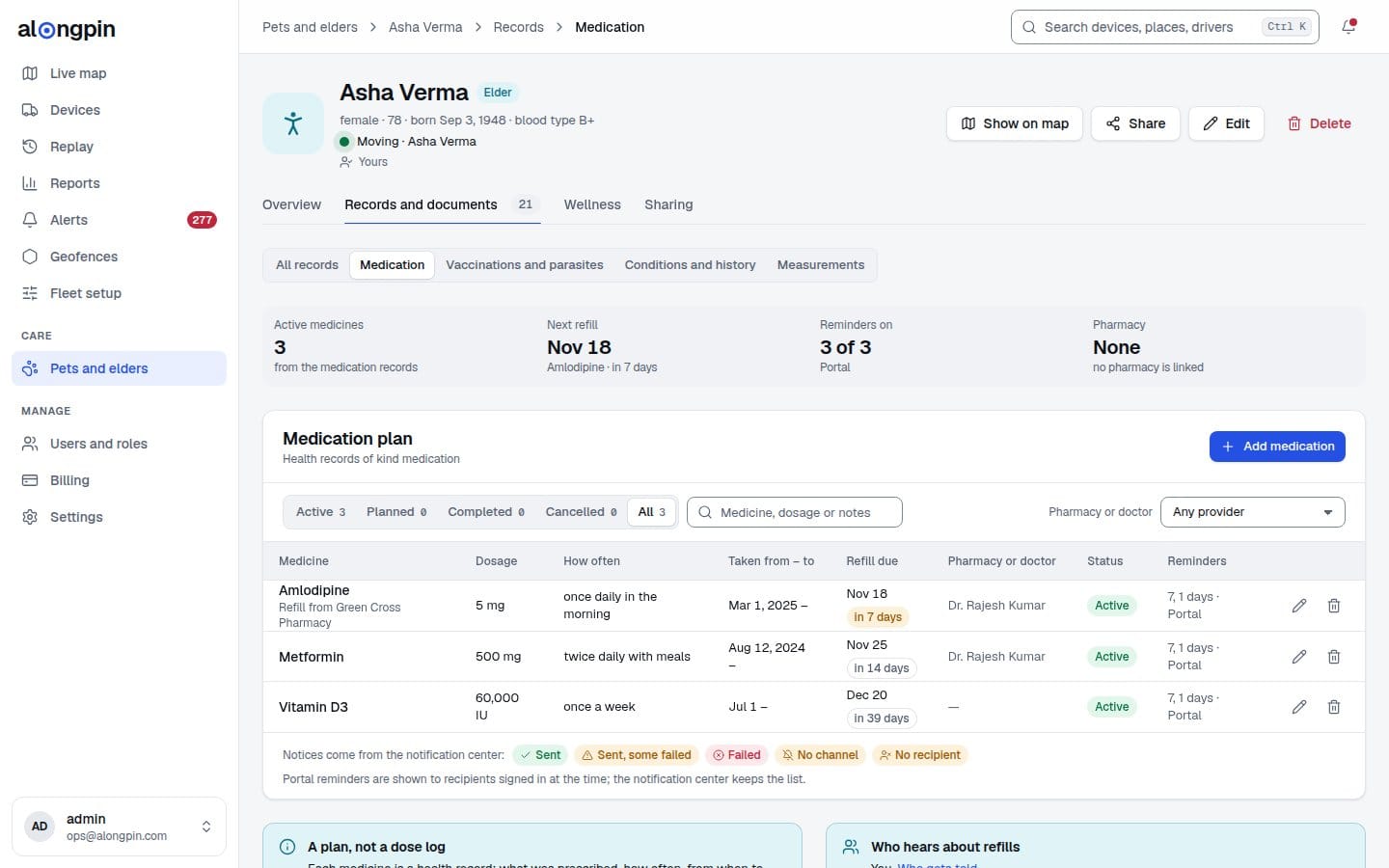
- Fill in the dates. For kinds that repeat, the form offers Next due (for medication, Next refill): "Reminders count down to this".
- Under Reminders, set the Days before the due date and tick the Channels (see below). The form shows "You will be reminded on" with the dates.
- Select Save.
For an appointment, add it under Appointments with its start time; reminders count down to that day while it is scheduled. For a document such as a pet passport or an insurance certificate, give it an expiry date. Pet owners use this for vaccinations and deworming, as shown for pets.
Choose the reminder days and channels
- Days before the due date: up to five numbers from 0 to 365, for example 30, 7 and 1. 0 means on the day itself. A new item starts with 15 and 7 days, which you can change.
- Channels: Portal shows the reminder to people signed in at the time; Email goes to account emails and to contacts' email addresses; SMS to account phones and contacts' mobiles. SMS works only where the operator of your server has switched text messages on. With no channel ticked, reminders go nowhere.
Reminders go out on each chosen day at the server's reminder time, 09:00 in a standard setup, in the profile's time zone, and can arrive up to 15 minutes later. Each one goes out once. Moving the due date sets all of them again for the new date.
Who is reminded
- The profile's owner.
- People the profile is shared with for Everything or Health data only. People with a Location only share get no reminders.
- Contacts with Receives reminders, by email and SMS only. You add them under Pets and elders → Contacts; see the care profiles page for how contacts work.
The Reminder settings of an item list who receives them, and Settings → Pets and elders → Who gets told shows it for the whole profile.
See what is due, overdue and upcoming
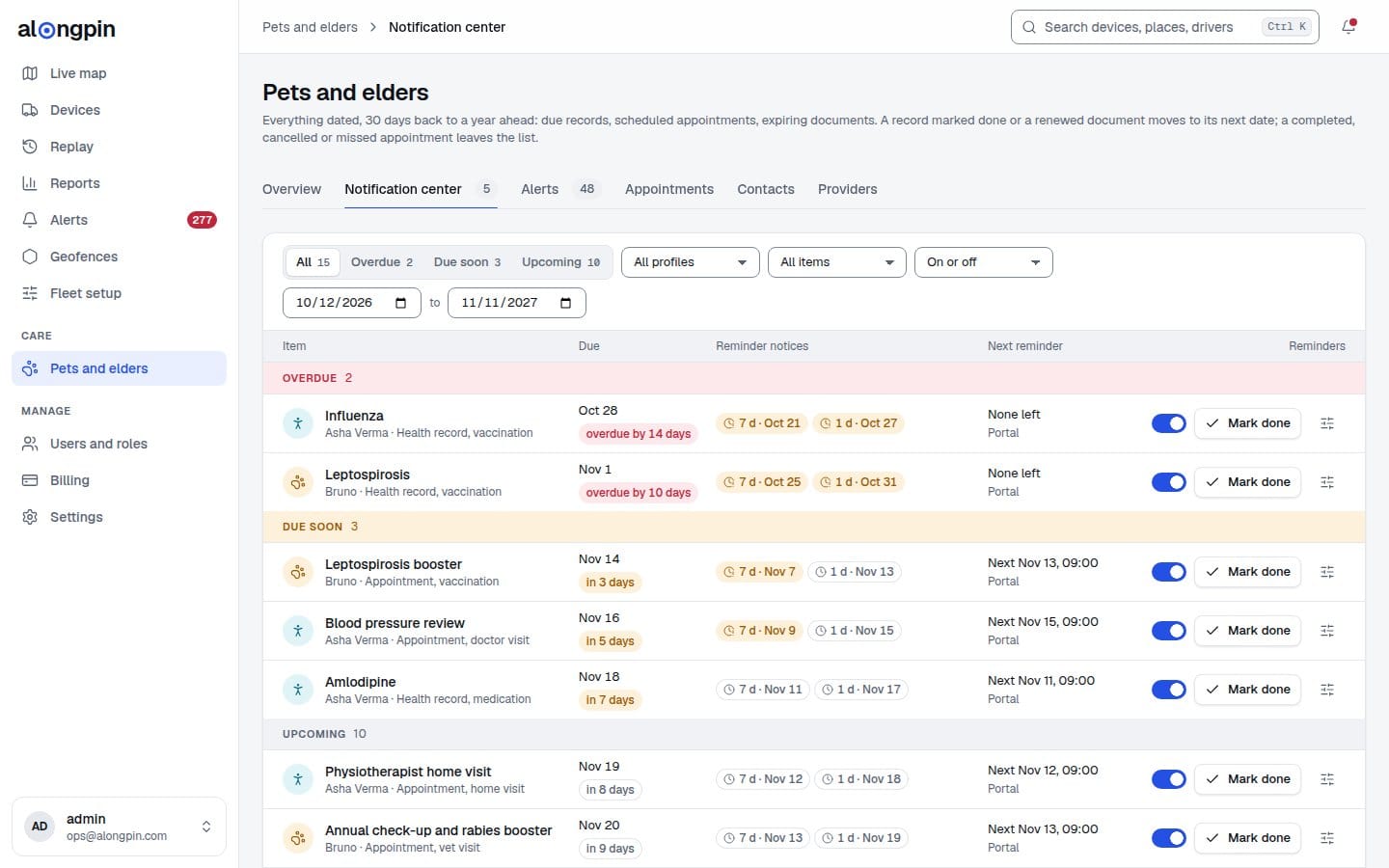
Pets and elders → Notification center lists everything dated from 30 days back to a year ahead, grouped as Overdue, Due soon and Upcoming. For each item it shows the due date, the reminder notices (sent, scheduled, skipped) and the next reminder. When a dose is refilled or a booster given, select Mark done: it records the day and moves the item to its next due date, and the reminders count down again. The health readings page shows how records, readings and reminders sit together.
Switch a reminder off
In the notification center, switch an item's Reminders off. The days and channels are kept, so switching it on again brings them back. You can also choose Just stop reminders under Mark done. Completed or cancelled records, and appointments that are no longer scheduled, send no reminders.
Frequently asked questions
Why can't I add a record for my mother?
If your server requires consents, an elder's health data is locked until a health consent is recorded on the profile. Record the consent first, then add the record.
Can I be reminded on the day itself?
Yes: add 0 to the reminder days.
Will my brother get the reminders too?
If the profile is shared with him for Everything or Health data only, yes; with Location only, no.