Geofences
Why a geofence alert did not arrive
A checklist for a missing enter or exit alert: the zone isn't attached, no rule covers it, a calendar or quiet hours held it back, the trip was private, or the tracker reported too rarely to be seen inside.
Ashish Srivastava4 min read
When a geofence alert is not working, the cause is almost always one of six things: the zone isn't attached to the device, no alert rule covers that device and event, a calendar or your quiet hours held the alert back, the trip was private, the tracker reported too rarely to be seen inside a small zone, or the message was raised but not delivered. Go through them in this order; the zone's page and the event's Sent to list answer most of them.
Key takeaways
- First check whether the event exists at all: under Alerts, on the device's Events tab, or on the zone's page under Recent events.
- No event: look at the zone (attached? calendar? private trip? zone size?).
- An event but no message: look at the rule, your quiet hours and the delivery list.
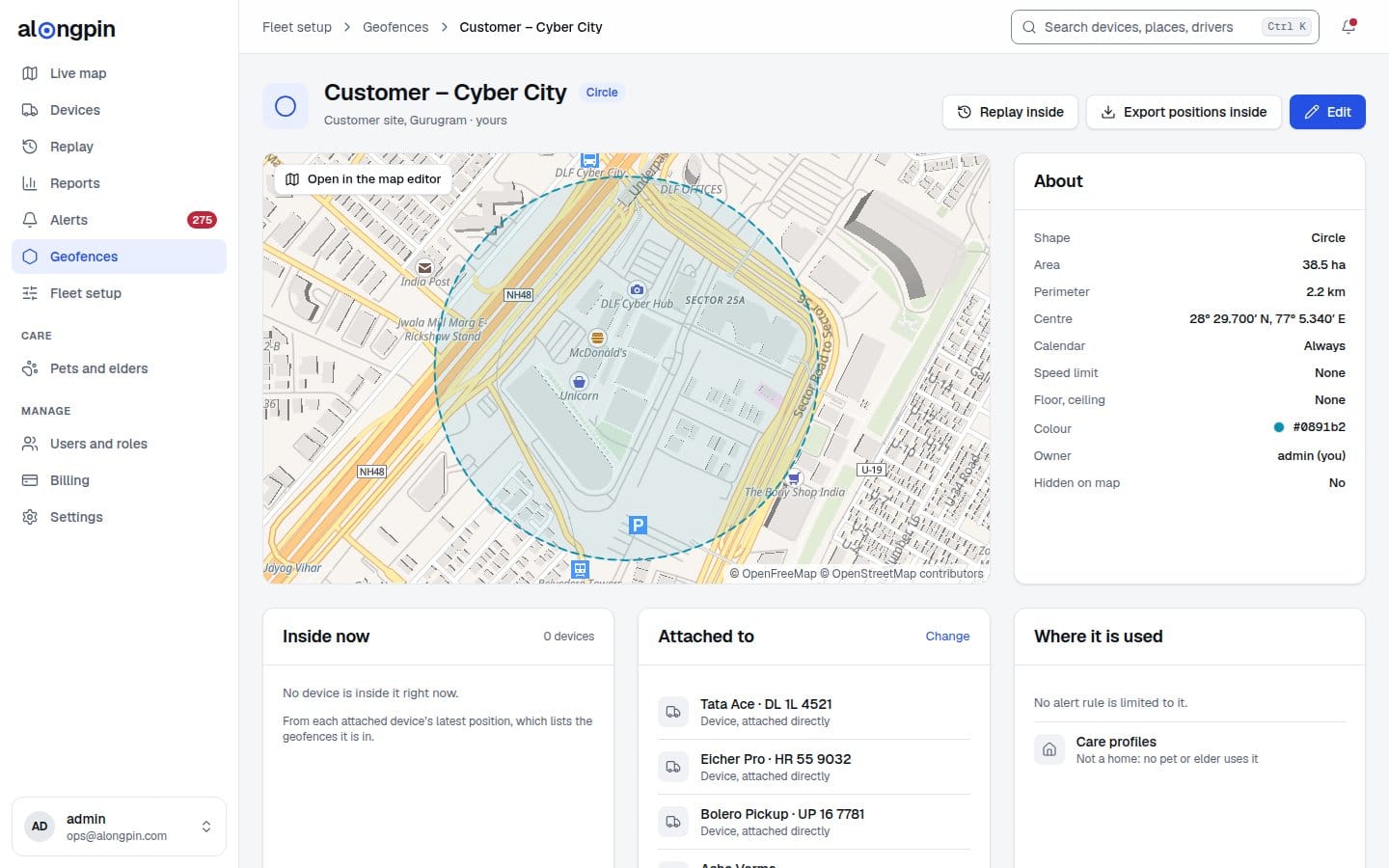
1. Is the geofence attached to the device or its group?
A zone raises events only for the devices it is attached to, directly or through their group. Open Geofences, select the zone's name in the list, and read Attached to. If it says Nothing attached: it applies to no device, or the vehicle is missing, attach it with Change. On the same page, Inside now shows whether the vehicle's latest position lies inside the zone.
2. Is there an alert rule for enter or exit that covers this device?
Open Alerts, the Rules tab, and look for a rule whose event is Geofence enter or Geofence exit. An exit alert needs a rule for exit; a rule for enter does not cover it. Then open the rule and check:
- Devices and people: is it set to All my devices, or does it list this vehicle or its group? Are you among the people who receive it?
- Only these geofences: if zones are ticked, is this one among them?
- Tell people by: does it have a channel that reaches you? A channel the server has switched off sends nothing.
- Is the rule Paused?
A rule shared with you can only be changed by its owner. More on rules is on the alerts page.
3. Calendars on the geofence or rule, and your quiet hours
- A Calendar on the zone means no enter or exit event outside its hours; the zone's page says so.
- Only during on the rule means no message outside its calendar, though the event is still recorded.
- Your Quiet hours (under Settings → Alerts and channels) hold back email, text messages, Telegram and push in their window. Held-back alerts are dropped, not sent later; they still show in the portal.
4. Private trips raise no geofence events
If your account uses driver privacy, positions recorded during a private trip raise no geofence events. A zone left during a private trip raises no exit afterwards either. The vehicle's route shows "Private trip" for that stretch.
5. A small zone and a long reporting interval
An event needs a position inside the zone and one outside. If the tracker reports once a minute and the vehicle drives through a 100 m circle in twenty seconds, no position falls inside it, and no event comes. Replay the trip under Replay and look at the points around the zone. The fix is a larger zone, a corridor shape for roads, or a shorter reporting interval while moving. See types of geofence for sizing.
Two more cases: a position that arrives late, after a newer one (a tracker sending stored positions after a dead spot), is kept in the history but raises no events. And a zone changed or attached after the vehicle passed does not raise events for the past.
6. Look at the events list and the delivery log
If the event exists, open it from Alerts or the device's Events tab. Sent to shows, for each person and channel, whether it was sent, failed (for example no phone number on the account) or held back by quiet hours. A failure on one channel does not stop the others. If the event exists and nothing is listed, the event was raised before the delivery log was switched on, or no rule matched it.
To test the channels without waiting for a vehicle, open the rule and use Test these channels: the test goes to you alone through each channel.
Frequently asked questions
The alert came late. Why?
The tracker may have been out of coverage and sent the position later, or a push notification may have waited on the phone. The event time in the portal is when the vehicle crossed.
I get the alert in the portal but not by email.
Check Settings → Alerts and channels for your email address and quiet hours, and the event's Sent to list for the reason.