Dashcam and video
Why live video has no sound
Live video from a dashcam is video only. Cabin audio in recordings stays off until an administrator turns it on in the capture policy, and listening in by call-back is refused while it is off.
Ashish Srivastava3 min read

Dashcam live video has no sound because the portal plays live video as video only, always. It is not a fault of the camera or your browser, and there is no switch for it on the Live video page. Sound from the cabin in uploaded recordings is a separate matter: it is off by default and stays off until an administrator turns on Keep cabin audio in the capture policy. While it is off, listening in by call-back is refused too.
Key takeaways
- Live video is always without sound; the Live video page says so.
- Cabin audio in recordings is off by default.
- Administrators decide in the capture policy, for all devices or per device and group.
- Turning audio on calls for a legal basis and a clear notice to drivers first.
Live video is always without sound
Whatever the camera can capture, the live view in the portal plays only the picture. The Stream card on the Live video page says "Live video has no sound." That is deliberate: a live view is something a dispatcher opens while a driver is at work, and hearing the cabin at the same time is a much bigger step into the driver's privacy than seeing the road or the cab.
Audio in recordings is off by default
Some cameras record audio with a clip, or upload audio recordings on their own. Whether the platform keeps that audio is set by the capture policy, and in a standard setup Keep cabin audio is off. Depending on how your server is set up, audio the policy refuses is deleted on arrival, or kept and only counted while the policy is being introduced. Ask your administrator which applies to you.
With cabin audio off, the Listening in on or off command, which makes a device call a number back so the cabin can be heard, is refused with "Cabin audio is turned off". In a group send, the devices with audio off are named and left out.
Who can change the capture policy
The capture policy is on the Privacy by default settings page, under Photos, video and audio:
- Keep cabin audio: off means audio that devices record isn't kept, and listening in can't be sent.
- Photos and videos kept: which kinds of recording are kept (SOS, collision, requested and so on), or every kind.
- Log who views recordings: whether views go into the audit log.
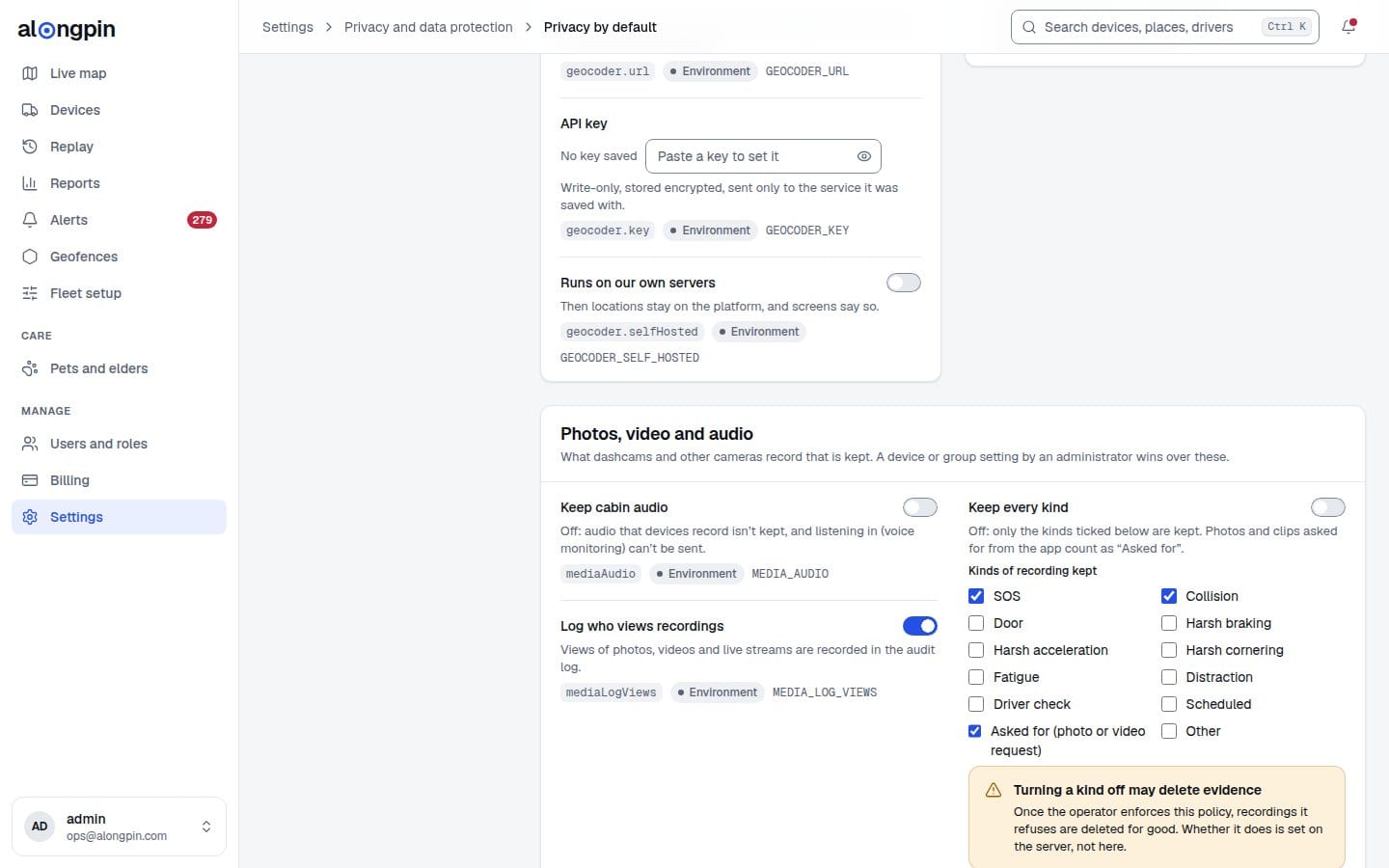
Administrators can change these, as can people whose role lets them change privacy settings. An administrator can also set cabin audio for a single device or a group, which then overrides the general setting for it. Nobody else can switch audio on for a vehicle.
Why this protects drivers
A cab is a workplace and, on breaks, a private space. Drivers talk on the phone, with colleagues, sometimes with family. Recording or listening to that is intrusive and, in many countries, regulated more strictly than video. Keeping audio off by default means nobody hears the cabin by accident or because a camera happens to support it; turning it on is a decision someone takes on purpose, and it is visible in the settings. The driver privacy page covers the other protections, such as private trips.
What to tell drivers in your notice
The platform gives you the tools, not the legal basis. Before you use dashcams, and certainly before you turn cabin audio on, tell drivers in writing:
- which cameras are fitted and which way they face;
- that there is no continuous recording in the cloud, and which events upload a photo or clip;
- that live video can be opened, by whom, and that it has no sound;
- whether cabin audio is kept, and if so when and why;
- that views of recordings and live video are logged, and how long recordings are kept.
Check with your legal adviser and, where there is one, the works council or employee representatives. Privacy at Alongpin explains how the platform handles personal data, and the dashcam page sums up what is recorded.
Frequently asked questions
Will turning on cabin audio give live video sound?
No. Live video stays video only. Cabin audio decides whether recorded audio is kept and whether listening in may be sent.
Can a driver tell whether audio is on?
Not from the platform. Say it in your notice, and in the vehicle if your rules ask for it.