Devices and connection
What happens to a command sent to an offline device
A command to a device that is not connected waits in a queue and goes out when it reconnects. How to see the queue, cancel a command, and read the command history of a device.
Ashish Srivastava4 min read

A command sent to an offline GPS tracker is not lost: it waits in a queue and goes out when the tracker reconnects. The send dialog tells you at once whether the command was Delivered or is Waiting in the queue, and the device's Commands tab lists what is still waiting, lets you cancel it, and keeps a history of every command sent to the device for 90 days.
Key takeaways
- Delivered: the tracker received the command now. Waiting in the queue: it goes out when the tracker can take it.
- Queued commands wait for up to 7 days by default, then expire.
- The Commands tab shows the queue with Cancel, and the Command history with who sent what and the result.
- Only if connected now sends without queueing: the command fails instead of waiting.
- Where the server has an SMS gateway, commands can go by text message instead, at once and never queued.
Delivered versus queued
When you select Send command, the dialog answers in one of three ways:
- Delivered: the tracker received the command. This means it was handed to the tracker, not yet that it was carried out; a tracker that replies sends a command result.
- Waiting in the queue: the tracker cannot take it right now, because it is offline, or because it is a phone or other device that collects commands with its next report. It is sent when the device can take it, for up to 7 days.
- The command was not sent: with the reason, for example a type the tracker's protocol does not support.
The device's state in the dialog (Online, Offline) tells you before sending which answer to expect. A queued command can arrive hours later, so think twice before queueing anything that acts on the vehicle, such as cutting the engine: it runs whenever the tracker reconnects, wherever the vehicle is then.
See waiting commands and cancel one
Open the device and select its Commands tab. The top line says whether the device is connected now or offline. Under Waiting in the queue you see every command sent while the device was offline, with when it was sent and by whom. Select Cancel on a command to remove it; Nothing is waiting for this device means the queue is empty.
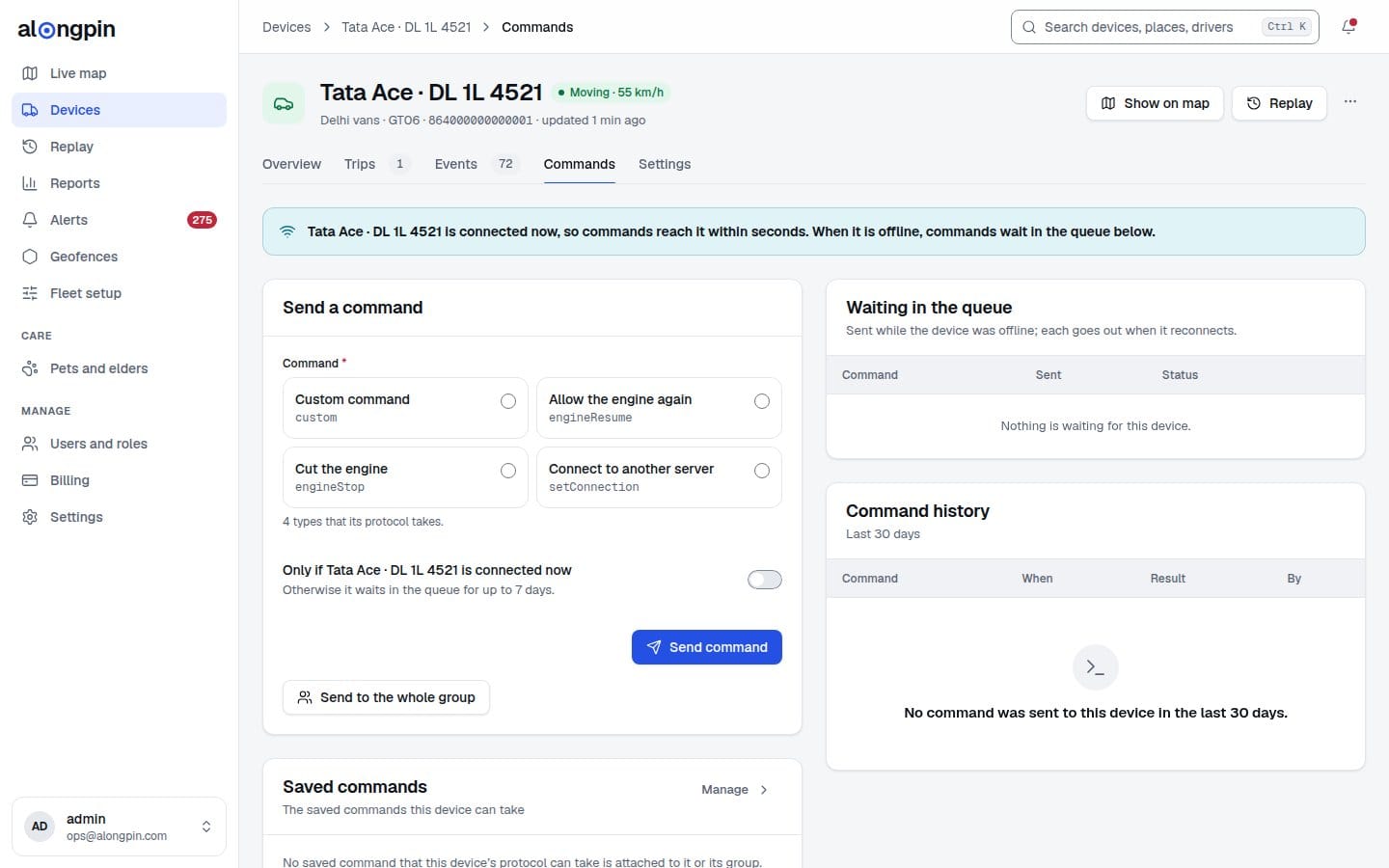
When the device reconnects, queued commands go out oldest first, and each is sent again on every reconnect until the tracker receives it. You can be told when it happens: alert rules can react to a queued command being sent, and to a queued command failing when it reaches the tracker.
Queued commands expire
A command that is still waiting after 7 days, the default, is dropped and shows as Expired in the history. Your server's operator can set another period. Commands are also dropped when the device is deleted. Editing or deleting a saved command does not change copies of it already in the queue: cancel those yourself.
Command history for 90 days
Under Command history on the same tab you see the commands sent to the device, newest first: the Command, when it was Sent, its Status, who it was By and the Result. It covers commands sent to the device on its own, to its group, and by an alert rule (shown as Rule). Statuses are:
| Status | Meaning |
|---|---|
| Sending | Sent, no result yet. |
| Waiting in the queue | Waiting for the device. |
| Delivered | The tracker received it at once. |
| Queued, then sent | It waited, then reached the tracker. |
| Sent by text message | Handed to the SMS gateway. |
| Failed | Not delivered, with the reason. |
| Cancelled | Someone cancelled it in the queue. |
| Expired | It waited too long and was dropped. |
The list starts with the last 30 days; Load older commands goes back to the 90 days kept.
Send only if connected, without queueing
When a command makes sense only now, for example Send one position now, tick Only if the device is connected now in the send dialog. If the tracker cannot take it at that moment, the command fails instead of waiting. A saved command keeps the queue setting it was saved with.
Commands by SMS
If your server has an SMS gateway, By text message sends the command to the tracker's phone number instead of over its data connection. A text message goes at once and is never queued, so it can reach a tracker that has lost its data connection but still receives texts. Each tracker takes at most 10 text commands an hour, and every message costs money. The history shows these as Sent by text message; whether the tracker acted on them is not known.
Who can see the queue and the history
The queue and the history are shown to people who may send commands to the device; read-only accounts and share links do not see them. What each person may do is set in their role, explained under users and roles. Everything here is also available to your own software through the API, and the remote commands page gives an overview of what commands can do.
Frequently asked questions
Can I change a command that is already queued?
No. Cancel it and send a new one.
What if the tracker never comes back?
The command expires after the queue period and shows as Expired in the history.