Care profiles and health
A reminder did not go out: what to check
A checklist for a care reminder that was not received: find it in the notification center, read its status, and check the reminder days, the channels, the addresses and whether the contact is marked to receive reminders.
Ashish Srivastava4 min read
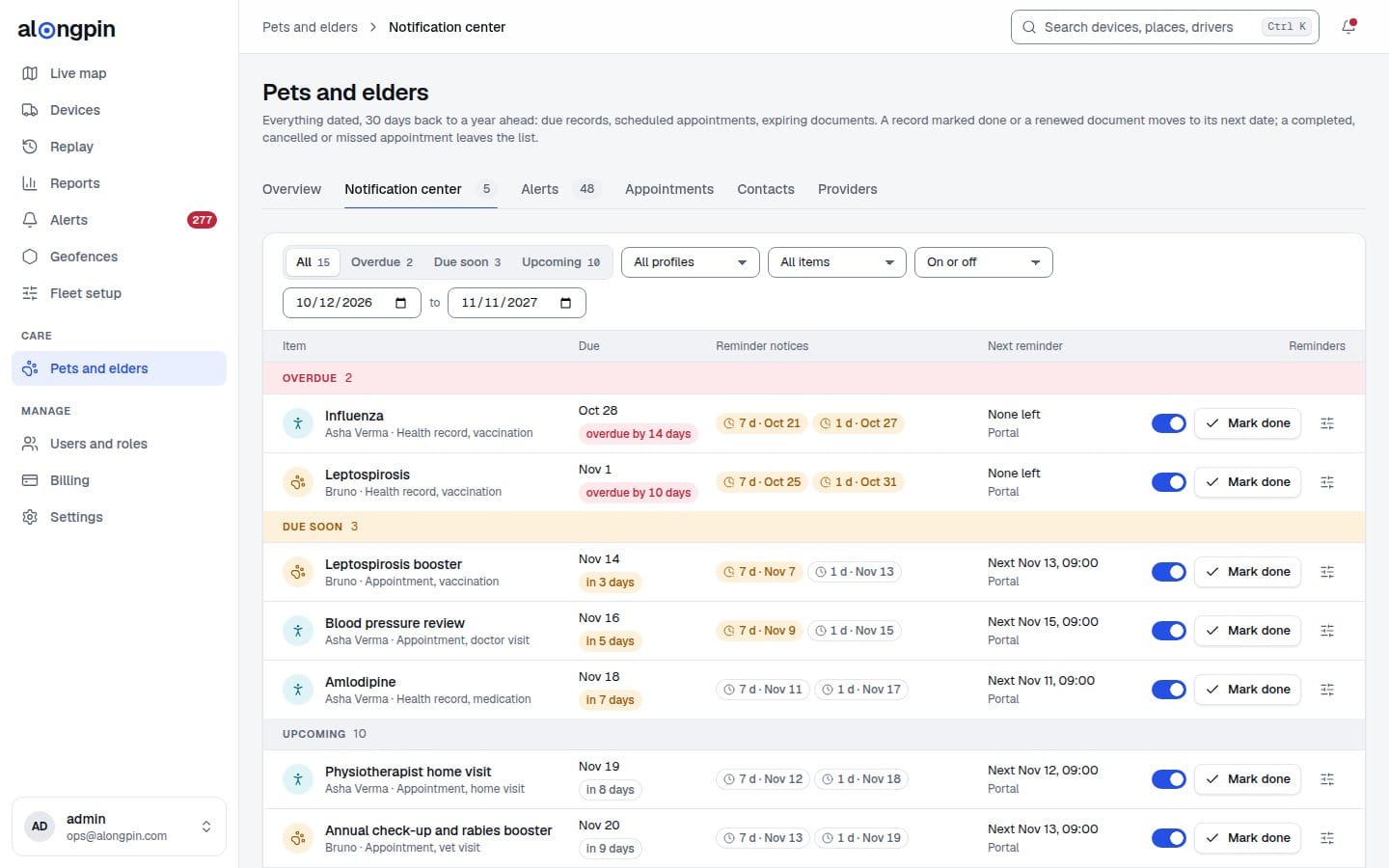
If a care reminder was not received, open Pets and elders → Notification center and find the item: each reminder day shows as a notice with what became of it, such as Sent, Scheduled, No channel or No recipient. That one word usually points to the check you need: the item's date, the reminder days, the channels, the addresses, or whether the person is marked to receive reminders. Work through the sections below in order.
Key takeaways
- The notification center keeps every reminder notice with its status and the channels it went out through.
- No channel means none of the ticked channels was on; No recipient means nobody could be reached on them.
- Contacts must be marked Receives reminders and have an email or a mobile number; they never get portal messages.
- Completed or cancelled records, and appointments that are no longer scheduled, send no reminders.
1. Find the item and read its notices
Open Pets and elders → Notification center. It lists everything dated from 30 days back to a year ahead; use Profile, Item type and Reminders to narrow it. Each item shows its notices, one per reminder day, with what became of it:
| Notice | What it means | What to check |
|---|---|---|
| Sent | It went out on every channel tried | The recipient's spam folder and address (section 4) |
| Sent, some failed | It went out, but some messages failed | Which channel failed, and that person's address |
| Failed | It was tried, but no message went out | Addresses, and ask the operator whether email or SMS is working |
| No channel | No channel was ticked, or none of the ticked ones is on | Section 3 |
| No recipient | Nobody could be reached on the ticked channels | Sections 3 and 4 |
| Skipped | A later reminder of the same item was due at the same time, so only that one went | Nothing: this is expected |
| Scheduled | Its day is still to come | When it is due (section 2) |
| Passed | Its day went by without it being sent | Section 2 |
2. Was a reminder due that day?
- Is the item there at all? Only items with a date appear: a record's next due date, a document's expiry date, an appointment that is scheduled. A record that is completed or cancelled, or an appointment marked completed, cancelled or missed, sends no reminders and leaves the list.
- Are reminders on? An item showing "Off" sends nothing; switch it on again and its days and channels come back.
- Which days are set? Open Reminder settings for the item: the days before the due date decide when reminders go out. With no day set, none go out.
- Was the date changed late? When an item is added or its date set close to the due date, only the latest reminder goes out, and the earlier ones show Skipped. Once the due date has passed, no reminder goes out for it.
- What time? Reminders go out at the server's reminder time, 09:00 in a standard setup, in the profile's time zone, up to 15 minutes later. A profile in another time zone than yours sends at its own 09:00.
3. Check the channels
- In Reminder settings, look at Channels. "None ticked: reminders go nowhere."
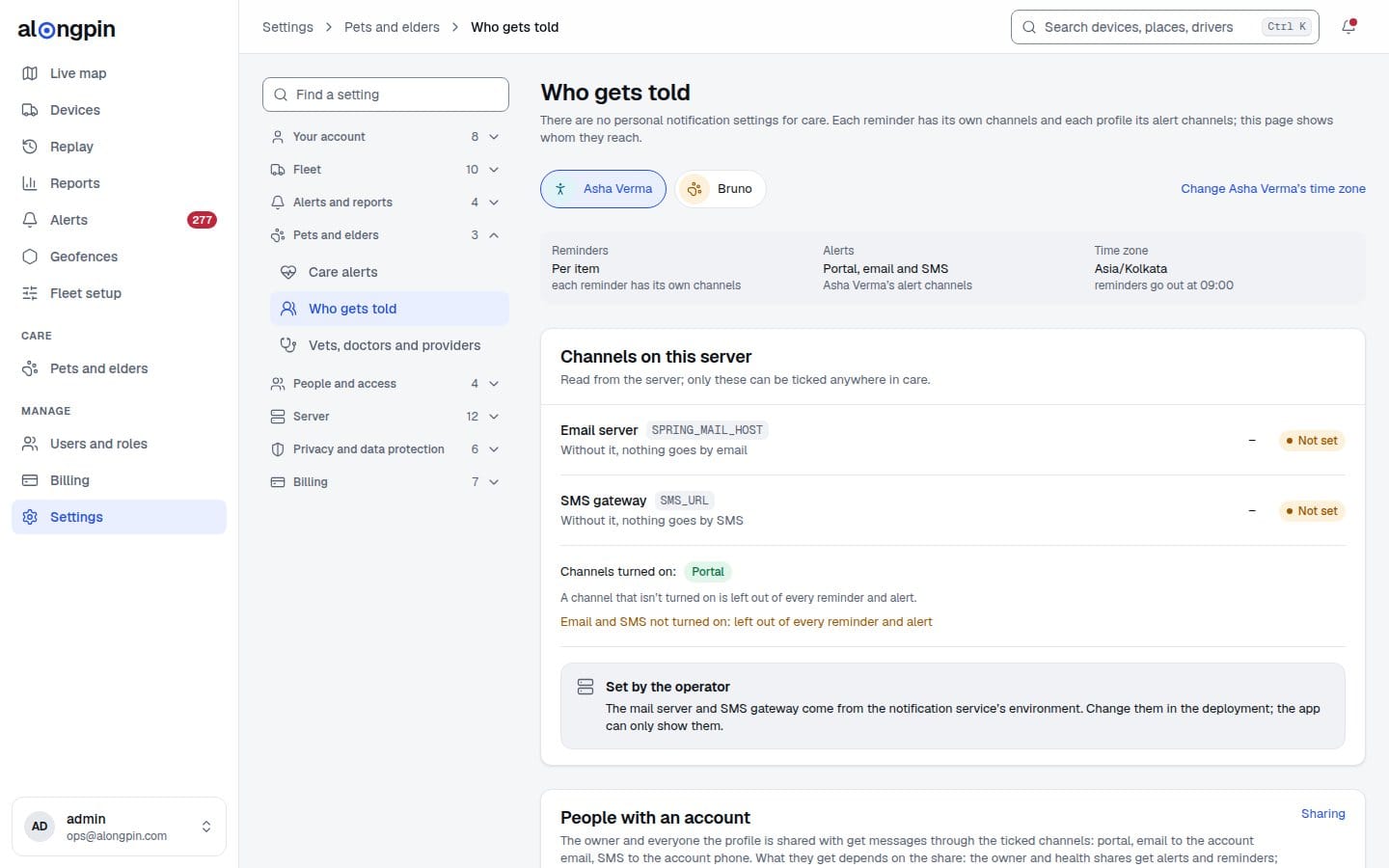
- SMS works only where the operator of your server has an SMS gateway; ticked alone without one, it sends nothing. Settings → Pets and elders → Who gets told shows under Channels on this server whether the email server and the SMS gateway are set.
- Portal reminders show only to people signed in at that moment; the notification center keeps the list for later.
4. Check who receives it, and their addresses
- People with an account get reminders when they own the profile or it is shared with them for Everything or Health data only. A Location only share gets no reminders. Email goes to their account email, SMS to their account phone; Who gets told marks someone without one as "No email" or "No phone". Each person can add theirs under Settings → Your account → Profile, and send themselves a Test email or Test SMS from Who gets told.
- Contacts get reminders only when Receives reminders is ticked, by email to Email and Email 2 and by SMS to Mobile. Second mobiles and landlines receive nothing. Check the contact under Pets and elders → Contacts.
- Spam folders catch reminder emails more often than you would think.
5. Elders: is health data locked?
If your server requires consents, an elder's records, appointments and documents send no reminders while the health consent is missing or withdrawn. The profile then says that health data is locked; record the consent to bring reminders back.
How records and reminders work together is shown on the health readings page, and contacts and sharing on the care profiles page. For alerts from the tracker rather than reminders, see alerts.
Frequently asked questions
The notice says Sent, but my sister got nothing.
Check that she is on the list in Who gets told, that her account email is right, and her spam folder. A Location only share gets no reminders.
Can I send a missed reminder again?
Each reminder goes out once. Move the due date, or add a reminder day that is still ahead, and a new reminder is scheduled.