Alerts and SOS
Putting an alert rule on a schedule
How to restrict an alert rule to a calendar, for example only outside working hours, so that an event raises a message only then, and how this differs from your own quiet hours.
Ashish Srivastava3 min read
To schedule alert notifications, put the alert rule on a calendar: under Only during in the rule, choose a calendar, and the rule then raises a message only for events that happen while that calendar is in progress. A typical use is movement alerts only at night and at weekends, when no vehicle should be moving. This article shows how to create the calendar, choose it on the rule, and how a rule's schedule differs from your own quiet hours.
Key takeaways
- Calendars are under Fleet setup → Calendars; a simple schedule takes a few periods, with days, times and exceptions.
- On the rule, Only during picks the calendar; Any time (no calendar) removes it.
- A calendar on a rule changes it for everyone who receives it; quiet hours change only your own messages.
- Each calendar has its own time zone, so 19:00 means 19:00 where your vehicles are.
1. Create or pick a calendar
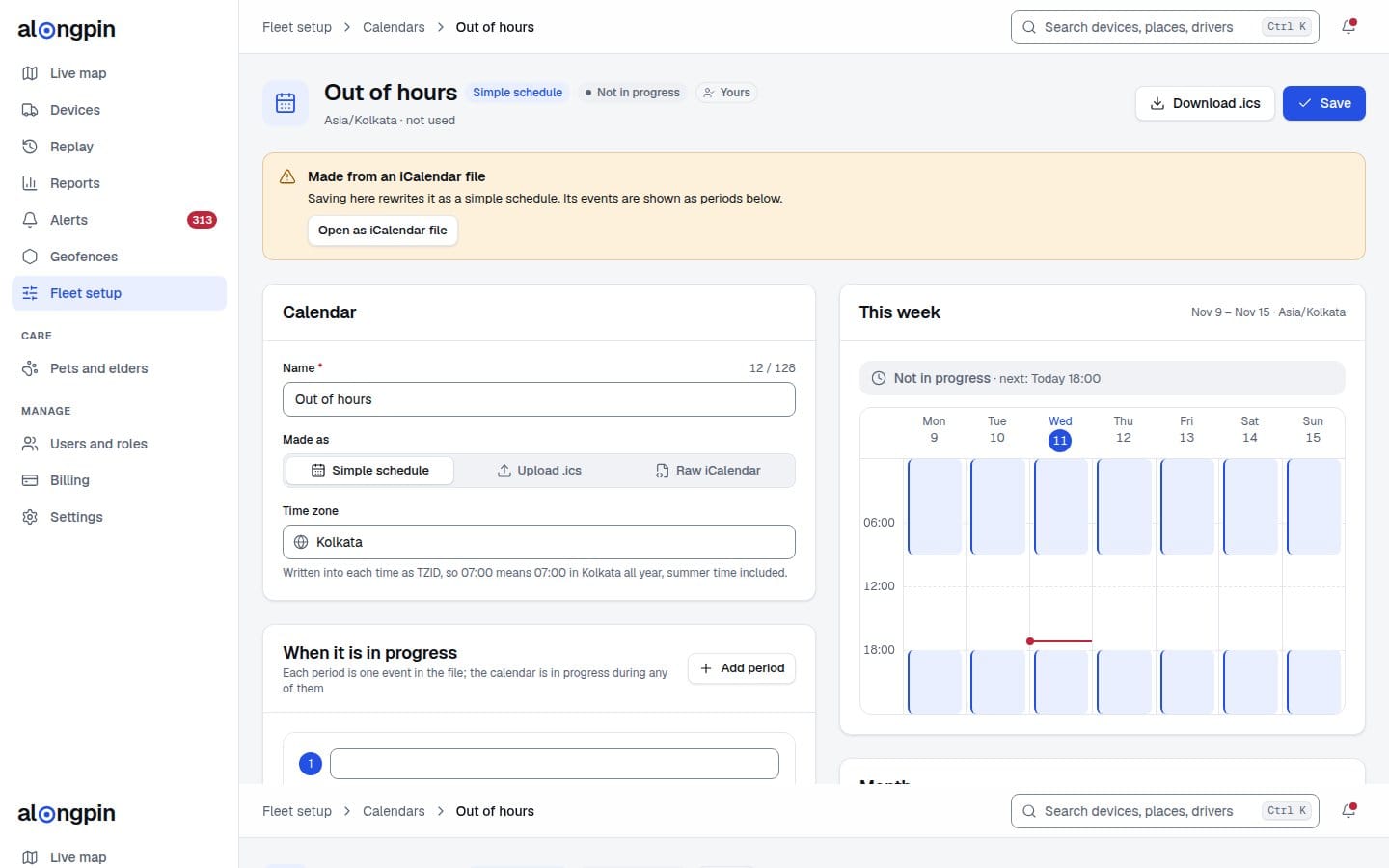
Open Fleet setup → Calendars. The list shows each calendar's schedule, whether it is in progress, and what uses it. To make one, press New calendar:
- Give it a Name, such as "Nights and weekends".
- Check the Time zone: times are saved in it, summer time included.
- Under When it is in progress, set the first period: From and To, how it Repeats and On these days.
- Use Add period for more periods, and Exceptions for days a period does not happen, such as public holidays.
- Save the calendar.
If you already keep the schedule elsewhere, you can upload an iCalendar file instead.
2. Choose the calendar on the rule
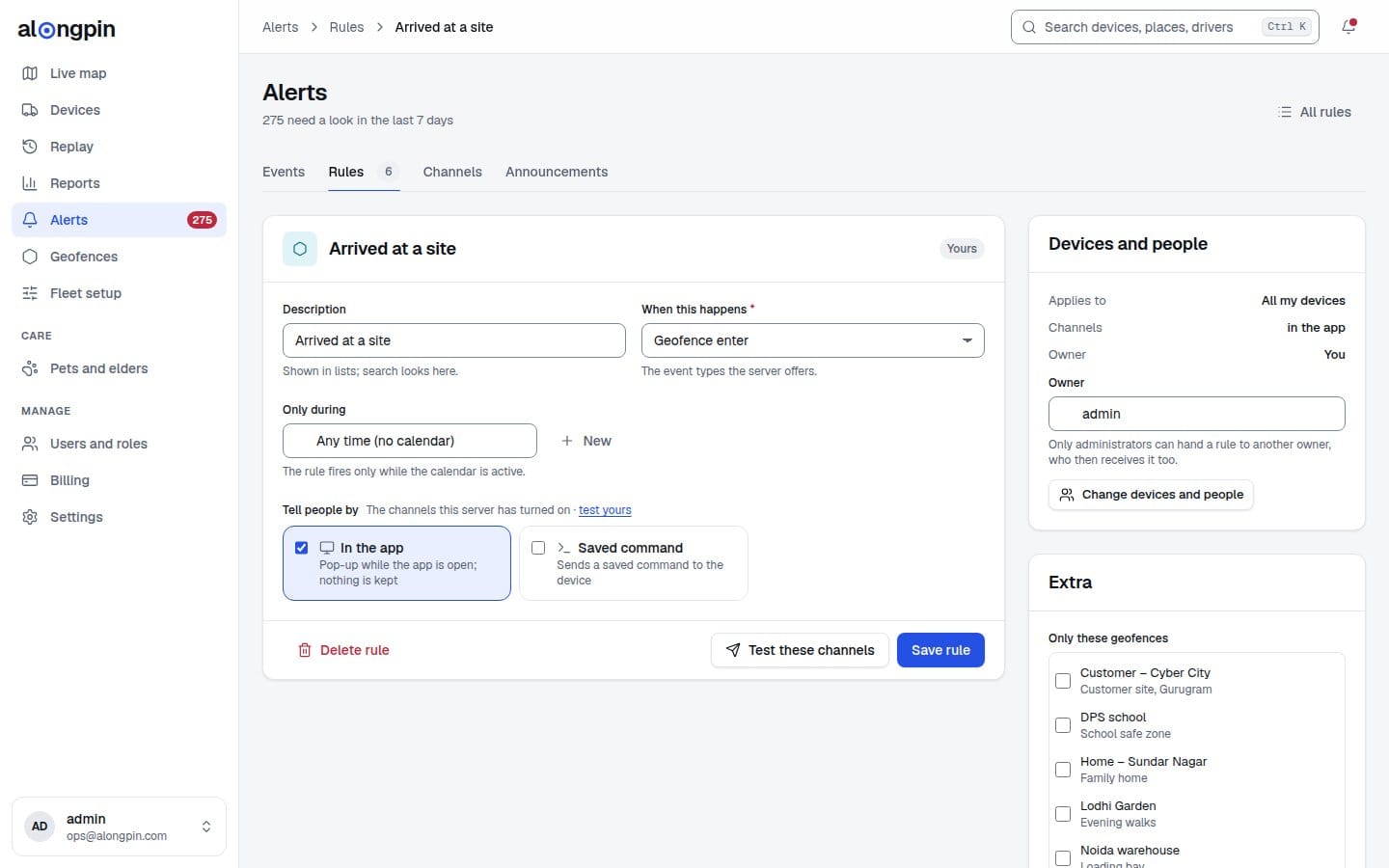
Open Alerts, then the rule (or New alert rule). Under Only during, choose the calendar. If it does not exist yet, New next to the picker creates one. The rule now fires only while the calendar is in progress; at other times the event still happens and shows in the alerts list, but the rule sends nothing.
Example: movement alerts only at night and at weekends
You want to know when a van moves after hours, but not during the working day.
- Create a calendar "Nights and weekends" with two periods:
- Nights: from 19:00 to 07:00, Ends the next day ticked, repeating weekly on Monday to Friday.
- Weekends: the whole of Saturday and Sunday, repeating weekly.
- Add your public holidays as Exceptions of the night period, or as a third period, depending on whether vans may move on those days.
- Make a rule When this happens: Started moving (or Ignition on for vehicles that report ignition), for your vans, with the channels you want, and Only during: Nights and weekends.
The same calendar can serve a geofence: on a geofence, a calendar limits enter and exit events to the times it is in progress.
A rule's schedule versus your own quiet hours
| Calendar on a rule | Your quiet hours | |
|---|---|---|
| Set where | The rule's Only during | Settings → Your account → Alerts and channels |
| Affects | Everyone who receives the rule | Only you |
| Outside the times | The rule sends nothing, on any channel | Only e-mail, texts, Telegram and push are held back; the app still shows the alert |
| Exceptions | Periods and exception days | Alerts you let through, such as SOS |
Use a calendar when an event matters only at certain times. Use quiet hours when the event matters, but you do not want to be woken by it.
The time zone of the calendar
A calendar's periods are read in its Time zone. A fleet working in one country can keep the default; when your vehicles are in another time zone than you, set the calendar's zone to theirs. The calendar page shows the week in that zone and whether it is In progress now.
Frequently asked questions
Can calendars also set working hours for drivers?
Yes: the same kind of calendar sets the working hours used for private trips. Read about driver privacy.
What happens if I delete a calendar a rule uses?
The calendar's Used by list shows which rules use it. If it is deleted anyway, the rule no longer has a schedule and fires at any time. Learn more about alert rules.