Video telematics
How live dashcam video works: streams, channels and mobile data
What happens between pressing Start and seeing the road in your browser: the few seconds of delay, main and sub stream, camera channels, the automatic stop when nobody watches, and what the SIM plan needs.
Ashish Srivastava6 min read
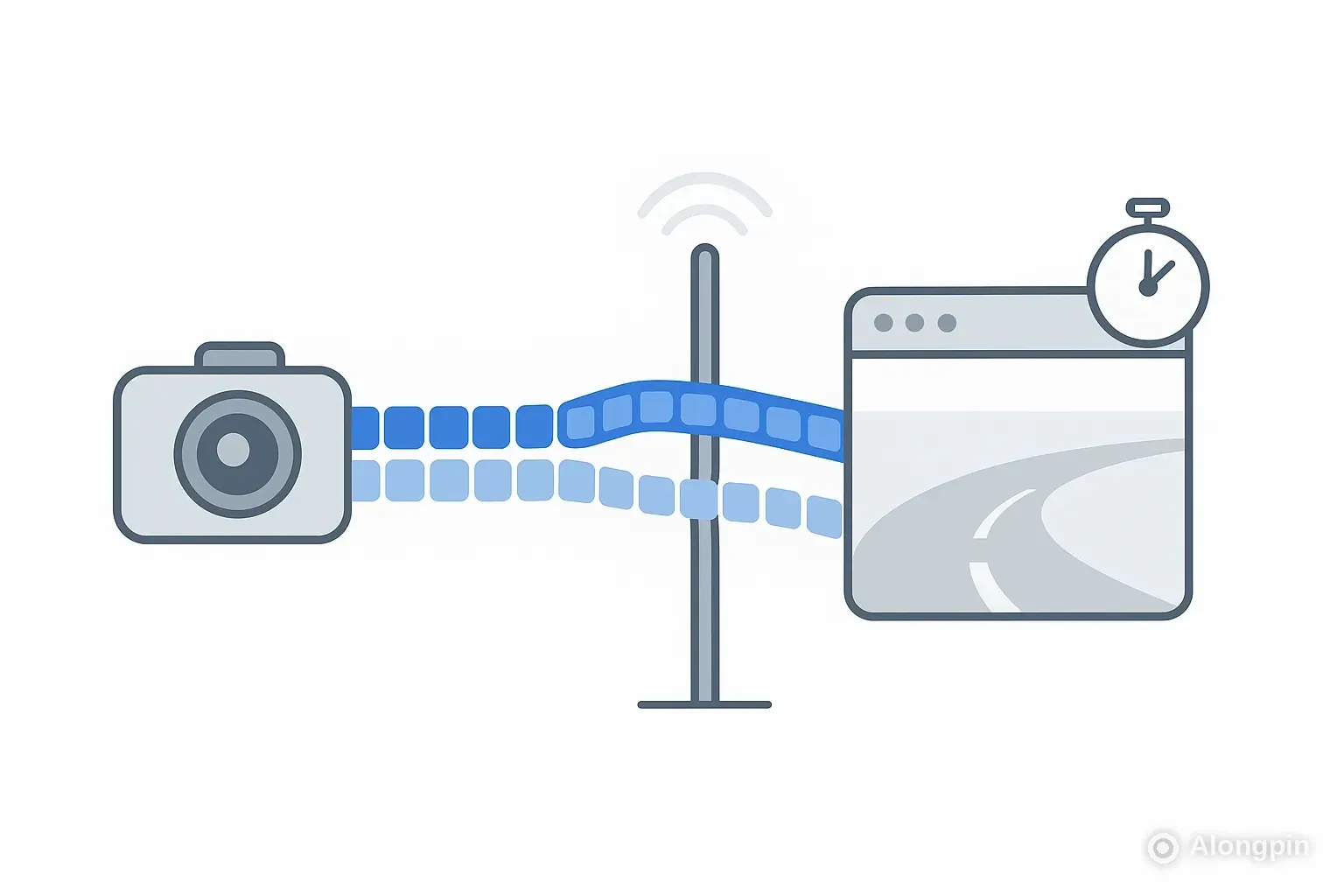
Live dashcam streaming lets you watch a vehicle's camera in your browser a few seconds after you ask for it. When you choose Start on a camera channel, the platform sends the camera a command, the camera opens a video connection over its mobile data, and the server turns the incoming video into short segments that your browser plays. That chain explains everything a manager notices in practice: the short delay, the choice between a detailed and a lighter stream, the automatic stop when nobody is watching, and why the SIM plan matters.
Key takeaways
- Video starts a few seconds after you ask, and runs a few seconds behind real time.
- The main stream gives detail; the sub stream uses less mobile data and starts more easily on a weak signal.
- Each camera channel (road, cabin, load) is started separately.
- A stream nobody watches stops by itself, after 5 minutes in a standard setup.
- Live video is video only, without sound, and needs a camera on JT808 with JT1078.
What happens when you press Start?
Open the vehicle's Live video page. It shows one tile per camera channel, the vehicle on a small map with its speed, place and driver, and the video received this month. When you choose Start on a tile:
- The platform sends the camera a command to start streaming that channel. It goes only to a camera that is connected at that moment; it is never queued for later.
- The camera opens a separate video connection to the server and starts sending.
- The server cuts the incoming video into segments of about three seconds and keeps only the last few.
- Your browser loads those segments one after another and plays them. The tile shows Connecting… until the first picture arrives, then LIVE.
Because the server needs a segment before your browser can play it, the picture you see is a few seconds behind the road. That is normal for this kind of streaming, and it is why live video suits checking a situation, not steering one second by second.
Why does it take a few seconds to start?
Three things add up: the command has to reach the camera over mobile data, the camera has to open its video connection, and the first segment has to fill. On a good signal that is usually a few seconds. On a weak one, or with the main stream, it takes longer, and the start can fail. If the camera is offline, the tile says so at once (The camera did not start streaming) rather than starting later by surprise.
Main stream or sub stream?
Under Stream, Quality offers two choices:
- Main stream: the camera's full resolution, for reading detail such as a road sign, a damaged bumper or a load.
- Sub stream (smaller, saves data): a smaller picture at a lower bitrate. It starts more easily on a weak connection and uses less of the SIM's data.
Switching stops the stream and starts it again with the other quality, which takes a few seconds. The actual resolution and bitrate are the camera's own, so they differ between models. A camera without a sub stream may refuse it or send its main stream anyway; if it refuses, the tile offers Use main stream.
A practical rule: start on the sub stream to see what is going on, and switch to the main stream only when you need to read something.
How do camera channels work?
A fleet camera often has more than one lens or input: a road-facing camera, a cabin camera, sometimes one for the load or the rear. Each is a channel, shown as its own tile (CH1, CH2 and so on). Which channel is which is decided when the camera is installed; road-facing is often CH1 and cabin CH2, but ask your installer.
You start each channel on its own and can watch several side by side. Every channel you start is a separate video stream over the same SIM, so two channels use roughly twice the data of one. A channel with no camera plugged in stays dark.
Why does a stream stop by itself?
A stream nobody watches is stopped by the server, after 5 minutes in a standard setup (the operator can change it). The server notices that no browser has asked for new video, sends the camera the stop command and drops the stream. The tile then reads Stream ended, with Start again.
This protects the vehicle's data plan: someone who closes the laptop without pressing Stop all does not leave a camera sending video for the rest of the shift. As long as the page is open and playing, the stream keeps running. The camera can also end a stream itself, for example when the ignition goes off.
Why is there no sound?
Live video is video only. Sound from the cabin is personal data of the driver and passengers, and cabin audio is a separate decision of your administrator in the capture policy, off in a standard setup. Photos and clips the camera uploads are a different matter from live video; the dashcam feature page explains both.
What does the SIM plan need to allow?
Live video is by far the heaviest thing a fleet camera sends. Before relying on it, check four points with your SIM supplier:
- Data volume. Position reports use very little; uploaded clips use more; live video uses the most, and the main stream more than the sub stream. Estimate how often and for how long people will actually watch.
- Upload speed. The camera uploads the video, so the plan's upstream speed and the network where your vehicles drive matter more than the download speed.
- Coverage where you drive. Depots in basements, rural routes and border areas are where streams fail first.
- What happens at the limit. A plan that slows down or stops at its cap will stop live video too.
The Live video page shows Video received this month for the camera: what the server received from it. It is a useful guide, but it is not the SIM's full data use, which also includes uploads, position reports and any retries.
Who can start and watch live video?
Starting and stopping video are commands to the camera, so they need the right to send commands to the vehicle and, with roles, the right to view live video on it. A read-only account can watch a stream that is already running but cannot start or stop one. Every time someone watches, the audit log records it, once per person and channel within a short window, unless an administrator turned that off. While the vehicle is on a private trip, live video is refused until the trip ends.
Which cameras support it?
Live video needs a camera on JT808 that also speaks JT1078, the live video protocol. Even among those, behaviour differs by model and firmware: the number of channels, whether a sub stream exists, how quickly the camera answers. Test one unit before you order a fleet's worth. The dashcams page lists what a compatible camera reports, and the video telematics solution shows where live video fits next to clips. For step-by-step help in the portal, see watching live video and choosing channel and stream.
How Alongpin helps
Alongpin (alongpin.com) is a GPS tracking platform you open in a browser or on your phone. Supported dashcams send photos and event recordings with the vehicle's position, live video plays in the browser, and every view is logged; a capture policy decides what is kept. See video telematics and the dashcam feature, or check your camera in the device check.
Frequently asked questions
Is live video recorded?
No. It plays while you watch; the server keeps only the last few seconds it needs to play it. Only the photos and clips the camera uploads are stored.
Can I schedule live video to start when the vehicle comes online?
No. The start goes only to a camera that is connected now.
Does live video work on a phone?
The portal works in a phone's browser. On mobile data at your end, the sub stream is the better choice too.