Privacy and trust
Exporting and deleting a person's data
How to export a family member's tracking data, delete a care profile, a period of positions or a whole account, restrict processing while a question is looked into, and how retention periods clear old history.
Ashish Srivastava6 min read
To delete location history from a family tracker, you have three routes in Alongpin, depending on how much should go: delete a care profile with everything in it, have an administrator delete the positions of one device for a period, or ask for the erasure of a whole account, which locks it at once and deletes it 14 days later. Before you delete, you can download a copy with Download my data. A person can also ask for their data to be restricted rather than deleted, and history that nobody deletes still goes by itself after the retention periods your server sets.
Key takeaways
- Download my data under Settings → Your account → Privacy and your data gives one ZIP file of your own account's data.
- Delete my account and data locks the account at once and erases it after 14 days, unless it is cancelled.
- Deleting a care profile removes its records, documents and alerts; it cannot be undone.
- A restriction keeps data but stops it being used while a question is looked into.
- The platform carries out these choices; whether you may track someone at all is for your family, or organisation, to decide.
What is held about a person
A family tracking account holds more than dots on a map. Knowing what is there tells you what an export contains and what an erasure removes:
| Part | What it holds |
|---|---|
| Account | Name, e-mail, preferences, roles, share links and alert rules |
| Devices and tracking | Each watch, tracker or phone, with positions, trips, stops, events, and any photos or videos |
| Care | Profiles of pets and older relatives, health records, measurements, documents, appointments, contacts and care alerts |
| Billing | Subscriptions and invoices |
| Audit entries | What was done in the account, and to it |
For an older relative with a care profile, the profile also keeps the consent records and Who viewed, the log of every read of their health data. The privacy page sets out what Alongpin processes and why.
Exporting it
Anyone with an account can download their own data:
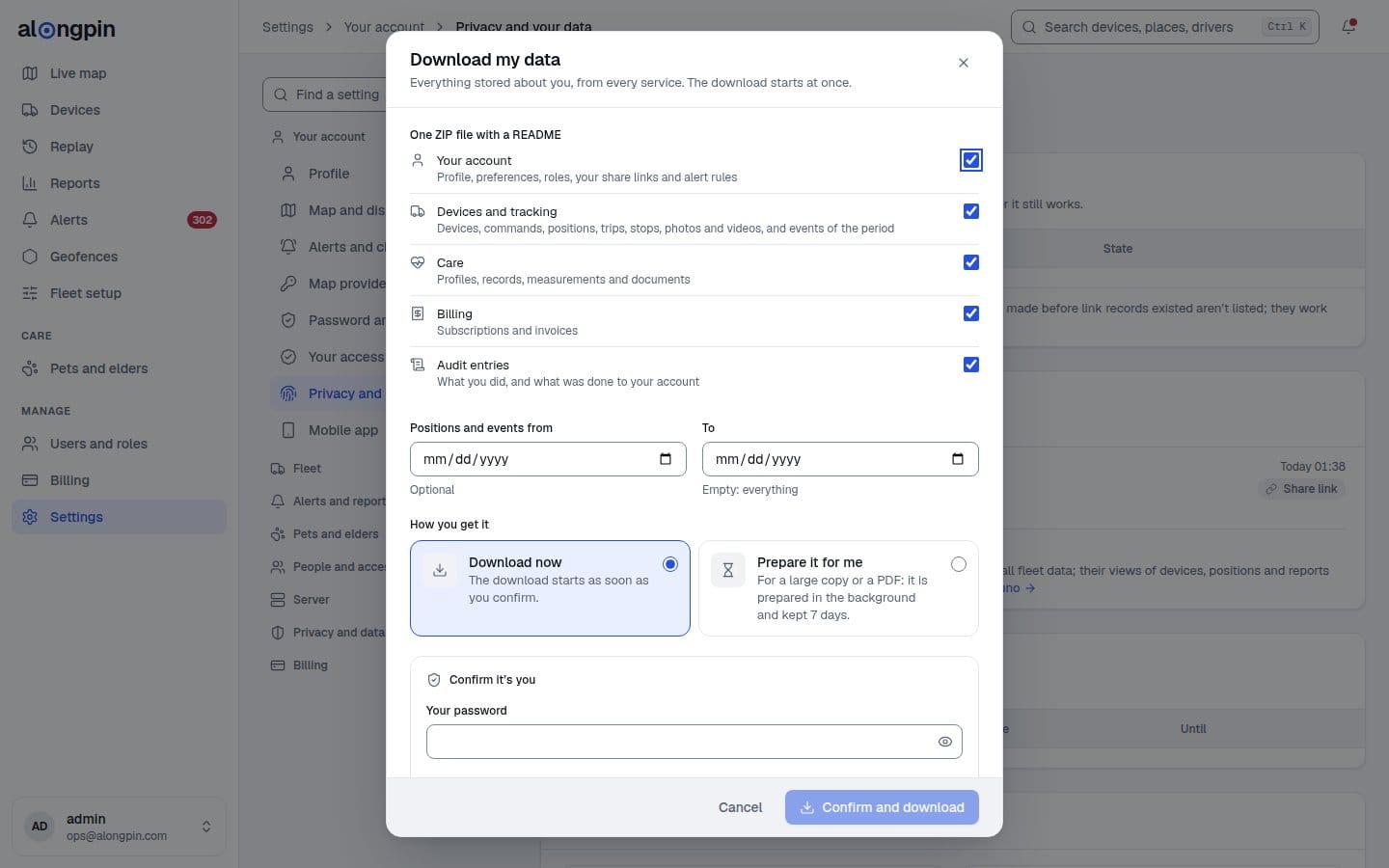
- Open the account menu, choose Profile and settings, then Privacy and your data.
- Under Your data, choose Download my data.
- Tick the parts you want and, if you like, a period for positions and events.
- Choose Download now, or Prepare it for me for a large copy. A prepared copy is kept for 7 days under Your copies.
- Confirm it is you with your password, and your two-factor code if you use one.
You get one ZIP file with a README that names any part you left out, so a partial copy is never mistaken for a complete one. Care profiles you own are in the Care part of your export. Someone who is logged in as you cannot confirm the download, and a share link cannot request one.
The portal exports only your own account. If your father or your teenager has an account of their own, they download their copy themselves; an export of someone else's account is made by an administrator through the platform's API, or by whoever handles privacy requests for your server. Exporting your data or a person's data covers the details.
Erasing it, and what that removes
There is more than one way to delete, and they remove different amounts.
A care profile
The owner of a pet's or a relative's profile, or an administrator, can choose Delete profile. Before you confirm, the portal lists What is deleted and What stays: the health records, measurements, appointments, documents and their scans, contacts, care alerts and reminder history, consent records and the log of who viewed the health data. It says plainly that this can't be undone. If you would rather keep the records, it offers to stop sharing instead, or an administrator can give the profile to another owner.
Positions of one period
A device's settings offer Delete positions for a period, such as one day you would rather not keep. This is for administrators and roles allowed to change positions; an ordinary family account asks its administrator. The dialog counts the positions first, so you can see what will go.
A whole account
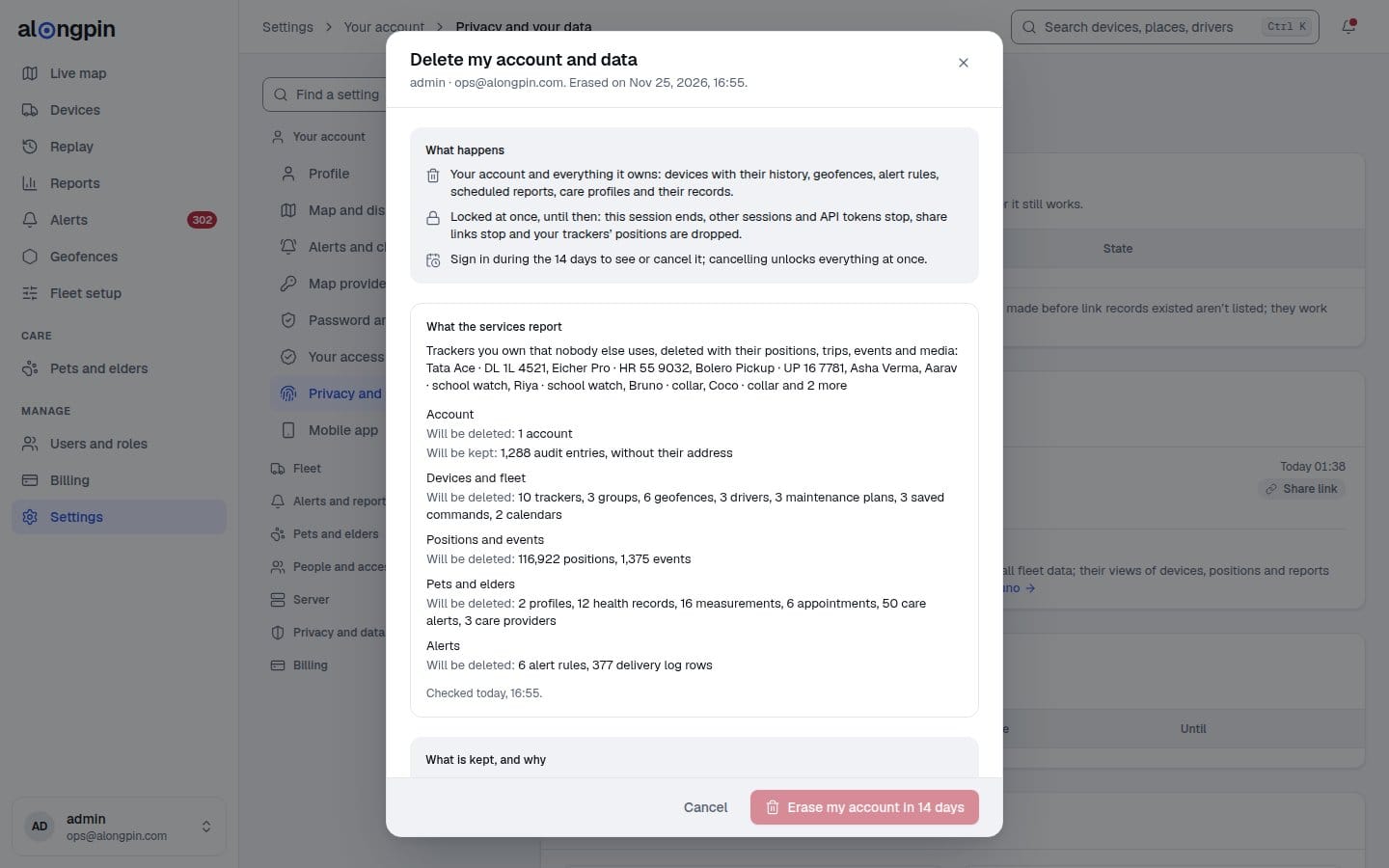
Delete my account and data, under Privacy and your data, erases the account of whoever is signed in:
- The account is locked at once: sessions end, share links stop working and trackers' positions are dropped.
- It is erased 14 days later. Until then, signing in or the link in the confirmation e-mail cancels it and unlocks everything.
- Devices nobody else uses go with their positions, trips, events and media; so do care profiles, geofences, alert rules and the rest.
- Invoices stay, because the law requires them, and audit entries stay without the name, e-mail and address.
A watch that another family member also uses stays for them. Copies in backups go when those backups expire. Erasing an account or a person's data lists each part.
Restricting processing
Sometimes deleting is too much and carrying on is too little: a relative says a record is wrong, or objects to being tracked at certain times, and you need to look into it. A restriction sits in between. The data is kept, but the platform stops using it: new positions of the person's devices are not stored, and nobody but the person reads their history, events or reports, not even administrators or share links.
A person asks for one under Privacy and your data → Your privacy requests → File a request, choosing Restriction or Objection. It goes to whoever handles privacy for the account, who starts and later lifts the restriction with a reason; the person is e-mailed before their data is processed again. Restricting the processing of a person's data explains what stops.
Retention: history is not kept for ever
Even if nobody deletes anything, old history goes. Whoever runs your server sets a period per kind of data under Settings → Privacy and data protection → Retention and deletion, and each service deletes what is older at its next run. On a fresh installation, positions, events and the audit log are kept 365 days and photos and videos 30 days, until someone saves other periods; trips and daily summaries can be kept longer than the positions behind them. A legal hold placed by an administrator keeps the data it covers past these periods, but a hold does not survive the erasure of the owner's account.
If you use a hosted service, ask what its periods are. Shorter is kinder: a family seldom needs last year's school runs. Setting how long data is kept shows the settings, and the security page describes how stored data is protected.
What the platform does not decide for you
The tools above do what you choose; they do not tell you what to choose. A family tracking a child, a parent or a partner needs its own good reason and, where the law asks for it, the person's agreement. For an older relative, the platform can record consent per scope, and withdrawing it locks the data or stops positions, but it does not check whether the person was able to agree, or whether a representative may agree for them.
Some questions only you can answer:
- Who in the family should be able to ask for a copy or a deletion?
- Should a teenager's history be deleted when they turn 18, or when they ask?
- What happens to a parent's profile and records after they move into care, or die?
Write the answers down once, and tell the people being tracked. The trust centre collects how Alongpin approaches privacy, security and data protection; this guide is not legal advice.
How Alongpin helps
Alongpin (alongpin.com) is a GPS tracking platform you open in a browser or on your phone. Location is personal data, so the platform is built around it: you decide who sees what with users and roles, every view of sensitive data is logged, retention periods are yours to set, and you can export or erase your data. Read about privacy and security, and see the privacy policy.
Frequently asked questions
Can I delete just one day of a watch's history?
Yes, as Delete positions for that period, done by an administrator or a role allowed to change positions. Ask the administrator of your account.
If I delete the watch, is its history gone?
Deleting a device removes it with its history, links and media. Any copy you downloaded earlier stays with you.
Can I cancel an account erasure?
Yes, within the 14 days: sign in, or use the cancel link in the e-mail. Positions sent while the account was locked are not recovered.