GPS trackers and devices
Choosing a SIM card for a GPS tracker
What a GPS tracker needs from its SIM: data, a network technology with coverage on your routes, roaming where vehicles cross borders, the right APN, and no PIN lock or forgotten top-up.
Ashish Srivastava6 min read
The right SIM card for a GPS tracker is one with an active data plan, on a network technology the tracker supports and that has coverage where your vehicles go, with roaming if they cross borders, and with its APN entered in the tracker. Price per megabyte matters less than those four points: a cheap SIM on the wrong network, or with the wrong APN, keeps a tracker offline however good it is. This guide goes through choosing a SIM card for a GPS tracker step by step, for owners and installers who buy SIMs separately from the hardware.
Key takeaways
- Every tracker needs a SIM with mobile data; voice and text are optional, but text helps for setting some trackers up.
- Match the network technology the tracker supports to what the local networks still run, and check coverage on your routes.
- Consumer SIMs work; machine (M2M or IoT) SIMs are built for fleets, with central management and multi-network roaming.
- Vehicles that cross borders need a SIM that roams there, at a price you know.
- The APN must be set in the tracker; a wrong one is a frequent reason a new tracker never connects.
- Remove the PIN lock, and keep top-ups and expiry dates in view.
1. Make sure the SIM has data
A tracker sends its positions over mobile data, so the SIM needs an active data plan. A voice-only SIM, or one whose data option was never activated, will let the tracker register on the network and still send nothing.
Two extras are useful:
- Text messages. Many vehicle trackers, GT06-type ones among them, are set up by text: you send the server address and port to the tracker's phone number. A SIM that can receive texts saves a trip with a laptop and cable.
- A known phone number. Record it with the device, so you or the portal can text the tracker later.
How much data a plan needs depends on the tracker and its settings; how much mobile data a GPS tracker uses explains how to measure it.
2. Match the tracker's network technology to local coverage
Trackers are built for particular mobile technologies: some only for 2G, others for 4G variants such as LTE-M or NB-IoT, others for several. The SIM's network must offer a technology the tracker speaks, at the places your vehicles go.
- Check the tracker's specification for the technologies and frequency bands it supports.
- Check what the networks run in your country. Some operators in some countries have switched off older technologies, or plan to; a 2G-only tracker on such a network will not connect, whatever the SIM.
- Check coverage where it matters: depots, customer sites, rural routes, underground car parks. A tracker in a basement depot may go offline every night simply for lack of signal.
When in doubt, test one tracker with the SIM you plan to buy, on a real route, before you order for the fleet.

3. Consumer SIM or machine SIM
Both work in a tracker. The difference is in how they are managed and where they work:
| Consumer SIM | Machine (M2M / IoT) SIM | |
|---|---|---|
| Where to buy | Any shop, prepaid or contract | A machine-SIM provider or an operator's business unit |
| Price model | Per SIM, often with more data than a tracker needs | Small data bundles, often pooled across many SIMs |
| Management | One account or top-up per SIM | A central portal for all SIMs: usage, suspend, activate |
| Roaming | Depends on the plan; can be expensive | Often several networks and countries included |
| Durability | Normal plastic card | Often industrial versions that withstand heat and vibration |
| Text messages | Usually included | Sometimes extra or limited |
For one or two private vehicles, a consumer prepaid SIM is fine. For a fleet, a machine SIM saves time: one portal to see which SIM used what, to suspend a stolen vehicle's SIM, and no monthly top-ups to forget.
4. Roaming for vehicles that cross borders
A vehicle that drives abroad needs a SIM that roams there:
- Ask which networks the SIM can use in each country on your routes, and whether data roaming is switched on by default.
- Ask what it costs. A data plan that is cheap at home can be expensive abroad. Machine SIMs often include many countries; consumer SIMs often do not.
- Know what happens without roaming. The tracker goes quiet at the border; many models store positions and send them when they are back on a network, so the history fills in later.
5. Enter the APN, and know why a wrong one keeps a tracker offline
The APN (access point name) is the name of the gateway the SIM uses to reach mobile data, for example a name like internet or one specific to the operator. Phones usually set it themselves; many trackers do not, so it must be entered in the tracker, along with a user name and password if the operator uses them.
With a wrong or missing APN the tracker registers on the network, shows signal on its lights, and still never reaches the server. On the platform that looks exactly like a tracker with no power or no SIM: it stays offline, or never connects at all.
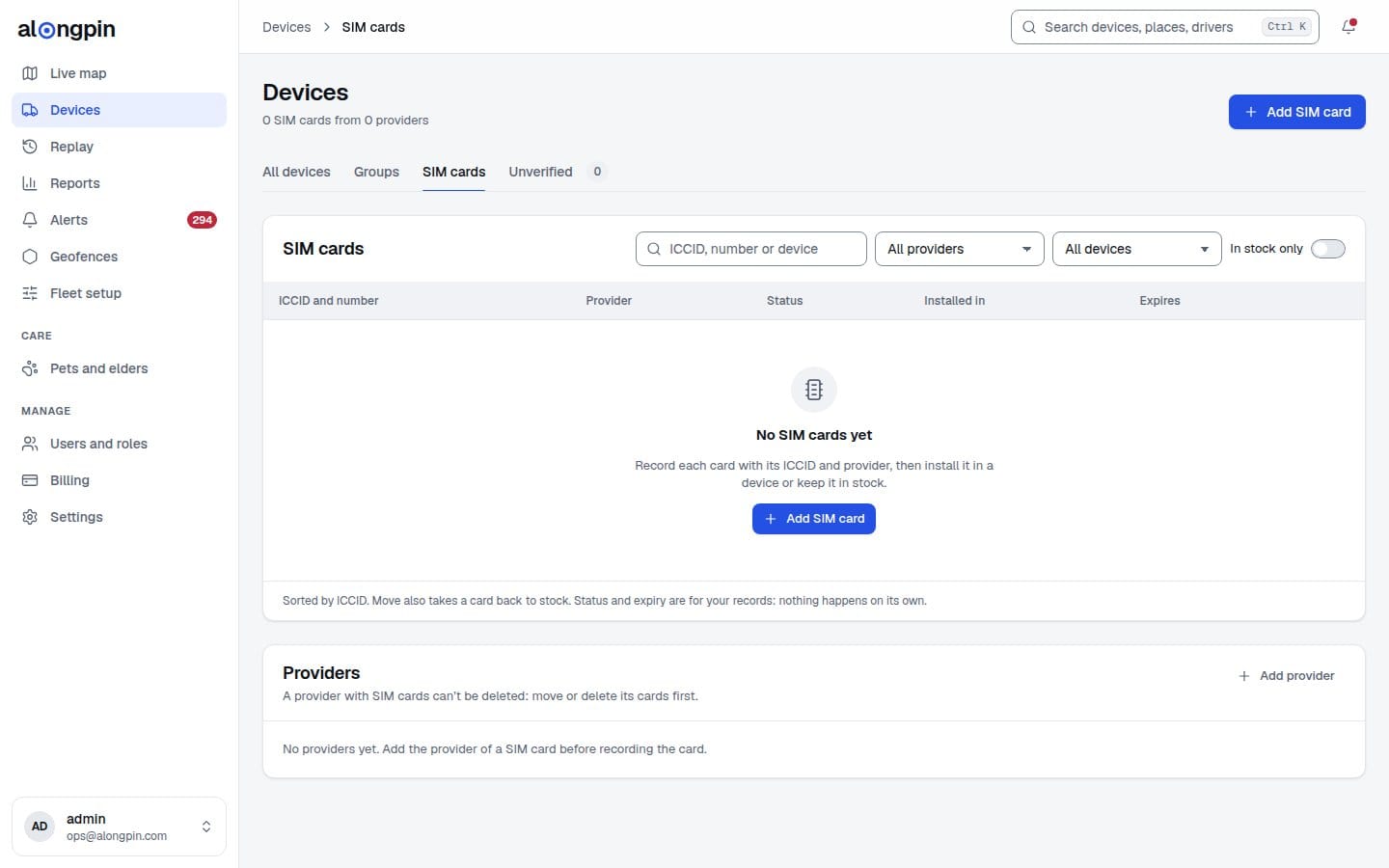
The operator publishes its APN on its website or in the SIM's paperwork. In the portal, if your account keeps SIM cards, a SIM provider can be recorded with its APN; when a SIM of that provider is installed in a device, Set up the tracker shows the APN next to the Server address and the Port of the tracker's protocol, so the installer has all three in one place.
The tracker also needs the server address and the port of its protocol. The device connection guide explains how a tracker reaches the platform, and the setup guides go through each kind of device, including where the APN is entered.
6. PIN lock, top-ups and expiry dates
- Remove the PIN lock before the SIM goes into the tracker: put it in a phone, switch off the PIN request, and take it out again. A tracker cannot type a PIN, and a locked SIM never connects.
- Prepaid SIMs run out. A tracker on a prepaid SIM goes offline the day the credit or the data bundle ends. Set top-ups to automatic, or use a contract or machine SIM.
- Some prepaid SIMs expire if they are not topped up for a while, and the number is gone with them.
- Contracts and data plans end. Note the end date.
If your account uses Devices → SIM cards, each SIM can be recorded with its ICCID, phone number, provider, status, plan and activation and expiry dates, and installed in a device. The dates are for your records: nothing happens on the platform when a SIM expires, so check the list for SIMs that expire soon.
A short checklist before fitting
- SIM has an active data plan, and texts if the tracker is set up by text.
- The tracker supports a technology the network runs, and coverage is good on your routes.
- Roaming is on and priced for every country your vehicles visit.
- PIN lock removed.
- APN known, and entered in the tracker with the server address and port.
- ICCID, phone number and expiry date recorded with the device.
The vehicle trackers page lists what a tracker needs and what it reports; how to connect a GT06-type wired tracker shows the APN, address and port being sent to a tracker by text message.
How Alongpin helps
Alongpin (alongpin.com) is a GPS tracking platform you open in a browser or on your phone. It is a platform, not a box: it works with the trackers, watches, phones, dashcams and collars whose protocols it decodes, so you keep the hardware you trust. Type a model into the device check, see the kinds of device and how a device connects, then sign up and add it by its IMEI.
Frequently asked questions
Can I use the SIM from an old phone?
Yes, if its plan includes data, the PIN is removed and it will not run out of credit unnoticed. For more than a few vehicles, a SIM made for trackers is easier to manage.
Does a tracker need a phone number?
Not to report. A number is useful to set the tracker up by text, and to send it text commands later.
My tracker has signal but stays offline. Is it the SIM?
Often. Check that the data plan is active, that roaming is on if you are abroad, and that the APN in the tracker matches the operator's. Then check the server address and port.