API and integrations
Why the webhook payload has no location
By default a webhook call carries a short payload without the position. How to read the event and its position through the API with the event id, who can switch on full payloads, and why the default protects personal data.
Ashish Srivastava3 min read

The webhook payload has no location because, by default, alerts that leave the platform carry minimal messages: they say which device and what happened, not where. Email, text messages, Telegram and webhooks all work this way unless an administrator changes it. The payload does carry the event's id, so your system can read the event and its position through the API with its own token, or the administrator can switch the webhook to full payloads, which are only ever sent to an https address.
Key takeaways
- The short payload has the event, the device, the user and a one-line message, but no
position.- Read the event with
GET /api/events/{id}, then its position withGET /api/positions?id=.- Full payloads are an administrator's choice in the privacy settings, and go only to
https.- The default keeps where people and vehicles are inside the platform, behind its access checks.
What the short payload contains
{
  "event":   { "id": 1234, "type": "geofenceExit", "eventTime": "2026-11-10T07:42:10Z", "deviceId": 12 },
  "device":  { "id": 12, "name": "…", "uniqueId": "…" },
  "userId":  7,
  "message": "…: geofence exit. Open the app for details."
}
| Field | What it holds |
|---|---|
event |
The event's id, type, eventTime and deviceId; its attributes are left out |
device |
The device's id, name and uniqueId |
userId |
The user this alert is for |
message |
The same short text the other channels send, without a place |
test |
true on a call made by testing a rule |
The address, coordinates, map link, speed and the geofence's name are all missing on purpose. The webhooks page shows the full payload as well.
Read the event and its position with the API
With the event id, two calls give you everything your token's user may see:
First the event, which names the position it happened at:
curl -H "Authorization: Bearer $TOKEN" https://YOUR_HOST/api/events/1234
{"id": 1234, "type": "geofenceExit", "deviceId": 12, "positionId": 406, "geofenceId": 3, "eventTime": "…"}
Then that position:
curl -H "Authorization: Bearer $TOKEN" "https://YOUR_HOST/api/positions?id=406"
[{"id": 406, "deviceId": 12, "latitude": …, "longitude": …, "speed": …, "address": "…"}]
Some notes:
- The token needs the right to read the device's events and positions. A
403means its user may not; the API reference names the right each call needs. positionIdis0for events that have no place, such as a device going offline, and after the position was deleted.- A position during a private trip comes back reduced and marked private.
- Speed is in knots and times are ISO-8601 instants, as everywhere in the API.
Doing the lookup in your endpoint adds a call per event, but your system then holds only what its own user is allowed to see.
Full payloads, only to an https address, when the administrator allows it
An administrator can change what the webhook carries in the privacy settings (Privacy by default), under Messages leaving the platform:
- Message detail set to full makes email, text messages and the webhook carry the place;
- Webhook set to Everything sends the full event to the webhook even while the other messages stay minimal.
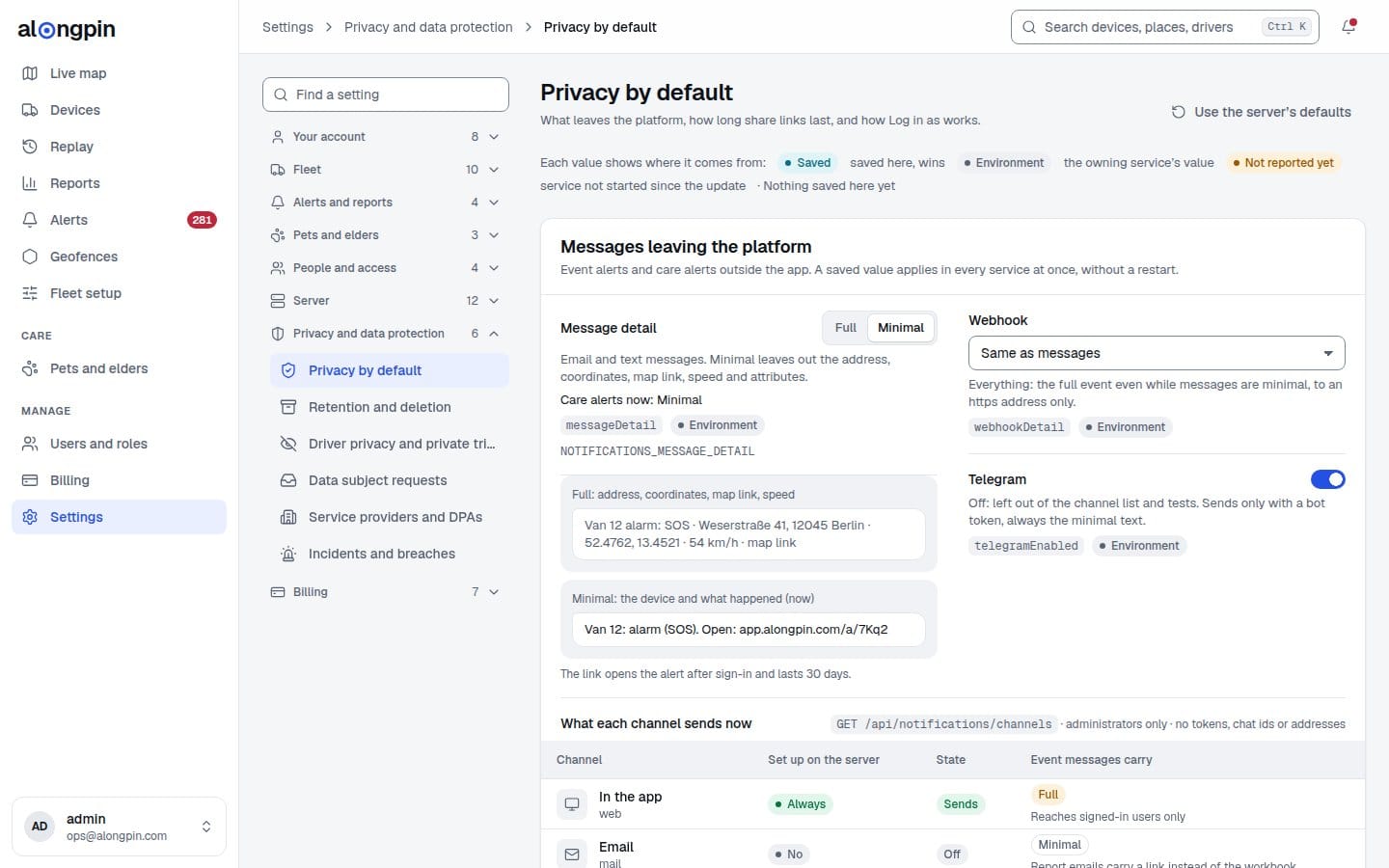
Either way, a full payload adds position and the event's attributes, and it goes only to an https webhook address. A plain http address always gets the short payload. Only administrators make this choice; a user or a token cannot ask for more detail on a single call.
Why the default protects personal data
A position is rarely just a point on a map. It is where a named driver stopped for lunch, or where an elderly parent wearing a watch is right now. Once it leaves the platform, it sits in the logs, queues and databases of whatever system receives it, outside the platform's roles, sharing rules and retention.
The short payload lets you react to an event (open a ticket, wake a dispatcher, count a delivery) without copying anyone's whereabouts into another system. When you do need the place, the API lookup is checked against the token's rights, at the moment you ask. The privacy overview explains the other defaults that follow the same idea.
Frequently asked questions
Can I get the address without coordinates?
Not in the short payload. Read the position through the API; its address field holds the address where one was looked up.
Is the webhook detail set per rule?
No. It applies to the whole installation, like the webhook address itself.