API and integrations
The API answers 401 or 403: tokens and rights
What the two answers mean: 401 for a missing, expired or revoked token or an inactive account, 403 for a request the user’s role, scope or restrictions do not allow, and how to find which right is missing.
Ashish Srivastava3 min read

An API 403 Forbidden answer means the token works but its user may not do what you asked; a 401 Unauthorized answer means the API does not accept the token at all. A 401 comes from a missing, expired or revoked token, or an account that is no longer active. A 403 comes from a role without the right, a scope that does not cover the object, or a restriction such as read-only. The fix differs: for 401 get a new token, for 403 find the missing right.
Key takeaways
401: no token, an expired or revoked one, or a disabled, expired or deleted account.403: signed in, but the role, its scope or a restriction does not allow this request.- Read the user's rights with
GET /api/sessionandGET /api/users/{id}/authorities, or in Your access and limits.- Lists never answer
403: they return only what the user may see, often[].
Every error is a problem detail in JSON, and its detail names the cause:
{"title": "Forbidden", "status": 403, "detail": "Only the owner can change this device", "instance": "/api/devices/5"}
401: no token, expired or revoked
Check these in order:
- No token reached the API. The header must be
Authorization: Bearer <token>. A proxy or HTTP library that drops the header causes this too. - The token expired. Tokens last 7 days unless a date was chosen, and at most a year. Scripts that "suddenly stop" a week after setup usually hit this.
- The token was revoked, by you, by someone who manages your user, or by an administrator. A token made from a session that did not start with a password also ends when that session ends.
- The account is no longer active: disabled by an administrator, past its expiry date, deleted, or locked for an erasure request.
GET /api/session with the token answers 404 Not logged in instead of the user in these cases, and may add a reason such as revoked. Create a new token and store it where the script reads it.
403: the user lacks the right or the scope
The token's user is known, but the request goes beyond what it may do:
- The role lacks the right. Each endpoint needs a right such as
report:report:readordevice:device:write; the API reference names it in the last column. - The scope does not cover the object. A role may grant a right only for some devices or groups. Asking for one device outside them answers
403; a list just leaves it out. - Ownership. Changing an object takes its owner, an administrator or a role grant; being shared a device lets you see it, not change it.
- Limits. Adding a device beyond the user's device limit answers
403 Device limit reached.
Read the effective rights of the token's user
GET /api/sessionreturns the user behind the token, with its restriction flags.GET /api/users/{id}/authoritieslists the user's grants. A grant marked"effective": falsewas given by someone who can no longer give it, so it gives nothing, or only part.- In the portal, signed in as that user, Settings → Your account → Your access and limits shows the kind of account, the roles, the restrictions and the limits.
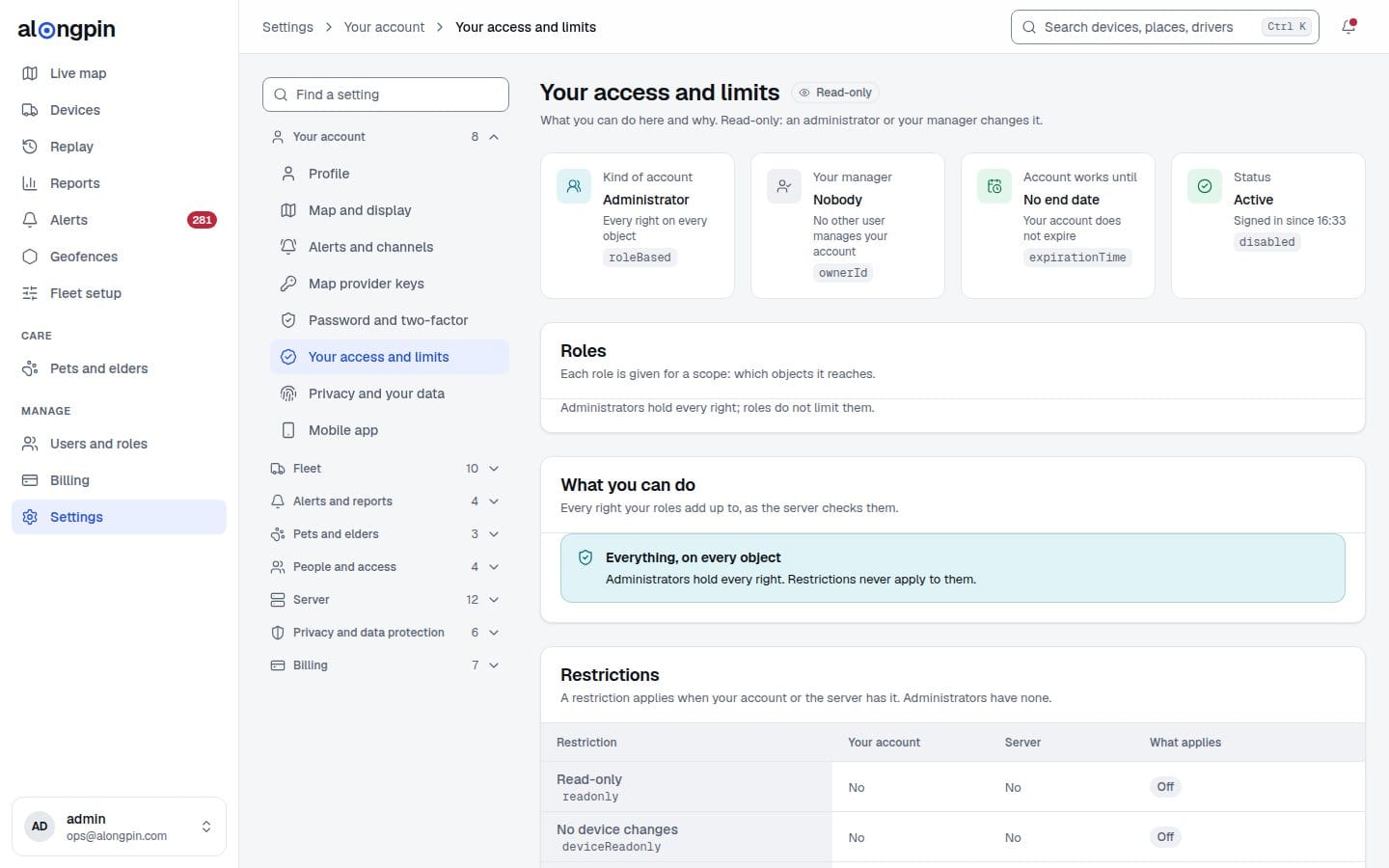
If a right is missing, the people who manage Users and roles in your account can add a role or widen its scope. Users and roles explains how rights and scopes are granted.
Read-only users and restrictions
Four restrictions, set on a user or for the whole server, turn requests into 403 regardless of roles:
| Restriction | What it blocks |
|---|---|
| Read-only | Creating, changing or deleting anything, sending commands, creating share links |
| Read-only devices | Creating, changing or deleting devices |
| Saved commands only | Sending commands other than saved ones |
| Reports switched off | Reports, exports, position history and events |
A token made by a read-only user is read-only too; the token can never do more than its user.
Ended subscription or locked account
- Subscription ended. When a subscription lapses, the account expires and its tokens answer
401. Signing in then offers billing only, and a billing-only session answers403"Only billing is available: your subscription has ended" outside billing. Renewing brings the account back; create a fresh token afterwards. - Locked after wrong passwords. A lock stops password sign-ins only; existing tokens keep working.
- Erasure requested. Asking to erase an account stops its sessions and tokens at once.
The security overview describes how tokens, roles and the audit log protect an account.
Frequently asked questions
Why does a list answer an empty array instead of 403?
Lists are filtered, not refused: they show what the user may see. An empty list for a user who should see objects points to a missing right or scope.
Do rights changes need a new token?
No. Rights apply to existing tokens at once, in every service.